Preview






Description
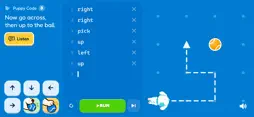
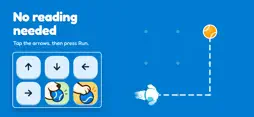
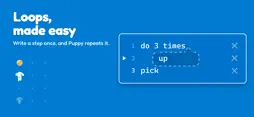
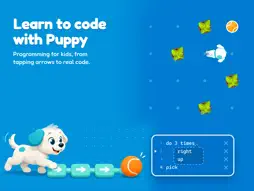
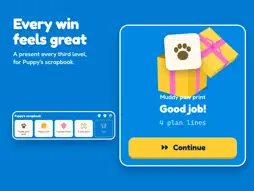
Puppy Code is a coding game for kids. Children learn to code by helping a puppy fetch its ball, one step at a time. The ball is somewhere in the garden. The puppy will fetch it, but only if you tell it exactly how to get there. Build a plan, press Run, and the puppy follows it step by step. If the plan does not work, change it and try again. That is programming. From Arrows to Real Code The first levels need no reading. Children tap arrows, and pictures carry the meaning. Then the arrows turn into words on the keys. Then children type the words themselves, on a keyboard made for small hands. There is no sudden jump from pictures to code. Each level adds one small new idea, so learning to code feels like play. The Programming Ideas Inside Children meet each idea because they need it to solve a puzzle. The programming name for the idea can come afterwards. Sequence A plan is a list of steps, done in order. Debugging Some levels start with a plan that has a mistake in it. Children find the step that goes wrong, and fix it. Loops "do 3 times" repeats the steps under it. A bubble shows which steps belong to the loop. The plan gets shorter to write, and the puppy still walks every step. If and else "if ball" asks a question: is the ball here? The steps under it run only when the answer is yes. The steps under "else" run when the answer is no. Short plans In Puppy's Little Notebook, the page has only seven lines. Writing every step out no longer fits, so loops and questions make the plan short enough. Programmers have a rule for this: don't repeat yourself. Functions "trick find" teaches the puppy a few steps under a name. Writing "find" then makes the puppy do them all. A trick works from wherever the puppy is standing. Functions that use functions One trick can use another, the way one function calls another. Fix a trick once, and every place that uses it is fixed. Programming for Kids, Without Pressure Puppy Code never simply says "Wrong." When a plan stops working, the game shows what the puppy tried to do and what stopped it. The child can change one step and run the plan again. A long plan that works is still a right answer. Only the notebook levels, with their seven-line page, ask for a short one. There are: • No timers • No scores • No streaks • No pressure to finish quickly • No way to lose Every level is open from the start. Children can stay on one level for as long as they want. A Listen key reads every mission aloud. Every third level a child finishes brings a present: a new picture for Puppy's scrapbook. Learn Together Coding for kids works well side by side. A child and a grown-up can share one screen, talk about what the puppy should do next, make predictions, and take turns writing steps. A page for grown-ups explains what each world teaches, and how to play along. It fits homeschool lessons, STEM time, or a quiet afternoon at home. Adults who have never programmed before can start at the first level too. Private by Design Puppy Code does not require an account. There are: • No adverts • No analytics • No tracking • No account or sign-up Nothing is collected or sent anywhere. Progress is saved on the device and stays on the device.
What's New
Version 1.5.0 2026-11-04
Puppy can listen! Six new levels teach events. Write "on bell" with a few steps under it, and Puppy waits for the bell, then does those steps each time it rings... Technical Analysis
Package Overview Basic metadata
Bundle ID
dev.codesuma.puppycode Current Version 1.5.0
Minimum iOS 15.0
Package Size App Store Size
Package Metadata 0 / 0 version records
Detailed binary, privacy manifest, framework, and Info.plist results have not been indexed for this package yet. The verified App Store and archive metadata above remains available.
Developer Information
Known Version Records
0 version records with stored package metadata
Stored metadata does not guarantee a package is currently available to download.
| Details | Version / IDs | Version date | Action |
|---|