
ArcSite: Quick CAD Floor Plans
(9,241 App Store ratings)
🏆 Best: #36 Top Grossing (RUS)
IPA Analysis Preview


Description
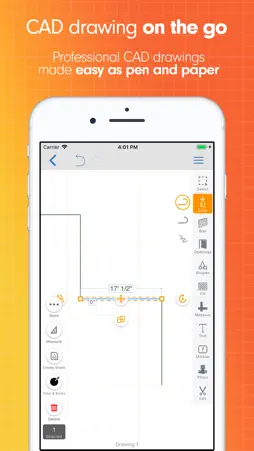
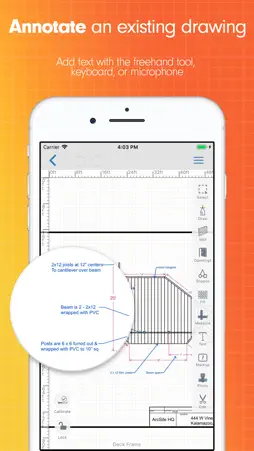
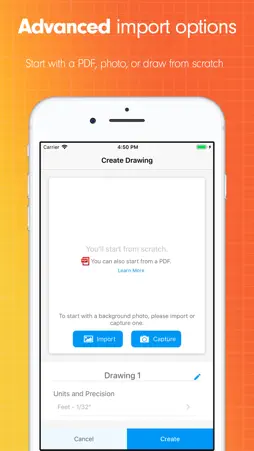
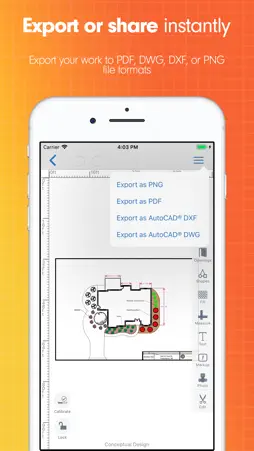
ArcSite is the perfect CAD sketch and design tool for all levels, from beginners sketching out floor plans to experienced professionals taking on complex projects. No matter your experience, ArcSite puts intuitive CAD within everyone's reach. ArcSite goes beyond design: start with a drawing to capture data, calculate material quantities, and instantly create estimates and job reports in one place. Once you’re finished drawing with ArcSite’s floor plan creator, you can easily share and collaborate on projects, generate professional proposals, material lists, and estimates, and accept payments from anywhere. INTUITIVE CAD SKETCH & DRAWING TOOLS FOR ROOM & HOUSE DESIGN - *AI Trace: Sketch it, scan it, see your space. Turn a hand sketch, photo, or PDF into an editable, to-scale floor plan. *only available for iPad; iPhone features coming soon - Advanced 2D CAD-level precision without the CAD learning curve. - Create CAD floor plans from a map: Start a new drawing using a satellite image as your base. Enter an address to find a location, then zoom in or out to set boundaries; the scale will be set automatically. - Designed for everyone: Easy for first-time users, precise enough for professionals. - Export, Cloud sync, and collaborate: Your room design drawings export to PNG/PDF/DXF/DWG, save to the cloud, and (for professional users) flow directly into material takeoffs, estimates, and signed proposals. - Send proposals: Access Proposal Generation (based on your drawing). - Communicate visual context: Add location-based photos with markup to highlight project issues instantly for teams or customers. WORK FASTER & STAY ORGANIZED WITH FIELD-LEVEL PRECISION - Keep all of your project details in one place. - Customize products, forms, material types, quantity calculations, and pricing to match your data requirements. - Our mobile CAD app offers unmatched accuracy, whether with exact-to-scale drawings or quantities of materials and pricing. - Draw to scale with confidence: Our mobile CAD app makes it easy to get accurate measurements and pricing, every time. - Security - SOC 2 Type II compliant and ISO/IEC 27001 certified. SMART FEATURES FOR CAD FLOOR PLANS - *AR Room Scanner: Scan a room or space with your phone or iPad camera and get a scaled floor plan placed directly in the drawing canvas, no manual measuring. *only for Apple Pro devices - Smart Shapes and parametric objects: Walls, doors, windows, and shapes can snap into place, auto-count, and adjust as you draw or resize. - Quick-start template gallery: Pre-built templates save you time. WHO USES ARCSITE? - Sales Teams - Residential Contractors - Fencing Pros - Foundation Repair Experts - Designers, Architects - Creative Homeowners - Remodeling Pros - Inspectors - Auditors - General Contractors - And more WHAT ARE PEOPLE SAYING ABOUT ARCSITE? "I haven't found anything else that comes close to meeting my needs. With ArcSite I save hours on every estimate. Very easy to make accurate and professional-looking drawings, while on-site." - Colin, from JES Foundation Repair "In my opinion, there is no better program for our line of work, we will be much more productive in the long term." - Paul from Johnson Controls TERMS Free 14-day trial on all plans Terms of Service: https://www.arcsite.com/legal/terms Privacy Policy: https://www.iubenda.com/privacy-policy/184541 To continue using ArcSite after your trial, purchase a monthly or annual subscription plan (Draw Basic, Draw Pro, Takeoff, or Estimate). Each tier offers different features; details are in-app. AUTO-RENEWABLE SUBSCRIPTION INFO * Payment charged to Apple Account at confirmation of purchase * Subscription renews unless auto-renew is turned off 24 hours before the current period ends * Renewal charged within 24 hours before the end of the current period * Manage subscriptions or turn off auto-renewal in Account Settings after purchase * Unused portion of a free trial is forfeited upon subscription purchase
What's New
Version 5.64.3 2026-10-28
- AI Trace is now available on iPhone and draws walls for you from an imported photo or PDF. - When you take a screenshot of a drawing, you'll see a quick way t... Technical Analysis
Package Overview Basic metadata
Bundle ID
com.arctuition.arcsite Current Version 5.64.3
Minimum iOS 15.4
Package Size App Store Size
Package Metadata 2 / 399 version records
4.7 / 5.0 (6,787 ratings)
Detailed binary, privacy manifest, framework, and Info.plist results have not been indexed for this package yet. The verified App Store and archive metadata above remains available.
Developer Information
Known Version Records
2 version records with stored package metadata • 399 known version records
Stored metadata does not guarantee a package is currently available to download.
| Details | Version / IDs | Version date | Action |
|---|---|---|---|
 242.93 MB | v5.61.1 App Store ID: 888229756Build: 5.61.1 | 2026-08-28 21:16:57 | Get Version |
| Not archived | App Store ID: 888112023 | Unknown | Request Version |
| Not archived | App Store ID: 887792113 | Unknown | Request Version |
| Not archived | App Store ID: 887380398 | Unknown | Request Version |
| Not archived | App Store ID: 887314864 | Unknown | Request Version |
| Not archived | App Store ID: 887093307 | Unknown | Request Version |
| Not archived | App Store ID: 886885559 | Unknown | Request Version |
| Not archived | App Store ID: 886767784 | Unknown | Request Version |
| Not archived | App Store ID: 886217696 | Unknown | Request Version |
| 174.91 MB | v5.55.4 App Store ID: 886017352Build: 5.55.4.0 | 2026-05-22 11:56:42 | Get Version |
| Not archived | App Store ID: 885938803 | Unknown | Request Version |
| Not archived | App Store ID: 885849641 | Unknown | Request Version |
| Not archived | App Store ID: 885815633 | Unknown | Request Version |
| Not archived | App Store ID: 885722350 | Unknown | Request Version |
| Not archived | App Store ID: 885528756 | Unknown | Request Version |
| Not archived | App Store ID: 885007286 | Unknown | Request Version |
| Not archived | App Store ID: 884896705 | Unknown | Request Version |
| Not archived | App Store ID: 884667432 | Unknown | Request Version |
| Not archived | App Store ID: 884403705 | Unknown | Request Version |
| Not archived | App Store ID: 884230962 | Unknown | Request Version |
| Not archived | App Store ID: 884101797 | Unknown | Request Version |
| Not archived | App Store ID: 883874284 | Unknown | Request Version |
| Not archived | App Store ID: 883844741 | Unknown | Request Version |
| Not archived | App Store ID: 883348977 | Unknown | Request Version |
| Not archived | App Store ID: 883147994 | Unknown | Request Version |
| Not archived | App Store ID: 883101793 | Unknown | Request Version |
| Not archived | App Store ID: 882843917 | Unknown | Request Version |
| Not archived | App Store ID: 882809952 | Unknown | Request Version |
| Not archived | App Store ID: 882370078 | Unknown | Request Version |
| Not archived | App Store ID: 882232924 | Unknown | Request Version |
| Not archived | App Store ID: 882070255 | Unknown | Request Version |
| Not archived | App Store ID: 881929307 | Unknown | Request Version |
| Not archived | App Store ID: 881891725 | Unknown | Request Version |
| Not archived | App Store ID: 881651704 | Unknown | Request Version |
| Not archived | App Store ID: 881489789 | Unknown | Request Version |
| Not archived | App Store ID: 881357374 | Unknown | Request Version |
| Not archived | App Store ID: 880781033 | Unknown | Request Version |
| Not archived | App Store ID: 880608509 | Unknown | Request Version |
| Not archived | App Store ID: 880340407 | Unknown | Request Version |
| Not archived | App Store ID: 880228818 | Unknown | Request Version |