
Preview





Description
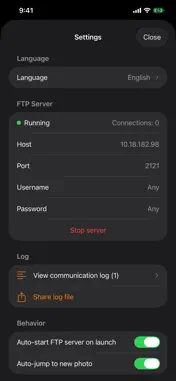
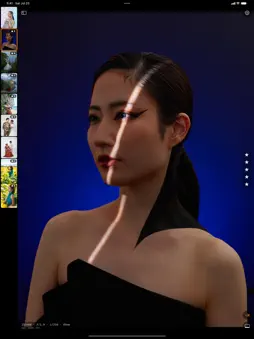
One-time purchase, no extra charges Buy it once and use every feature as it is. No subscription, no additional charges. ShotTetherPro requires a camera with built-in FTP upload. The moment you press the shutter, your photo arrives wirelessly on your iPad / iPhone. ShotTetherPro is a wireless tethering receiver built for professional photographers — with every unnecessary feature stripped away. [Why we built it] ShotTetherPro was developed in-house by arcion Inc., a production studio specializing in photo and video shoots, focused only on the features that truly matter on set — rebuilt from the ground up to eliminate wasted screen space, slow transfers, and sluggish response. [Key features] ■ Stay on camera Wi-Fi Keeps your iPad / iPhone connected to the Wi-Fi of the camera you registered. Even if you open the app while connected to another Wi-Fi network (such as at home or the office), it switches to the camera’s Wi-Fi automatically. If the connection drops during a shoot, a banner at the top of the screen and a vibration let you know, and the app tries to reconnect every 10 seconds until it succeeds. You can also tap “Connect” to reconnect yourself. On iPadOS 18 / iOS 18 or later, once you register a camera, no confirmation screen appears on later reconnections. To set it up, join the camera’s Wi-Fi, register the camera’s name, and enter the Wi-Fi password once. ■ Register multiple cameras Register the Wi-Fi of several cameras, such as a second body, and simply choose the one you want to use from the list. ■ A perfectly optimized display An immersive UI that fills the screen with your photo, at maximum size with aspect ratio preserved. ■ Zero bloat — blazing fast and light No editing, social sharing, ads, or histograms. One tap from launch to the incoming shot; jumps instantly to the newest frame even in burst shooting (pausable while a client reviews). ■ Freely customizable thumbnail position & size Switch between horizontal scroll (bottom) and vertical scroll (left); drag to resize freely. ■ Works with every FTP-capable camera Any camera that can push photos over FTP / FTPS works, regardless of brand: Nikon Z9 / Z8, Sony α1 / α7R V, Canon EOS R5 / R3, FUJIFILM GFX / X-H series, Panasonic GH series, OM SYSTEM, and more. ■ Immersive single-photo viewer A full-screen viewer without unnecessary menus. Tap left/right for the previous/next shot. ■ Auto-display on arrival The newest photo appears the instant it's captured, even in burst shooting. Lock it for a closer look. ■ Photo grid & save to Camera Roll Browse in a grid, select multiple, and export to the iOS Photos app (Camera Roll) with one tap. ■ Project management One project per shoot, named automatically by date and time; switch with one tap. ■ 5-star rating Rate favorites instantly with the five stars on the right edge. Filter to speed up your selects. ■ Instant EXIF display ISO, aperture, shutter speed, focal length, and file name shown at the lower left — toggle on or off. ■ Aspect-ratio-preserving thumbnails Tell portrait and landscape shots apart at a glance and avoid mistaps. [Requirements] iPad (iPadOS 17 or later recommended) / iPhone (iOS 17 or later) On the camera side, any model that can push over FTP (PASV mode) [Setup] 1. Launch the app -> the FTP server starts automatically 2. Join your camera to the iPad's Wi-Fi (or make the camera an access point and join it with the iPad) 3. Enter the IP shown in the app and port 2121 into your camera's FTP profile 4. Press the shutter -> the photo appears within a few seconds For detailed setup, see In-app Settings -> Camera setup examples. [Support] Feature requests & bug reports: [email protected] Official site: https://arcion.jp Developed by arcion Inc.
What's New
Version 1.2 2026-10-28
• We have returned to selling the app as a one-time purchase on the App Store. Once you buy it, every feature is yours to use as it is • If you installed the ap... Technical Analysis
Package Overview Basic metadata
Bundle ID
jp.arcion.shottetherpro Current Version 1.2
Minimum iOS 17.0
Package Size App Store Size
Package Metadata 1 / 3 version records
Detailed binary, privacy manifest, framework, and Info.plist results have not been indexed for this package yet. The verified App Store and archive metadata above remains available.
Price History (USA store)
2 recorded price change points. These are historical observations, not a guarantee of the current price.
| Recorded at | Price | Currency |
|---|---|---|
| 17.99 | USD | |
| 0.0 | USD |
Developer Information
Known Version Records
1 version record with stored package metadata • 3 known version records
Stored metadata does not guarantee a package is currently available to download.
| Details | Version / IDs | Version date | Action |
|---|---|---|---|
| 3.17 MB | v1.0.5 App Store ID: 887716092Build: 1.0.5 | 2026-08-01 18:58:46 | Paid / Arcade |
| Not archived | App Store ID: 885612192 | Unknown | Paid / Arcade |
| Not archived | App Store ID: 885189209 | Unknown | Paid / Arcade |