Preview


Description
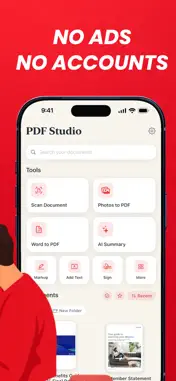
Read, mark up and convert documents right on your iPhone, then share them when you are ready. PDF Studio brings your PDF reader, scanner and everyday document tools into one calm place. The app interface is in English. SUBSCRIPTION REQUIRED PDF Studio is a subscription app. A subscription is required to use the app. The plans and prices are shown before you commit, and you can cancel anytime. SCAN AND CONVERT Scan paper with the camera, turn photos or typed text into a PDF, and compress a file down to a sensible size. Convert PDF text to an editable Word document, turn Word files into PDFs, or export pages as images. PDF to Word rebuilds the text rather than preserving the original page layout. ORGANIZE PAGES Merge files, split a document, and reorder, rotate or remove pages in a visual grid. Find words across your whole library with content search. SIGN AND PROTECT Fill in forms, draw and place your signature, add a password or a watermark, and black out sensitive areas. Blackouts flatten the affected pages. Compression can change image quality and text searchability; the reduction depends on your file. GET HELP READING Use cloud AI to summarize, ask questions or translate document text into 18 languages. It processes up to the first 25 pages, limited to 16,000 characters. Check important answers against your document. Conversion, markup and text recognition happen on your iPhone. AI sends the document name, extracted text and your questions to a cloud service over an encrypted connection. AI requires internet access. KEEP YOUR FILES TOGETHER Use local folders, favorites and name search. Share through the iPhone share menu. No account is required, and there are no ads. SUBSCRIPTIONS PDF Studio offers weekly and annual subscriptions. Prices are shown in the app before purchase. Restore Purchases is available. Payment is charged to your Apple Account at confirmation. Subscriptions renew automatically unless canceled at least 24 hours before the current period ends. Manage or cancel in your Apple Account subscription settings. Support: https://yx0z7ffx6x6rqydfzwlj4-web.rork.live/support Privacy Policy: https://yx0z7ffx6x6rqydfzwlj4-web.rork.live/privacy Terms of Use: https://yx0z7ffx6x6rqydfzwlj4-web.rork.live/terms
What's New
Version 1.3 2026-10-17
Bug fixes, performance improvements, and a new Home Screen quick action to report issues directly from the app icon. Technical Analysis
Package Overview Basic metadata
Bundle ID
app.rork.yx0z7ffx6x6rqydfzwlj4 Current Version 1.3
Minimum iOS 18.0
Package Size App Store Size
Package Metadata 0 / 0 version records
Detailed binary, privacy manifest, framework, and Info.plist results have not been indexed for this package yet. The verified App Store and archive metadata above remains available.
Developer Information
Known Version Records
0 version records with stored package metadata
Stored metadata does not guarantee a package is currently available to download.
| Details | Version / IDs | Version date | Action |
|---|