
Preview




Description
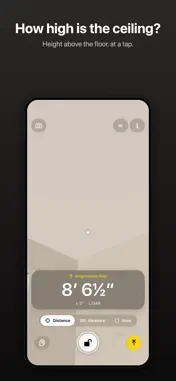
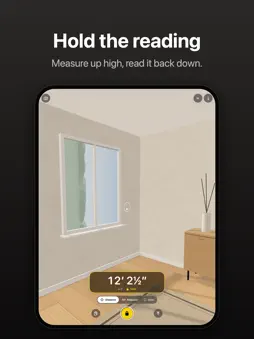
LiDAR Measure turns the LiDAR Scanner in your iPhone Pro or iPad Pro into a distance meter and a tape measure – and tells you, next to every value, how far that value may be off. DISTANCE Point at a wall, the ceiling or an object and read the distance, live, in large digits. Hold freezes the reading, so a value taken at arm's length up a ladder can still be read once you are back down. Switch to Height above floor and the reading is measured from the floor instead: aim at the ceiling for the room's height, at a windowsill for its height. MEASURE Place a point with +, aim at the end and place another: the length from A to B appears on the line. Points snap to earlier endpoints, so measurements join up corner to corner. Undo takes back one point at a time, and can even bring back a Clear. AREA Measure a wall, a window or a floor. Rectangle: place two corners along one edge and a point on the opposite edge – width, height and area appear at once. Free form: place the corners one by one and finish on the first, for an L-shaped room or a sloping ceiling. The area is shown in square meters or square feet, with its margin. If the points don't lie in one plane, the app says so instead of showing a number that looks exact. PHOTO WITH MEASUREMENTS Take a picture with the lines, areas and values drawn in – margins included, with a reminder to verify – and save it or send it to whoever will cut, order or build. THE MARGIN, EVERYWHERE - Every value comes with an estimated ± margin, worked out from the distance, the angle to the surface and how steadily the scanner is measuring – and always rounded up - Within about 5 meters the LiDAR Scanner measures directly. Beyond that, or on surfaces it can't see, the value is estimated from the camera image, marked Estimated and given a wider margin - No millimeters: whole centimeters under a meter, centimeter-precise meters above, half inches in imperial – the precision LiDAR can deliver - Copy a value or share your list of measurements: the margin goes with every value, and a reminder to verify goes with every list ALSO - Metric or imperial, one tap away - In 34 languages - No images are saved or leave your device, except a photo with measurements that you share or save yourself - No account, no ads, no tracking REQUIRES A LIDAR SCANNER LiDAR Measure needs the LiDAR Scanner found in iPhone 12 Pro and later Pro models and in iPad Pro from 2020 on. On other devices the app says it is not supported, rather than show measurements too uncertain to trust. PLEASE NOTE Measurements are estimates. Accuracy depends on distance, light, angle and the surface material, and can at times be worse than shown. The margin of error (±) is an estimate, not a guarantee. Don’t rely on the app alone where an error could cause harm or cost – for example in construction, when ordering materials, for safety distances, or for medical and legal purposes. Verify with a calibrated measuring tool. You use the measurements at your own risk.
What's New
Version 1.1.1 2026-10-28
Fixed: + now responds reliably when you aim at edges, corners and glossy surfaces. Plus several smaller fixes. Technical Analysis
Package Overview Basic metadata
Bundle ID
se.vintermist.Lidar-Measure Current Version 1.1.1
Minimum iOS 18.0
Package Size App Store Size
Package Metadata 0 / 0 version records
Detailed binary, privacy manifest, framework, and Info.plist results have not been indexed for this package yet. The verified App Store and archive metadata above remains available.
Developer Information
Known Version Records
0 version records with stored package metadata
Stored metadata does not guarantee a package is currently available to download.
| Details | Version / IDs | Version date | Action |
|---|