
Preview
Description
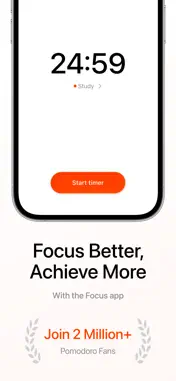
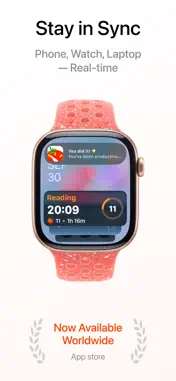
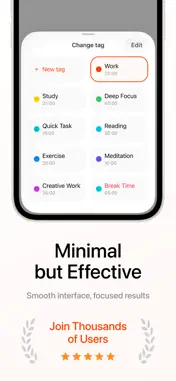
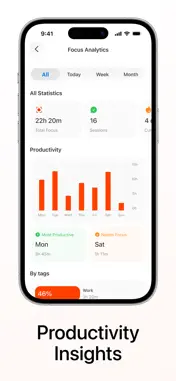
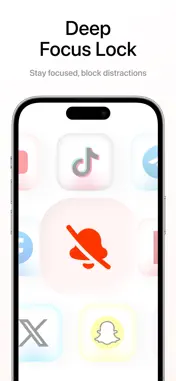
Boost your productivity and master your time with our beautifully designed Pomodoro timer app. Whether you're studying, working, or pursuing personal projects, this intuitive focus timer helps you maintain concentration, avoid distractions, and achieve your goals using the proven Pomodoro Technique. Who Needs This App Students struggling with study sessions and exam preparation Professionals seeking to maximize work efficiency Anyone battling procrastination and distraction Remote workers managing their daily schedules Creative minds who need structured focus time Core Features Customizable Widgets Access your timer instantly with fully customizable home screen widgets. Adjust size and color to match your style, and start or pause any timer with a single tap. Live Activities Everywhere Track your focus sessions in real-time across your iPhone, Apple Watch, and Mac with dynamic Live Activities. Your timer stays visible on your lock screen, Dynamic Island, and always-on display. Ambient Focus Sounds Choose from 7 carefully selected background melodies designed to enhance concentration, or work in complete silence. Each sound creates the perfect atmosphere for deep focus sessions. Smart App Blocking Eliminate distractions by blocking specific apps during your focus sessions. Stay committed to your tasks without the temptation of social media or other time-wasting applications. Automatic Cycle Management Work smarter with automatic session transitions. When your focus time ends, the app seamlessly starts your break timer, maintaining your Pomodoro rhythm without manual intervention. Personal Status Tags Create custom tags for different activities - studying, reading, working, exercising, or relaxing. Track how you spend your focused time and gain insights into your productivity patterns. Detailed Analytics Visualize your progress with comprehensive statistics organized by day and week. Understand your productivity trends, identify your peak performance times, and celebrate your achievements. Productivity Insights Receive intelligent insights about your focus habits. Discover patterns in your work sessions and get personalized suggestions to optimize your productivity. Beautiful Dark & Light Themes Switch between elegant dark and light themes that are easy on your eyes during any time of day. The minimalist design keeps you focused on what matters - your work. Intuitive Interface Navigate effortlessly through a clean, user-friendly menu designed for simplicity. Spend less time figuring out the app and more time being productive. How the Pomodoro Technique Works Select a task you want to accomplish Set your focus timer (traditionally 25 minutes) Work with complete concentration until the timer rings Take a short break (5 minutes) to recharge After completing 4 focus sessions, reward yourself with a longer break (15-30 minutes) Why Choose Our App Unlike cluttered productivity apps, we believe in the power of simplicity. Our timer gives you exactly what you need to stay focused - nothing more, nothing less. With seamless integration across all your Apple devices, customizable features that adapt to your workflow, and beautiful design that makes time management enjoyable, this is the last Pomodoro app you'll ever need. Start Your Productivity Journey Join thousands of users who have transformed their work habits and achieved their goals. Whether you're preparing for exams, meeting project deadlines, or building better daily routines, our Pomodoro timer helps you take control of your time. Download now and experience the difference that focused work can make in your life! The Pomodoro Technique is a proven time management method used by millions worldwide to enhance focus and productivity. Privacy Policy: https://applayers.io/privacy Terms of Use: https://applayers.io/terms
What's New
Version 1.0.9 2026-01-18
Minor bug fixes Technical Analysis
Package Overview Basic metadata
Bundle ID
com.pomoFocus Current Version 1.0.9
Minimum iOS 18.0
Package Size App Store Size
Package Metadata 0 / 10 version records
Detailed binary, privacy manifest, framework, and Info.plist results have not been indexed for this package yet. The verified App Store and archive metadata above remains available.
Known Version Records
0 version records with stored package metadata • 10 known version records
Stored metadata does not guarantee a package is currently available to download.
| Details | Version / IDs | Version date | Action |
|---|---|---|---|
| Not archived | App Store ID: 881571340 | Unknown | Request Version |
| Not archived | App Store ID: 881509007 | Unknown | Request Version |
| Not archived | App Store ID: 880570931 | Unknown | Request Version |
| Not archived | App Store ID: 879995842 | Unknown | Request Version |
| Not archived | App Store ID: 879646784 | Unknown | Request Version |
| Not archived | App Store ID: 879526645 | Unknown | Request Version |
| Not archived | App Store ID: 879220711 | Unknown | Request Version |
| Not archived | App Store ID: 879188930 | Unknown | Request Version |
| Not archived | App Store ID: 879039024 | Unknown | Request Version |
| Not archived | App Store ID: 877506066 | Unknown | Request Version |