
Preview



Description
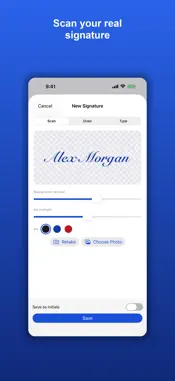
Stop printing forms just to sign them. Signature Maker turns your real handwritten signature into a clean image and puts it on your PDFs, along with everything else a form asks for. Sign on paper and photograph it, or import a photo: the background is removed automatically, and you can strengthen faint pen strokes and choose black, blue or red ink. Prefer not to scan? Draw with your finger or Apple Pencil, or type your name in a cursive style. Your signatures and initials stay saved for next time. A contract just landed in Mail? Open the attachment, tap Share and choose Signature Maker, and it is ready to sign. PDFs in Files open the same way, and you can also start from photos of a paper document. Long agreements are where it saves the most time. Initial All Pages puts your initials on every page at once, and when you drag one, the whole set moves with it. Save your name, important dates and addresses as fields, then drop them onto any form instead of typing them again. Add text boxes, today's date and checkmarks, and move or resize anything on the page. When you finish, export a flattened PDF that opens the same everywhere. The free version lets you scan, draw or type your signature, save up to three, fill and sign documents, and preview the result. A one-time unlock adds exporting and sharing, unlimited saved signatures and documents, stamps such as Approved and Paid, and every cursive font. Everything is processed on your device, with no account to create. This app is free to try. A single one-time purchase unlocks exporting and sharing your signed documents and signatures and all premium features, forever, with no subscription. Payment is charged to your Apple ID at confirmation of purchase. Restore your purchase any time from the app settings. Terms of Use (EULA): https://www.apple.com/legal/internet-services/itunes/dev/stdeula/ Privacy Policy: https://www.appharbour.com/signaturescanner/privacy.html Terms: https://www.appharbour.com/signaturescanner/terms.html
What's New
Version 1.1.0 2026-11-12
Open PDFs straight from Mail and Files with Open in Signature Maker. Initial All Pages places your initials on every page at once. Saved fields keep your name, ...Open PDFs straight from Mail and Files with Open in Signature Maker. Initial All Pages places your initials on every page at once. Saved fields keep your name, dates and address ready to drop onto a document. The whole app, including the upgrade screen, is now translated into German, French and Spanish. Technical Analysis
Package Overview Basic metadata
Bundle ID
com.appharbour.signaturescanner Current Version 1.1.0
Minimum iOS 17.0
Package Size App Store Size
Package Metadata 1 / 2 version records
Detailed binary, privacy manifest, framework, and Info.plist results have not been indexed for this package yet. The verified App Store and archive metadata above remains available.
Developer Information
Known Version Records
1 version record with stored package metadata • 2 known version records
Stored metadata does not guarantee a package is currently available to download.
| Details | Version / IDs | Version date | Action |
|---|---|---|---|
| 1.25 MB | v1.0.4 App Store ID: 887447998Build: 1.0.4 | 2026-09-19 14:30:27 | Get Version |
| Not archived | App Store ID: 886801091 | Unknown | Request Version |