
Preview




Description
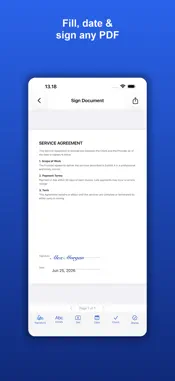
Turn your real handwritten signature into a clean, professional image, and sign any document in seconds. Sign your name on paper, photograph it, and Signature Scanner lifts the ink off the page: the background is removed automatically and you get a sharp signature with a transparent background, ready to place on any PDF or share as a PNG into Word, email, and web forms. No account. No uploads. Everything happens on your device. SCAN YOUR REAL SIGNATURE - Photograph your signature on paper with the camera, or import a photo - Automatic background removal with live preview - Ink-boost control turns faint pen strokes into solid, dark ink - Fine-tune with the background slider, then pick black, blue, or red ink - Export as a transparent PNG that drops cleanly onto any document DRAW OR TYPE INSTEAD - Draw your signature with your finger or Apple Pencil, with smooth strokes, undo, and adjustable thickness - Type your name and pick from elegant cursive styles - Save signatures and initials and reuse them everywhere SIGN ANY DOCUMENT - Open a PDF from Files, or photograph a paper document - Place, move, and resize your signature on any page - Fill forms with text boxes, dates, and checkmarks - Add initials to every page that needs them - Export a flattened, share-ready signed PDF PRIVATE BY DESIGN Your signature is sensitive. That is why Signature Scanner processes everything on your iPhone or iPad: photos, signatures, and documents never leave your device, and there is no account to create. PREMIUM One simple one-time purchase unlocks everything: exporting and sharing your signed documents and signatures, unlimited saved signatures, unlimited signed documents, approval and date stamps (Approved, Paid, Confidential, Received), and the full cursive font collection. No subscription, ever. Perfect for contracts, leases, invoices, permission slips, offer letters, NDAs, and every form that still wants ink. FREE TO TRY The free version lets you scan, draw, or type your signature, fill and sign documents, and preview everything on your device. When you are ready to export or share your signed documents and signatures, a single one-time purchase unlocks that and all premium features, forever. This app is free to try. A single one-time purchase unlocks exporting and sharing your signed documents and signatures and all premium features, forever, with no subscription. Payment is charged to your Apple ID at confirmation of purchase. Restore your purchase any time from the app settings. Terms of Use (EULA): https://www.apple.com/legal/internet-services/itunes/dev/stdeula/ Privacy Policy: https://www.appharbour.com/signaturescanner/privacy.html Terms: https://www.appharbour.com/signaturescanner/terms.html
What's New
Version 1.0.4 2026-09-19
Under-the-hood improvements and refinements. Technical Analysis
Package Overview Basic metadata
Bundle ID
com.appharbour.signaturescanner Current Version 1.0.4
Minimum iOS 17.0
Package Size App Store Size
Package Metadata 1 / 2 version records
Detailed binary, privacy manifest, framework, and Info.plist results have not been indexed for this package yet. The verified App Store and archive metadata above remains available.
Developer Information
Known Version Records
1 version record with stored package metadata • 2 known version records
Stored metadata does not guarantee a package is currently available to download.
| Details | Version / IDs | Version date | Action |
|---|---|---|---|
| 1.25 MB | v1.0.4 App Store ID: 887447998Build: 1.0.4 | 2026-09-19 14:30:27 | Get Version |
| Not archived | App Store ID: 886801091 | Unknown | Request Version |