Preview








Description
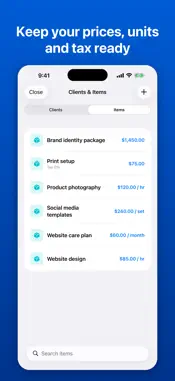
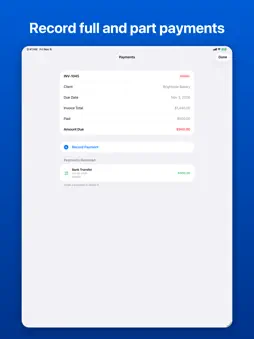
Invoice Generator turns a finished job into a clean PDF invoice or estimate in about a minute, then keeps track of who has paid. Save your regulars once. Store clients with their email, address, tax ID and default payment terms, and keep a list of the products and services you bill, each with its price, unit and tax rate. On a new invoice, choose a saved client or start typing a name and tap the match. Items fill in the same way, so descriptions and prices are never retyped. Editing a saved client or item later leaves the invoices you already made untouched. Know what's owed. Record each payment against an invoice with the date, amount, method and a note. Every invoice shows as unpaid, part-paid, paid or overdue, worked out from its due date and the payments you've logged. The Payments screen totals what is outstanding and overdue for each currency and lists overdue invoices first, longest overdue at the top. On a part-paid invoice, the PDF shows the amount paid and the amount still due. Quote before you bill. Estimates use the same editor, with a validity date and an optional deposit. When the client says yes, convert the estimate to an invoice in one tap and every line carries over. Make it look like yours. Add your logo, pick a template, choose from 150+ currencies, and give a line its own tax rate when items are taxed differently. Preview the PDF, then send it by email, AirDrop or any app, or save it to Files. No account to create. Your invoices, clients, items and payments are stored locally on your device. Your first 3 PDF exports are free. Invoice Generator Premium unlocks unlimited exports, all 8 templates, PDFs without the branding footer, and invoice duplication. Subscription Options: • Weekly subscription with a 3-day free trial • Annual subscription Payment will be charged to your Apple ID account at confirmation of purchase. Subscription automatically renews unless canceled at least 24 hours before the end of the current period. Your account will be charged for renewal within 24 hours prior to the end of the current period. You can manage and cancel your subscriptions by going to your App Store account settings after purchase. To restore previous purchases, use the "Restore Purchases" option in Settings. Support Website: https://www.appharbour.com/invoicegenerator/service.html Email: [email protected] Privacy Policy: https://www.appharbour.com/invoicegenerator/privacy.html Terms of Use: https://www.appharbour.com/invoicegenerator/terms.html
What's New
Version 1.2.0 2026-11-11
What's new: • Clients & Items: save clients (email, address, tax ID, default terms) and the products and services you bill. Pick them, or start typing and tap t...What's new: • Clients & Items: save clients (email, address, tax ID, default terms) and the products and services you bill. Pick them, or start typing and tap the match, on any invoice. • Payments: record payments against an invoice with date, amount, method and note. Invoices now show as unpaid, part-paid, paid or overdue. • A new Payments screen totals what's outstanding and overdue, and My Documents has an Overdue filter. • Line items can have a unit and their own tax rate, and tax IDs print on the PDF. • Part-paid invoices show the amount paid and the amount still due on the PDF. Technical Analysis
Package Overview Basic metadata
Bundle ID
com.appharbour.invoicegenerator Current Version 1.2.0
Minimum iOS 17.0
Package Size App Store Size
Package Metadata 0 / 1 version records
Detailed binary, privacy manifest, framework, and Info.plist results have not been indexed for this package yet. The verified App Store and archive metadata above remains available.
Developer Information
Known Version Records
0 version records with stored package metadata • 1 known version records
Stored metadata does not guarantee a package is currently available to download.
| Details | Version / IDs | Version date | Action |
|---|---|---|---|
| Not archived | App Store ID: 881691081 | Unknown | Request Version |