
Preview




Description
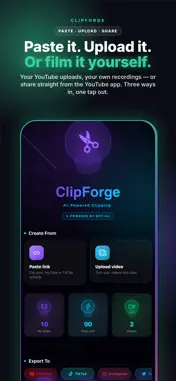
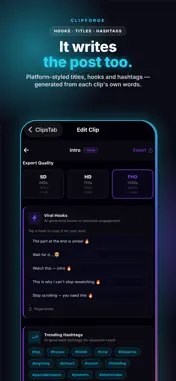
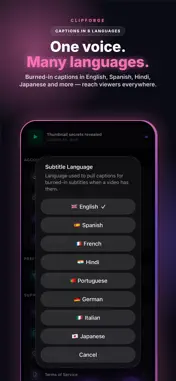
One long video. A week of short-form content. ClipForge turns YouTube videos and your own recordings into ready-to-post vertical clips — with AI-picked moments, word-by-word captions, and platform-styled titles — in about two to three minutes. HOW IT WORKS Paste a YouTube link, browse YouTube inside the app, or upload a recording from your phone. ClipForge reads the video's captions or transcribes the speech, finds the moments most likely to hold attention, and delivers polished vertical clips sized for TikTok, Instagram Reels, YouTube Shorts, and more. WHAT YOU GET - AI moment selection — clips are chosen from what's actually said, not random timestamps - Word-by-word captions — burned-in subtitles synced to speech, in your choice of language, with 15 caption styles - Smart Crop — face tracking keeps speakers centered in the 9:16 frame (Pro and Team) - 8 output formats — TikTok, Reels, Shorts, Facebook, and landscape formats too - Titles, hooks & hashtags — generated from each clip's own content, styled for the platform you picked - Bulk generation — queue up to 5 videos and let them process back to back (Team) - Upload your own recordings — phone videos are compressed on-device and upload in the background, so you can keep using your phone - Export everything — save clips straight to your camera roll, one tap or all at once HONEST BY DESIGN If a clip can't be generated, you're never charged for it. If a source limits quality, you get the best available. Your uploads are deleted after processing, and finished clips clear from our servers within about 24 hours — your content isn't stored long-term, sold, or used for ads. PLANS - Free — 4 clips per month, with watermark - Starter — 30 clips per month, no watermark - Pro — 100 clips per month, Smart Crop, priority processing - Team — 400 clips per month, 3 seats, bulk generation Subscriptions are billed monthly through your Apple ID. Payment is charged to your Apple ID account at confirmation of purchase. Subscriptions automatically renew unless canceled at least 24 hours before the end of the current period. Manage or cancel anytime in your Apple ID account settings. Privacy Policy: https://rishu1065.github.io/clipforge-legal/privacy.html Terms of Use: https://rishu1065.github.io/clipforge-legal/terms.html Questions? [email protected] Made for creators, podcasters, and anyone with more footage than time.
What's New
Version 1.3.2 2026-11-20
• Plan prices now always show in your local currency • Clearer free-trial details before you subscribe • Clearer messages when a video can't be clipped • Bug fi...• Plan prices now always show in your local currency • Clearer free-trial details before you subscribe • Clearer messages when a video can't be clipped • Bug fixes and improvements Technical Analysis
Package Overview Basic metadata
Bundle ID
com.rishu.clipforge Current Version 1.3.2
Minimum iOS 15.1
Package Size App Store Size
Package Metadata 0 / 0 version records
Detailed binary, privacy manifest, framework, and Info.plist results have not been indexed for this package yet. The verified App Store and archive metadata above remains available.
Known Version Records
0 version records with stored package metadata
Stored metadata does not guarantee a package is currently available to download.
| Details | Version / IDs | Version date | Action |
|---|