Preview




Description
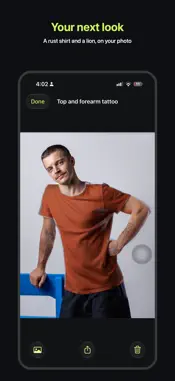
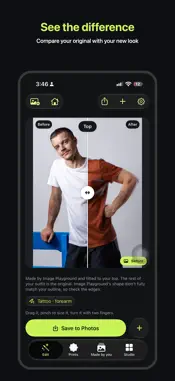
Wearover helps you try a different outfit in your own photo on iPhone, Mac and Apple Vision Pro. Describe a look in Customise, such as "cream silk festive kurta with gold embroidery", and choose a card. Apple's image drawing redraws only the selected clothing, and Wearover fits it back into your photo with your face and hair as pictured. CUSTOMISE Type what you want. Wearover turns it into cards with the colour, fabric, style and embroidery it understood, and nothing changes until you tap Generate. Festive words like Diwali, Eid or sangeet mean a festive look. Ask a follow-up to change it, and Undo steps back one change at a time. GROUP PHOTOS Change one person, several, or everyone. Wearover shows a plan and draws one person at a time, so each person stays themselves. FACE MAKEOVERS (OPTIONAL) Ask for a witch, a Joker face, smoky eyes or red lipstick. Makeovers are off until you allow them: Wearover asks first, then sends only a crop of your face, eyes or lips to Apple's image drawing and blends the result back into that part of the photo. Undo puts your original back, and you can turn makeovers off in Settings. Or keep your face on the device and wear a mask on top instead. SALON (OPTIONAL, IPHONE) Try up to three hairstyles on one photo and compare them side by side. After you allow it, Apple's image drawing draws the new hair on a crop of your head, including your face; your face from brows to chin stays your original photo. Add a beard as an optional face makeover; your eyes, nose and lips stay your original photo. Each look comes with a hair recipe written on your device (cut lengths, clipper guards, steps, colour and upkeep) as a suggestion, not professional advice. Save a look with its recipe to your Wardrobe and share it. OBJECTS AND BIKE LOOKS (IPHONE) Pick one photo of a motorbike, a bicycle or a chair, or most single objects on a plain background. Wearover lifts it out on your device and says what it found, such as "Object found: motorbike". Then try colours, patterns and looks on it: colour blocks, a racing stripe, matte, chrome, a race-number decal or a glowing neon edge. Add a white border (none, thin or thick), or place a person or thing from another photo on it. Every look is drawn on your iPhone, inside the object's outline. Nothing is uploaded, and nothing is saved unless you choose Save. NAIL COLOUR (IPHONE) Pick one close photo of a nail to preview approximate polish shades. It runs on your device. Nail-art designs drawn with Apple's image drawing are on Mac only. PRINTS, ACCESSORIES AND TATTOOS Add a logo, sticker or drawn picture to a top. Try glasses, jewellery, watches, masks, headpieces, face paint and costume pieces as removable layers, and tattoos on a detected arm or hand. SHARE AND KEEP Share a story card with your new look large and the original in the corner, a before and after, or the new look alone. Every garment drawn for you is kept on your Wardrobe shelf, cut out with the words that made it, to filter by kind and colour. On iPhone, Made by you gathers every drawing, saved look and hair look in one place, from the start screen: open one full screen, put it on a photo, share it or delete it. PRIVATE BY DESIGN Wearover has no account and does not track you. It does not identify people in photos. Clothing redraws start from a crop below your face. Your face is sent only when you allow face makeovers, or Hair try-on or beards in Salon, each asked separately. Image generation is handled by Apple's Image Playground, under Apple's system and terms.
What's New
Version 3.0.7 2026-11-16
Image Playground outfits now reach your shoulders: a strip of your old top no longer shows above the new one. Technical Analysis
Package Overview Basic metadata
Bundle ID
com.anupamchugh.BestFaceForward Current Version 3.0.7
Minimum iOS 27.0
Package Size App Store Size
Package Metadata 0 / 2 version records
Detailed binary, privacy manifest, framework, and Info.plist results have not been indexed for this package yet. The verified App Store and archive metadata above remains available.
Developer Information
Known Version Records
0 version records with stored package metadata • 2 known version records
Stored metadata does not guarantee a package is currently available to download.
| Details | Version / IDs | Version date | Action |
|---|---|---|---|
| Not archived | App Store ID: 885749508 | Unknown | Request Version |
| Not archived | App Store ID: 885288479 | Unknown | Request Version |