
Preview






Description
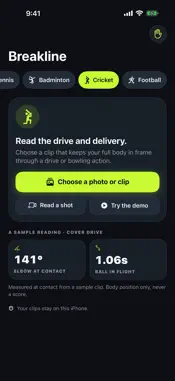
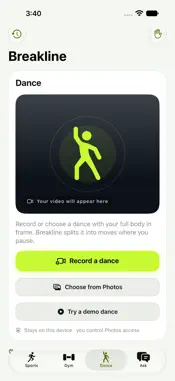
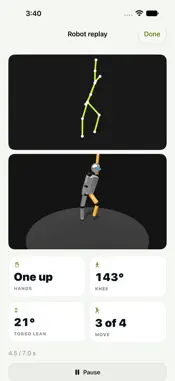
Breakline describes your body position in your own sports photos and clips, privately on your iPhone. Choose surfing, skateboarding, golf, tennis, badminton, cricket, football or dance. Pick one photo or clip. Breakline uses Apple Vision on your device to find your pose, then tells you what it sees in one or two plain sentences, such as "Your knees are bent. Your chest is over your feet." Add a second photo or clip to compare the two. Ask about your position. Tap a suggested question or a drill, or type your own. On iPhones with Apple Intelligence turned on, answers are generated by Apple's on-device model, which looks at your photo and the measured pose. Without Apple Intelligence, every question still gets an answer built from the measurements. Read a shot. For golf, tennis, badminton, cricket and football, film a shot or choose a clip. Breakline finds the load, contact and follow-through moments and describes your elbow and front-knee angles at contact, or both knees for a football kick. Scrub the three moments to see the pose at each. Follow the ball. For cricket, tennis, golf and football clips filmed from a tripod, Breakline draws the ball's path as the clip plays and states what it measured: how long it followed the ball, the angle it left at in the camera's view, and when it bounced. Read a dance. Dance has its own tab. Record up to 10 seconds with the camera or choose a dance video, and Breakline splits it into moves on the music's beat or where you slow down, then describes each one in plain sentences: which hands rise above the head, how far the knees bend, how far the torso leans. With Apple Intelligence on, a short line names each move, written only from those measurements. For a video longer than 20 seconds, Apple's video analysis on your iPhone can suggest 20 seconds to read, and you can drag to pick another stretch. Watch a robot dance it back, drawn only from the measured pose, and save your clip with its pose and the robot's dance to Photos. Ask which way you moved. For a dance or a surf clip, the movement coach answers "Which way did I move?" and "What should I change?" from the measured pose, such as a pop-up that should land with bent knees. With Apple Intelligence on, the on-device model words the measurements, and a reply with a number Breakline didn't measure is replaced by the measurement. See your latest readings. The Shot Readings widget shows your latest reading of each filmed shot on the Home Screen. Train in the gym. The Gym tab reads your body position in a filmed set and keeps your set history. Save your trainer's meal plan, photograph each meal, see your week at a glance and ask the on-device coach about your meals and sets. Surfing keeps a front-camera land drill and an optional Find possible surf media button that looks through the Photos library you allow. Suggestions can be wrong, and you choose what to use. Features: - Seven sports and dance: surfing, skateboarding, golf, tennis, badminton, cricket, football, dance - One or two photos or clips, with plain-language body-position readings - Dance: record 10 seconds or choose a video; moves on the beat, named in words, and a robot that dances them back - Movement coach: which way you moved and what to change, from measured poses - Shot reading with load, contact and follow-through for racquet, bat, club and kick - Ball path for cricket, tennis, golf and football clips filmed from a tripod - Follow-up questions answered on your device - Shot Readings Home Screen widget - Gym tab with set history, meal plan, meal photos and a week view - Skeleton and angle overlay, and a frame slider for clips - No account, no ads, no analytics, nothing uploaded Readings describe what is visible in the picture. Breakline does not score or grade your technique, identify people, or give medical advice.
What's New
Version 1.7 2026-11-11
A movement coach. Ask which way you moved and what to change, and Breakline answers from your measured pose. • Dance: after a reading, tap "Ask which way you m...A movement coach. Ask which way you moved and what to change, and Breakline answers from your measured pose. • Dance: after a reading, tap "Ask which way you moved". Pick a move, ask a question, and see the move drawn from where it started to where it ended. • Surfing: open a clip's coach options and tap "Ask which way you moved". Breakline checks the pop-up: start low, land with your knees bent and your chest over your feet. • Measured first: Breakline works out the direction and distance; with Apple Intelligence on, the on-device model only puts them into words, and a reply with a number Breakline didn't measure is replaced by the measurement. • Show me the drill again: replay the move on the robot from the answer. • Report an answer: thumbs down on a model answer lets you email it with its conversation. You see every part and can leave any out; nothing is sent until you send it. • Steadier skeletons: the pose overlay on clips and the live drill no longer jitters. • Ghost overlay keeps both photos' poses when you switch it on. Measurements only, never a score. Nothing is uploaded. No account needed. Technical Analysis
Package Overview Basic metadata
Bundle ID
com.anupamchugh.surfcoach Current Version 1.7
Minimum iOS 27.0
Package Size App Store Size
Package Metadata 0 / 0 version records
Detailed binary, privacy manifest, framework, and Info.plist results have not been indexed for this package yet. The verified App Store and archive metadata above remains available.
Developer Information
Known Version Records
0 version records with stored package metadata
Stored metadata does not guarantee a package is currently available to download.
| Details | Version / IDs | Version date | Action |
|---|