
Preview






Description
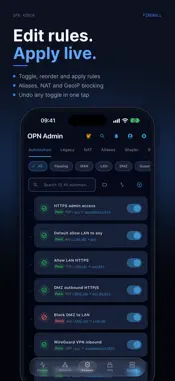
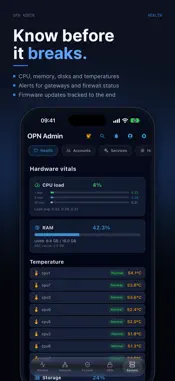
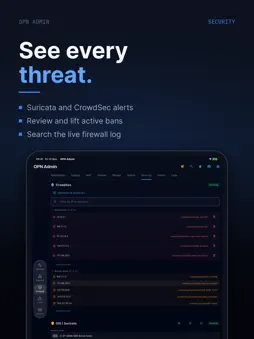
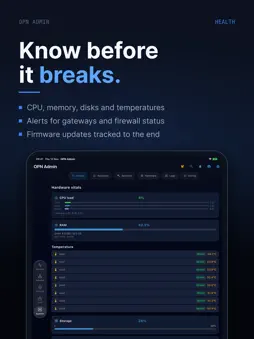
Your OPNsense firewall, in your pocket. OPN Admin talks straight to your firewall's API, so you can watch live traffic, edit rules, manage VPN peers and get an alert the moment something changes. On iPhone, iPad, iPhone Duo and Apple Watch. Built for homelabs, small offices and anyone who runs OPNsense and doesn't want to open a laptop to check on it. SEE EVERYTHING AT A GLANCE • Live traffic for every interface, upload and download side by side • Gateway latency, packet loss and jitter, per link • CPU, memory, disks, S.M.A.R.T. health and temperatures • Tap any Overview card for the details: VPN peers and their traffic, expiring certificates, the latest IDS alerts, the firmware version you'd move to • Several firewalls in one app, with a fleet overview CHANGE THINGS SAFELY • Toggle, reorder and apply firewall rules, with undo right from the message • Aliases, NAT and port forwards, GeoIP country blocking • Firewall logs that refresh on their own, with search • Export and restore rule sets • Config backups with a diff by setting (secrets stay hidden) and revert • Compare this firewall's config with another one you manage, read-only • Firmware updates and reboots followed step by step until the firewall is back VPN AND NETWORK • WireGuard: servers and peers, keys and QR codes, online, idle or offline at a glance • IPsec, OpenVPN and Tailscale • DHCP leases and static mappings, Unbound DNS overrides and blocklists • Ping and traceroute with hop-by-hop results • Suricata and CrowdSec alerts, certificates with ACME renewals • BIND, FRR and OSPF, HAProxy, Nginx and Caddy, when the plugin is installed KNOW BEFORE IT BREAKS • Push alerts when an interface, gateway or VPN tunnel drops, a certificate nears expiry, firmware is waiting or the firewall reports a warning or error • Home Screen widgets, Control Center and Shortcuts MADE FOR EVERY SCREEN • iPhone Duo: unfold for the full dashboard, navigation in the status strip • iPad: side navigation, cards in balanced columns, list and detail side by side • Landscape on iPhone, light and dark themes APPLE WATCH Status, CPU and memory, interfaces and gateways, live traffic and recent alerts on your wrist, with complications and a Smart Stack card. Switch chosen firewall rules and WireGuard tunnels on or off, with a confirm step first. Your sign-in details stay on your iPhone; the watch never holds them. PRIVATE BY DESIGN • No account and no middleman: the app connects directly to your firewall • Your firewall's certificate is pinned on first use, so a swapped certificate is caught • Face ID lock, keys kept in the Keychain, the app switcher preview hidden • Usage and crash reports are off unless you turn them on Try it without a firewall: tap Try demo mode on the sign-in screen. Free, with nothing locked; an optional tip in Settings supports development. Sign in with an OPNsense API key and secret, or your web GUI username and password. Features that need a newer OPNsense release appear once your firewall has it. OPN Admin is an independent app and is not affiliated with Deciso B.V. or the OPNsense project.
What's New
Version 1.6.5 2026-11-19
A new Monitor that stays calm unless something is wrong, a Black theme, and certificate warnings that understand short-lived Let's Encrypt certificates. NEW • ...A new Monitor that stays calm unless something is wrong, a Black theme, and certificate warnings that understand short-lived Let's Encrypt certificates. NEW • In your language: OPN Admin, its widgets and the watch app are now available in German, Spanish, French, Italian, Japanese, Dutch, Portuguese (Brazil) and Simplified Chinese. The app follows your device language; to use a different one for OPN Admin only, change it in your device settings. Names and messages from your firewall appear as the firewall sends them. • A new Monitor, now the default: a "Needs attention" list at the top (an offline gateway, an expiring certificate, a UPS on battery or a full disk; tap to jump, or dismiss), "At a glance" tiles for gateways, VPN, IDS alerts and firmware, a compact live chart that opens the full one, a System line with CPU, RAM and uptime that expands to the details (both remember which way you left them), and your firewall's name as the title. Prefer the previous layout? Turn on Settings › Look & feel › Old dashboard. • Calm unless something is wrong: a gateway you marked down on purpose, VPN peers that simply aren't connected right now, an available update and routine IDS alerts are shown as information, not as problems. A highest-severity IDS alert that was let through still stands out. • A new welcome for first-time users: see what the app does, try the demo firewall from the first screen, and get asked for less up front. • New Black theme: Settings › Look & feel › Theme now offers System, Default, Black and White. • Home screen widgets follow the app's theme, and say so when their last update couldn't reach the firewall. • Support development is now also in Settings. FIXED • Certificates: expiry warnings now scale with how long a certificate lasts, so short-lived Let's Encrypt certificates no longer show as expiring right after they are issued. ACME certificates no longer show as expired; they show when they were last issued. An expired certificate that nothing uses is flagged for cleanup instead of as urgent. Thanks to the anonymous user who reported this. • Gateways: packet loss and high latency show in amber instead of green, a gateway marked down on purpose shows as "Marked down" without an offline alert, status reads correctly whatever language your firewall's web interface uses, and gateway status on Monitor stays current while you watch it. • Watch: the status matches the app. An unplugged port or a gateway marked down on purpose no longer shows as degraded, and the wording is the same as on Monitor. • A UPS self-test no longer sends a "Mains power lost" alert. • Live interface load says so when no interface has reported traffic yet, instead of showing a loading placeholder forever. Thank you for the feedback that shapes every release. Technical Analysis
Package Overview Basic metadata
Bundle ID
com.frerisdev.opnsenseapp Current Version 1.6.5
Minimum iOS 17.6
Package Size App Store Size
Package Metadata 1 / 10 version records
Detailed binary, privacy manifest, framework, and Info.plist results have not been indexed for this package yet. The verified App Store and archive metadata above remains available.
Developer Information
Known Version Records
1 version record with stored package metadata • 10 known version records
Stored metadata does not guarantee a package is currently available to download.
| Details | Version / IDs | Version date | Action |
|---|---|---|---|
| 49.71 MB | v1.2.1 App Store ID: 888013386Build: 1.2.1 | 2026-09-16 07:57:50 | Get Version |
| Not archived | App Store ID: 887828453 | Unknown | Request Version |
| Not archived | App Store ID: 887764164 | Unknown | Request Version |
| Not archived | App Store ID: 887202192 | Unknown | Request Version |
| Not archived | App Store ID: 887083476 | Unknown | Request Version |
| Not archived | App Store ID: 886766164 | Unknown | Request Version |
| Not archived | App Store ID: 886620522 | Unknown | Request Version |
| Not archived | App Store ID: 886322146 | Unknown | Request Version |
| Not archived | App Store ID: 885644937 | Unknown | Request Version |
| Not archived | App Store ID: 884980571 | Unknown | Request Version |