
Preview






Description
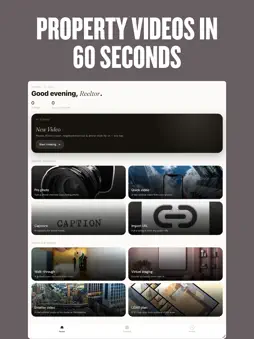
Turn listing photos into scroll-stopping real estate videos in about a minute — no editing skills needed. AI listing reels, virtual staging, pro photo enhancement, captions and flyers: everything you need to market a property, in one app built for agents. Turn every property into a polished, market‑ready presentation without juggling multiple apps. Reeltor combines listing creation, photo & video production, location visuals, CRM tools, and spatial capture into a single, iOS‑optimized workflow. Who’s It For? - Real‑estate agents, brokers, and property managers - New‑home builders and developers - Marketing teams that need fast, brand‑consistent assets From Listing to Content – One Seamless Flow - Create listings manually or pull basic data by pasting a property URL. - Start from a recorded walk‑through – import the video and let Reeltor extract key frames. - All data lives in a single listing record, ready for the next steps. Photo Management & Pro‑Photo Enhancements - Full‑screen viewer for quick inspection. - Add, remove, reorder, and reuse images across multiple listings. - One‑tap Pro Photo enhancement with selectable output sizes; edited sets can be saved to a personal gallery for future use. Quick Video & AI‑Assisted Video Builder - Choose photos and let the app generate a quick video in seconds. - AI‑assisted video adapts format, duration, quality, music, on‑screen text, logo/branding, and captions based on the selected workflow (social post, MLS, email, etc.). - Export options include MP4, MOV, and optimized sizes for Instagram, Facebook, and property portals. Rich Content Packages - Property tours with smooth transitions. - Neighbourhood highlights – add local amenities, schools, and transit info. - Carousels for multi‑image social ads. - Ready‑to‑post social captions, suggested hashtags, and script drafts for video narration. - Branded PDF reports that combine photos, video links, and property details. Location Tools – Street & Aerial‑Style Views - Automatic retrieval of address‑based street and exterior imagery where available. - Aerial‑style renderings are created from existing satellite or map data; no real drone is dispatched. Output quality varies by imagery source, device, region, and provider. Integrated CRM Features - Store buyer records, search criteria, and matching scores. - Track prospects, schedule showings, and draft follow‑up emails directly from the listing. - Export contact lists or import leads from third‑party CRMs. LiDAR & RoomPlan Spatial Capture (Supported Apple Devices) - Use the iPhone 14 Pro, iPad Pro, or other LiDAR‑equipped devices to scan rooms. - Generate floor‑plan‑style layouts and 3D measurements that can be attached to the listing. - Scans are saved in the library for reuse in future tours. Library, Background Jobs & Notifications - All assets—photos, videos, scans, and documents—are organized in a searchable media library. - Enable background processing for batch enhancements, video renders, or AI copy generation. - Receive push notifications when jobs finish or when a prospect updates their criteria. Language‑Aware AI Writing (Where Supported) - AI can draft property descriptions, social captions, and report copy in the device’s language settings. - User review is mandatory – you must verify AI‑generated text, media selections, measurements, and factual statements before publishing. - Paid AI actions draw from your monthly plan credits; unused credits roll over until the next billing cycle. Technical Limits & Requirements - Certain features need compatible hardware (LiDAR, camera), system permissions (photos, location), an active internet connection, or third‑party services (map providers, music libraries). - AI generation is only available in regions where the service is supported. Terms of Use: https://www.apple.com/legal/internet-services/itunes/dev/stdeula/
What's New
Version 1.0.3 2026-10-17
• Exterior video stays on screen until your video is ready • Photos imported from a listing link are saved to the listing • Virtual staging before/after labels ...• Exterior video stays on screen until your video is ready • Photos imported from a listing link are saved to the listing • Virtual staging before/after labels now sit on the correct sides • Stability improvements Technical Analysis
Package Overview Basic metadata
Bundle ID
com.sorin.estator Current Version 1.0.3
Minimum iOS 15.6
Package Size App Store Size
Package Metadata 0 / 1 version records
Detailed binary, privacy manifest, framework, and Info.plist results have not been indexed for this package yet. The verified App Store and archive metadata above remains available.
Known Version Records
0 version records with stored package metadata • 1 known version records
Stored metadata does not guarantee a package is currently available to download.
| Details | Version / IDs | Version date | Action |
|---|---|---|---|
| Not archived | App Store ID: 887309431 | Unknown | Request Version |