
Preview




Description
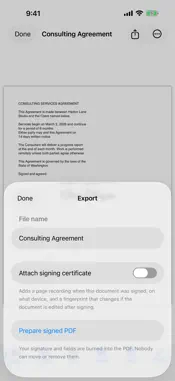
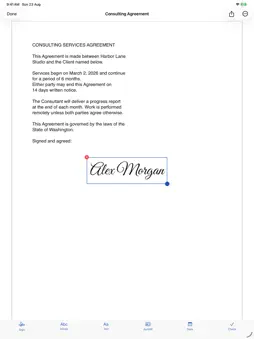
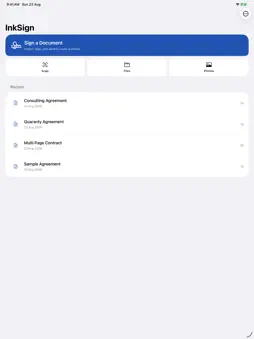
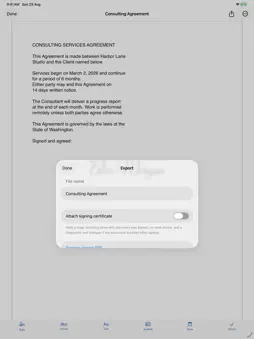
Sign a PDF in under a minute, without sending it to anyone. Most signing apps upload your document to a server first. InkSign does not. Import a PDF or scan a paper page, place your signature exactly where it belongs, and export the finished file. Everything happens on your iPhone or iPad. The app contains no networking code at all. SIGN THE WAY YOU ACTUALLY SIGN Draw your signature once with your finger or Apple Pencil and reuse it forever. Add initials, typed text, dates, and checkmarks in black, blue, or red ink. Drag anything to the exact spot, resize it, undo a slip, and see the result on the real page rather than a preview. GET THE DOCUMENT IN, WHATEVER SHAPE IT IS IN Import from Files or iCloud Drive, share a PDF straight to InkSign from Mail or Messages, or scan a paper document with the camera. Password protected PDFs are unlocked on device with the password you already have. UNDERSTAND IT BEFORE YOU SIGN IT Tap once for a plain language briefing of what the document contains: the dates, the amounts, the deadlines, and the clauses worth a second look. It reads the document on your device and tells you what it found. It is information to help you read, not legal advice, and it never replaces reading the document yourself. MULTI PAGE, HANDLED PROPERLY Reorder pages, rotate them, delete the ones you do not need, and sign across as many pages as the document has. SIGN THE SAME FORM TWICE Save any document as a template with its fields already placed, then reuse it whenever that form comes round again. Store your name, address, and other details once and fill a form with a single tap. SHARE IT THE WAY THEY ASKED FOR IT Export the signed document as a PDF or as images, one JPG per page, or print it directly. Rename, search, and file your documents into folders so the next one is easy to find. PROOF THAT IT WAS NOT CHANGED Every Pro export can carry a tamper evident certificate. Open a signed file in InkSign later and it will tell you whether anything moved since you signed it. PRIVATE BECAUSE OF HOW IT IS BUILT No account. No sign in. No analytics. No ads. Your documents and signatures are stored only on your device, and we have no servers that could hold them even if we wanted to. INKSIGN PRO InkSign Pro is $1.99/week, $3.99/month, or $29.99/year. The yearly plan includes a 7 day free trial. Pro unlocks unlimited saved signatures, the photo signature stamp, templates, one tap form fill, the document briefing, and the tamper evident certificate. Payment is charged to your Apple Account at confirmation of purchase. Subscriptions renew automatically unless cancelled at least 24 hours before the current period ends. Manage or cancel anytime in your Apple Account settings. Privacy Policy: https://ajain26.github.io/app-policies/inksign/privacy-policy.html Terms of Use: https://ajain26.github.io/app-policies/inksign/terms.html
What's New
Version 1.1 2026-09-27
New in 1.1: - Sign in black, blue, or red ink. - Undo and redo while you place your signature and fields. - Export as images (JPG), one per page, as well as PD...New in 1.1: - Sign in black, blue, or red ink. - Undo and redo while you place your signature and fields. - Export as images (JPG), one per page, as well as PDF. - Print a signed document straight from the Export screen. - Rename documents, search them, and file them into folders. - New Settings screen with help, privacy, terms, and Restore Purchases. Fixes: - Subscribers are recognised immediately at launch and right after a purchase. - Onboarding fits properly on iPad in landscape. - Renaming a file after preparing it now shares it under the new name. Technical Analysis
Package Overview Basic metadata
Bundle ID
com.anshuljain.inksign Current Version 1.1
Minimum iOS 18.0
Package Size App Store Size
Package Metadata 0 / 0 version records
Detailed binary, privacy manifest, framework, and Info.plist results have not been indexed for this package yet. The verified App Store and archive metadata above remains available.
Developer Information
Known Version Records
0 version records with stored package metadata
Stored metadata does not guarantee a package is currently available to download.
| Details | Version / IDs | Version date | Action |
|---|