
Preview





Description
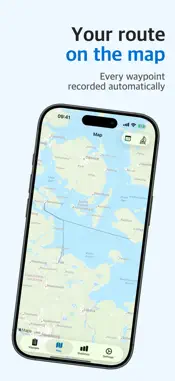
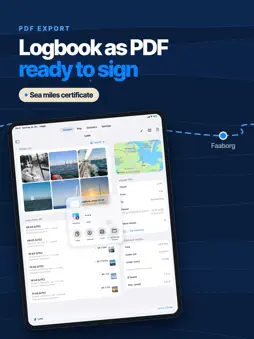
Logge turns your iPhone or iPad into a complete ship's log – built for use on the water. On board Create a voyage in seconds and start logging right away. Every log entry records GPS position, course, speed (kn), wind force (Beaufort), wind direction, sea state, visibility, air pressure, water depth, water temperature, sail setting and engine status. GPS data is filled in automatically, and every entry shows how far you've come since the start of the voyage. Over Wi-Fi (TCP/UDP), Logge takes data from compatible chart plotters and NMEA multiplexers. Boat & manoeuvres Sailing boat or motorboat – the forms show only relevant fields. Quick actions for tack, gybe, reef, engine, anchor and more create pre-filled log entries, also via Siri or a shortcut. Automatic course-change detection suggests entries. Air pressure from the iPhone barometer, even offline, with a trend arrow. Anchor & route At anchor, Logge monitors an adjustable swinging circle and sounds an alarm as soon as the boat leaves it – even in the background and with a Focus active. Logge records your route in the background, even with the screen off. Distances are measured along the actual route, split into sailing, engine and time at anchor. Voyage review & statistics Every completed voyage shows total distance, distance under sail and under engine, average and top speed, wind rose, weather history and the share under sail. The statistics tab sums up nautical miles, days at sea, engine hours, records and favourite ports – with an annual goal and filters. Spotted a mistake in a completed voyage? Time, log reading, sail setting, engine, weather and remarks can be corrected; position, course and speed stay as recorded. Challenges, badges & profile Your profile is the cover of your logbook: the running challenge, such as "100 NM in December", with a progress ring, plus 27 milestone badges in ten series – from distance to night miles and harbours – in bronze, silver, gold and platinum. Share any badge as an image. Your name and photo stay on your device; "Add me" puts you in the crew with one tap. All free. iPhone Duo On the foldable iPhone Duo, voyage list, map and statistics split exactly at the fold. In a running voyage the bridge view shows speed, course, position and logbook at a glance, the entry form opens as the right half, and your voyage and draft survive folding. Half-open on the chart table, the Duo becomes a plotter – free. Sea miles certificate For sailing licence applications: a PDF certificate of your voyages with total distance, days at sea, night miles and cruising area – signed with your finger or Apple Pencil if you like. Whether it is accepted is decided by the issuing authority. Night mode (Logge Pro) Extremely dark and red-tinted, so your eyes stay adapted on night passages. Switch it with the moon symbol in a voyage, or automatically at sunset and sunrise. Maps turn dark and the route is drawn in red. PDFs and map exports stay light. Photos in your logbook (Logge Pro) Up to 10 photos per entry, 30 per voyage – via the system photo picker, so Logge only sees what you choose. They appear on the voyage map, as "Voyage in pictures" and, if you like, as an appendix in the PDF. Photo suggestions from your library come only after an explanation, and the search runs on your device. Export, backup & organisation Export your logbook as a PDF in A4 landscape, and each voyage's route as a GPX track. Back up your logbook, photos included, to a file and restore it at any time – merged instead of overwritten. Logge Pro One-time purchase, no subscription. Pro unlocks: night mode, photos in your logbook, your own goals, the career certificate, free column selection in the PDF logbook, GPX import, CSV export, season comparison, fuel analysis and cruising-area heat map. Terms of Use: https://www.apple.com/legal/internet-services/itunes/dev/stdeula/
What's New
Version 1.11 2026-11-13
What's new in version 1.11: • Challenges and badges: the new profile button at the top left opens your profile – the cover of your logbook, with the running ch...What's new in version 1.11: • Challenges and badges: the new profile button at the top left opens your profile – the cover of your logbook, with the running challenge (for example "100 NM in December"), your badges and your career totals. A dot on the button tells you about anything new. While your logbook is still empty, the challenge also shows as a card in the voyage list. • 27 milestone badges in ten series, free: total distance, single voyages, night miles, harbours, days at sea, voyages, locks and first anchorage. Stepped badges come in bronze, silver, gold and platinum, and a progress ring shows how far along you are. What your logbook already contains is awarded quietly after the update. • Share any badge as an image. Links to challenges open the matching challenge right in Logge. • Profile with name and photo: both stay on this device – not in iCloud sync, backups or exports. In the crew section, "Add me" puts you on board with one tap. • iPhone Duo: unfolded, voyage list, map and statistics split exactly at the fold. A running voyage opens the bridge view with speed, course, position, distance, a compact chart and the logbook. "New entry" opens as the right half; the open voyage and an unfinished entry survive folding. • Chart-table mode (free): half-open on the chart table, the iPhone Duo shows the map with large speed and course in a running voyage, plus a wide "New entry" button and large tiles for tack, course change, engine, reefing, anchor and fuel below. • Each screen now has just one "New entry" button. Also: minor improvements and stability fixes. Technical Analysis
Package Overview Basic metadata
Bundle ID
de.ibp.Logge Current Version 1.11
Minimum iOS 18.6
Package Size App Store Size
Package Metadata 0 / 7 version records
Detailed binary, privacy manifest, framework, and Info.plist results have not been indexed for this package yet. The verified App Store and archive metadata above remains available.
Known Version Records
0 version records with stored package metadata • 7 known version records
Stored metadata does not guarantee a package is currently available to download.
| Details | Version / IDs | Version date | Action |
|---|---|---|---|
| Not archived | App Store ID: 888926376 | Unknown | Request Version |
| Not archived | App Store ID: 888381246 | Unknown | Request Version |
| Not archived | App Store ID: 887840990 | Unknown | Request Version |
| Not archived | App Store ID: 887003329 | Unknown | Request Version |
| Not archived | App Store ID: 886341728 | Unknown | Request Version |
| Not archived | App Store ID: 885348514 | Unknown | Request Version |
| Not archived | App Store ID: 884295043 | Unknown | Request Version |