
Preview




Description
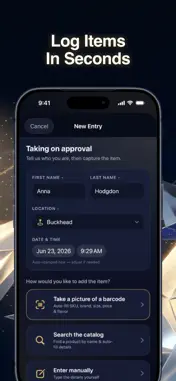
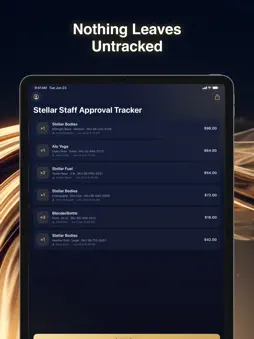
Stellar Inventory keeps your entire team in sync — every item taken out for a staff try-on approval logged, tracked, and visible in real time. For the Stellar Bodies team, keeping accurate records of merchandise pulled for staff try-ons shouldn't require spreadsheets, sticky notes, or chasing down colleagues. Stellar Inventory gives every staff member a simple, fast tool to log items the moment they're taken off the floor to try on — and keeps everyone on the same page, instantly. Purchases are handled separately. Scan and Log in Seconds Use your device camera to scan a product barcode or enter it manually. Capture brand, description, quantity, size or flavor, price, and collection method — all in one streamlined form. Every entry is stamped with the signed-in staff member's name, so accountability is built in from the start. Always in Sync Across the Team Every submission syncs to a shared central database the moment it's saved. No matter who made the entry or when, your team sees accurate, up-to-date records in real time. Stellar Inventory also works offline and automatically syncs all changes the moment connectivity is restored. Reporting That Does the Work for You Every log entry is automatically mirrored to a connected Google Sheet, giving managers instant access to formatted, exportable data. Filter by staff member, brand, or date and share records with stakeholders — all without any manual data entry. Secure Sign-In for Every Staff Member Staff sign in with their Apple or Google account, so there's no separate username or password to manage. Optional Face ID lock adds an extra layer of security for shared or personal devices, keeping your records protected at all times.
What's New
Version 1.0.8 2026-10-05
New: Wait Items & Notes. A shared list on the home screen for items your team is waiting on, with the date each item is available and notes. Anyone can view it;... Technical Analysis
Package Overview Basic metadata
Bundle ID
app.rork.2ksir0sf3qz9vsbl22y4b Current Version 1.0.8
Minimum iOS 18.0
Package Size App Store Size
Package Metadata 0 / 0 version records
Detailed binary, privacy manifest, framework, and Info.plist results have not been indexed for this package yet. The verified App Store and archive metadata above remains available.
Developer Information
Known Version Records
0 version records with stored package metadata
Stored metadata does not guarantee a package is currently available to download.
| Details | Version / IDs | Version date | Action |
|---|