
Preview






Description
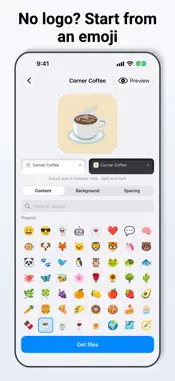
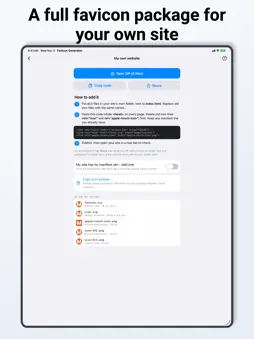
Favicon Generator ▹ turns your logo, initials or an emoji into a favicon that stays clear in browser tabs, then gives you exactly the files your website needs. Start from what you have. Crop your logo to the part that is easy to recognize, type one to three letters in a font and color, or pick an emoji. Adjust the background shape, color and spacing while a live preview shows the icon at its real size on light and dark tabs. Check it before you publish The Preview screen shows your favicon in a browser tab, in a search result and on a phone home screen. Readability warnings point out low contrast, long text or a small image, so you can fix the icon before you use it. Get the files for your site Choose where the favicon goes and get only what that place needs, with short steps on the same screen: • Shopify, Wix, WordPress or Squarespace: one image at the size the platform asks for. • Your own HTML site: a ZIP with favicon.ico, PNG sizes, an SVG for letters and emoji, an Apple touch icon, and the code to paste into your pages. A web manifest is added only when you ask for one. • Not sure: a square PNG and an ICO file that most site builders accept. Save the files to the Files app or send them with the share sheet, then upload them in your website's settings. Help explains what to do when a browser still shows the old icon and how long search results can take to update. Your favicons stay on your iPhone or iPad. Saved designs can be opened again to change them or to export for another site. The app works offline and does not need an account. It does not upload to your website for you or check a live site. Favicon Generator is free. You can use it forever, at no cost. However, Favicon Generator does offer premium features for its subscribers. If you decide to purchase an upgrade, you will unlock additional features. Privacy Policy: https://kociapp.github.io/favicon-generator/privacy-policy.html Terms of Use: https://kociapp.github.io/favicon-generator/term-of-use.html
What's New
Version 1.0.1 2026-11-22
Make a favicon that stays clear in a tiny browser tab, with the right files for your site. Emoji search now finds names with capital letters, like Santa Claus o...Make a favicon that stays clear in a tiny browser tab, with the right files for your site. Emoji search now finds names with capital letters, like Santa Claus or T-Rex. A short welcome tour shows how it works, and Settings has a new About page. Technical Analysis
Package Overview Basic metadata
Bundle ID
com.kociapp.favicongenerator Current Version 1.0.1
Minimum iOS 16.0
Package Size App Store Size
Package Metadata 0 / 0 version records
Detailed binary, privacy manifest, framework, and Info.plist results have not been indexed for this package yet. The verified App Store and archive metadata above remains available.
Developer Information
Known Version Records
0 version records with stored package metadata
Stored metadata does not guarantee a package is currently available to download.
| Details | Version / IDs | Version date | Action |
|---|