
Preview




Description
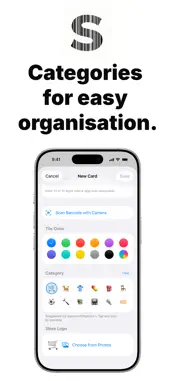
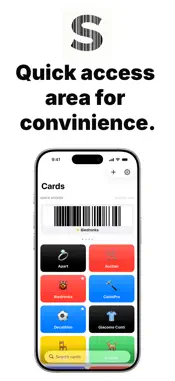
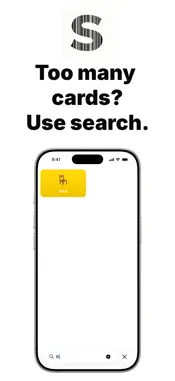
Scandio keeps all your loyalty cards in one place on your iPhone. Add a card by scanning its barcode, give it a name and a colour, and the next time you're at the checkout you open it in two taps and let the cashier scan it off the screen. Everything stays on your device. No account, no sign-in, no cloud, no tracking. The app has no analytics, no advertising identifiers, no crash reporters, and no third-party SDKs. WHAT YOU CAN DO • Add cards by scanning a barcode with the camera or typing the number manually • Render seven barcode types: EAN-13, EAN-8, ITF, QR, Code 128, PDF417, and Aztec • Show any card full-screen with an automatic brightness boost so it scans cleanly even on supermarket scanners • Pin favourites to the Quick Access carousel at the top of the home screen • Sort alphabetically, by date added, or by last used • Search by card name • Pick a tile colour from the brand palette or with a custom hex picker • Attach a store logo from your photo library • Choose a category icon from twelve emoji, or let the on-device language model suggest one BUILT-IN STORE RECOGNITION Scandio recognises common store names and fills in the brand colour and a built-in icon automatically — Biedronka, Lidl, Rossmann, IKEA, Auchan, Carrefour, Decathlon, MediaMarkt, and many more. APPLE INTELLIGENCE On supported iPhones running iOS 26 or later, Scandio uses Apple's on-device Foundation Models framework to suggest a category icon from the store name you typed. The suggestion runs entirely on your iPhone — no prompt or response is logged or transmitted. BACKUP AND RESTORE Built-in export creates a .scandiobackup file with all your cards, colours, logos, and preferences embedded. AirDrop it to a new iPhone or save it anywhere iOS lets you save documents. On import, Scandio asks how to handle duplicates — skip, merge, or add as new — and you can set a default for the dialog if you'd rather not be asked. PRIVACY BY DESIGN Scandio collects nothing and transmits nothing. Loyalty cards, photos, and preferences live only on your device, in the app's private container. The full privacy policy is at siemion.pro/scandio/privacy. OPEN SOURCE Scandio is open source under the MIT license. The full source code — SwiftUI views, SwiftData model, barcode renderers, backup format — lives at github.com/andrzejsiemion/scandio-ios. LANGUAGES English and Polish. REQUIREMENTS iPhone running iOS 17 or later. Camera permission is requested only when scanning a barcode; Photo Library permission only when attaching a logo image.
What's New
Version 1.1 2026-05-16
This release is all about speed and polish: ...This release is all about speed and polish: • Cards open instantly — barcodes are pre-rendered in the background and shared across screens. • Smoother scrolling in the card grid, especially with photo logos. • Crisper EAN-13, EAN-8 and ITF barcodes thanks to pixel-aligned rendering. • Faster restore when importing a backup with many cards. • Snappier taps — haptic feedback responds instantly. • Lower memory use during long sessions. Thanks for using Scandio! Technical Analysis
Package Overview Basic metadata
Bundle ID
pro.siemion.scandio Current Version 1.1
Minimum iOS 17.0
Package Size App Store Size
Package Metadata 0 / 2 version records
Detailed binary, privacy manifest, framework, and Info.plist results have not been indexed for this package yet. The verified App Store and archive metadata above remains available.
Developer Information
Known Version Records
0 version records with stored package metadata • 2 known version records
Stored metadata does not guarantee a package is currently available to download.
| Details | Version / IDs | Version date | Action |
|---|---|---|---|
| Not archived | App Store ID: 885704652 | Unknown | Request Version |
| Not archived | App Store ID: 885396929 | Unknown | Request Version |