
Preview


Description
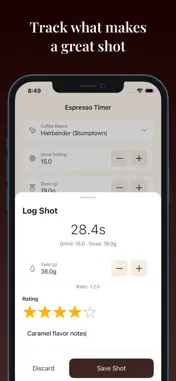
Dialed In is the shot logging companion built for home baristas who take their craft seriously. Whether you're dialing in a new bean or chasing a personal best, Dialed In tracks every variable that matters so you can pull better shots whether you’re learning or an experienced barista. **TRACK WHAT MATTERS** Log shot time, dose, yield, grind size, and notes alongside every shot. Each entry builds a complete picture of your technique over time. Use the in-app timer with a tap, or enter the time your machine already provides. Either way, your data is captured accurately and consistently. **KNOW YOUR EXTRACTION** Every shot is automatically labelled — Very Under, Slightly Under, Good, Slightly Over, or Very Over — based on your brew ratio or shot time. See at a glance what went wrong and what went right, without doing the math yourself. **SEE YOUR TRENDS** The trend charts lets you visualize extraction time, grind setting, and brew ratio across your recent shots. Spot the moment your dial-in clicked, or when an adjustment threw something off. **MANAGE YOUR BEANS** Keep a library of your coffees. Log shots against specific beans and see how each one performs as you work through a bag. **PREMIUM: iCLOUD BACKUP & CUSTOM FIELDS** Back up your shot history automatically to iCloud and restore it anytime. Add custom fields to capture anything your workflow requires — water temperature, crema color, acidity, specific flavors, or anything your heart desires. Dialed In is built for iOS and feels at home on your iPhone. No account required. No subscription needed to get started.
What's New
Version 1.1.0 2026-10-30
Grinders • Add the grinders you own and switch between them in one tap. • Match each grinder to its dial: whole numbers, half steps, or decimals like 5.2 and 5...Grinders • Add the grinders you own and switch between them in one tap. • Match each grinder to its dial: whole numbers, half steps, or decimals like 5.2 and 5.4. The + and − buttons move in your grinder's real increments, and settings are shown exactly the way your dial is marked — no more "7.0" on a grinder that only goes to 7. • Each grinder remembers the setting you last left it on, so switching back doesn't lose your place. • Grind trends now read one grinder at a time, so a coffee you've pulled on two grinders no longer mixes their numbers into one line. Your existing shots carry over automatically — nothing to re-enter. Adding more than one grinder is part of Pro. Setting your grinder's steps and decimals is free for everyone. Also in this update • Corrected Spanish and Portuguese throughout the app. Technical Analysis
Package Overview Basic metadata
Bundle ID
com.dialedinespressotimer.app Current Version 1.1.0
Minimum iOS 13.0
Package Size App Store Size
Package Metadata 0 / 2 version records
Detailed binary, privacy manifest, framework, and Info.plist results have not been indexed for this package yet. The verified App Store and archive metadata above remains available.
Known Version Records
0 version records with stored package metadata • 2 known version records
Stored metadata does not guarantee a package is currently available to download.
| Details | Version / IDs | Version date | Action |
|---|---|---|---|
| Not archived | App Store ID: 883402843 | Unknown | Request Version |
| Not archived | App Store ID: 882450328 | Unknown | Request Version |