
Preview



Description
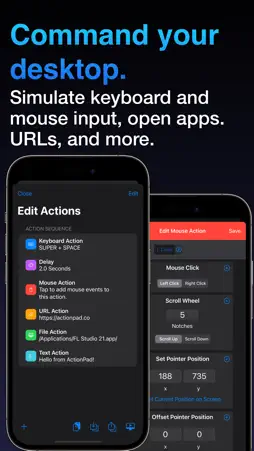
ActionPad allows you to create your own custom control panels to remote control applications on your computer. This app requires the ActionPad Server desktop software to be installed on your computer for full functionality. For more information on this, visit https://actionpad.co/go. Compatible with macOS and Windows. Panels can contain buttons and other objects, which can be used to simulate keyboard and mouse input, as well as open files and URLs. With grid and dynamic panel types, buttons can be arranged into a grid with customizable rows and columns, or positioned and sized anywhere you would like on your panel for infinite customization possibilities. Customize the appearance of buttons and other panel objects to give them a distinct look. Get ready to make your keyboard and mouse jealous. With ActionPad, you may implement buttons on your panel that: -Execute keystrokes, such as Command C or Ctrl V. -Move your mouse pointer or hold keys as you hold down the button. -Launch applications and open files on your computer. -Open websites in your default browser and interact with them. -Control media and volume on your computer. -Do all of these things with one press! You can have buttons send continuous keyboard and mouse input as you hold them down, or you can combine multiple actions to create simple or complex macros that will run with just one tap of the button! All of this, along with visual elements such as images, text, and containers can all be combined to create unique control panels, each of which with it's own purpose. Don't feel like creating your own panel, or want to use some pre-created panels for some of your favorite desktop apps? ActionPad features the Community Panels Hub, which allows users to upload and share panels they create. It's very easy to share panels and build upon everyone's creations. Along with sharing through the Community Panels Hub, you can also export your panel and send it via E-mail, AirDrop, or a variety of other mediums. No account needed to download user-made panels, only required if you wish to upload to share with other users. Whether it be a panel used to quickly access the most commonly used tools in Photoshop, extra shortcuts for DAW power users, controls for your cockpit in a space simulation game, or a remote control for your streaming setup, there is no limit to what you can create and control with ActionPad.
What's New
Version 3.1.0 2025-09-08
Version 3.1.0 brings some new improvements to the Dynamic Panel design editor. - Neighbor Snapping for Dynamic Panels: Can be enabled in Dynamic Panels to easil...Version 3.1.0 brings some new improvements to the Dynamic Panel design editor. - Neighbor Snapping for Dynamic Panels: Can be enabled in Dynamic Panels to easily align elements by snapping them to nearby items, with guide lines for precise layouts. - Arrange Elements with Ease: New Bring to Front and Send to Back options for elements in Dynamic Panels. - Dynamic Panel Element Gradients: Apply gradients to buttons and containers in dynamic panels - 60+ Gradient Presets: Choose from a wide selection of ready-made gradients in the new preset picker. Technical Analysis
Package Overview Basic metadata
Bundle ID
aarpasi.ActionPad Current Version 3.1.0
Minimum iOS 15.0
Package Size App Store Size
Package Metadata 1 / 13 version records
Detailed binary, privacy manifest, framework, and Info.plist results have not been indexed for this package yet. The verified App Store and archive metadata above remains available.
Developer Information
Known Version Records
1 version record with stored package metadata • 13 known version records
Stored metadata does not guarantee a package is currently available to download.
| Details | Version / IDs | Version date | Action |
|---|---|---|---|
| 28.65 MB | v3.1.0 App Store ID: 868251994Build: 3.1.0 | 2025-09-08 19:24:08 | Paid / Arcade |
| Not archived | App Store ID: 865194485 | Unknown | Paid / Arcade |
| Not archived | App Store ID: 862735565 | Unknown | Paid / Arcade |
| Not archived | App Store ID: 862054699 | Unknown | Paid / Arcade |
| Not archived | App Store ID: 857480030 | Unknown | Paid / Arcade |
| Not archived | App Store ID: 836280607 | Unknown | Paid / Arcade |
| Not archived | App Store ID: 834189874 | Unknown | Paid / Arcade |
| Not archived | App Store ID: 834142102 | Unknown | Paid / Arcade |
| Not archived | App Store ID: 821375761 | Unknown | Paid / Arcade |
| Not archived | App Store ID: 820819118 | Unknown | Paid / Arcade |
| Not archived | App Store ID: 819900132 | Unknown | Paid / Arcade |
| Not archived | App Store ID: 818626697 | Unknown | Paid / Arcade |
| Not archived | App Store ID: 818475283 | Unknown | Paid / Arcade |