Preview





Description
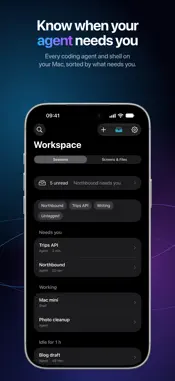
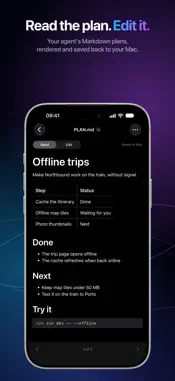
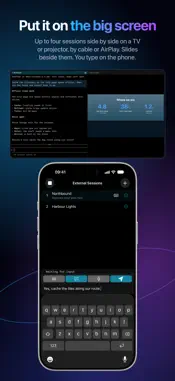
Your Mac keeps working. Your iPhone tells you when it needs you. Glasswing Remote connects directly to the coding agents already working on your own Mac, plus its terminals, files, slides and screen. The Mac app is free. KNOW WHAT NEEDS YOU The Workspace sorts your sessions into Needs you, Working and Idle. Group them by project, filter by Codex or Claude, or jump in from a widget or the app icon. ANSWER FROM A NOTIFICATION When an agent asks something, the question arrives with choices, switches and a note field. Answer in the notification and confirm with Face ID. The Inbox works without an account, and push alerts are optional. READ THE WORK, NOT THE TERMINAL Agent sessions read like a conversation, formatted from the agent's own log. Switch to Activity for the steps, or choose All output for the unchanged terminal. The agent's input box stays live at the bottom. Dictate prompts with push to talk. Sessions keep running on your Mac, and the history stays readable offline. CHECK YOUR ALLOWANCE See Codex and Claude usage together, with allowance charts and forecasts. Shared accounts across your Macs appear once. Open Usage from a session, the Workspace or a Mac screen. YOUR MAC'S FILES, OFFLINE TOO Browse folders, preview documents, and edit Markdown and text with changes saved back to the Mac. Pre-cache Folder downloads a whole folder before you lose signal. Documents remember your reading position, including offline. Hold an embedded image or file link for Quick Look. Your agents can also send links, reports and sites to your Inbox. TODOS ON APPLE WATCH Dictate a Todo on your Watch, or add one on the Mac. Your agents can read the same list and update it. A watch-face shortcut opens capture in one tap. THINK AND PRESENT WITH SLIDES Describe an idea and an agent turns it into slides and diagrams. Say what to change and look again. Use it to work out a design on your own or to give a talk. On a connected display, your phone keeps the notes, and new slides wait until you show them. On the Watch, use Next, Back and Blank, or pick a slide with the Digital Crown. SESSIONS ON A BIG SCREEN By cable or AirPlay, show up to four sessions side by side. Choose on your phone which one gets the keyboard. CONTROL YOUR MAC View a display or choose from each Mac's window list. Zoom, point, tap, scroll and type with Mac modifier keys. Share the clipboard and record sessions. YOUR DEVICES, YOUR DATA Pair by scanning a QR code on your Mac. Credentials stay on your iPhone behind Face ID or your passcode. Everything travels directly between your devices. Optional push uses Sign in with Apple, without your name or email, through a relay to Apple's push service. Choose a generic alert, a readable title, or end-to-end encrypted text and images. No subscription, in-app purchases, ads or tracking. AT HOME OR AWAY Use your local network at home and your router's WireGuard server when away. The tunnel runs inside Glasswing, reaches only your Mac and leaves your system VPN alone. Glasswing is not a VPN service. REQUIREMENTS iOS 27 or later. An Apple Silicon Mac on macOS 27 or later, awake and logged in, with the free Glasswing for Mac app. Screen Recording and Accessibility enable viewing and control. Terminals need tmux; agent sessions need the agent's own tool on the Mac. Watch features need a paired Apple Watch on watchOS 27 or later. Remote access needs your router's WireGuard server, such as a UniFi gateway. MAC APP AND SETUP https://www.brrai.nz/products/glasswing/ Privacy Policy: https://www.brrai.nz/privacy/ Terms of Service: https://www.brrai.nz/terms/ WireGuard is a registered trademark of Jason A. Donenfeld. UniFi is a trademark of Ubiquiti Inc. Codex is a trademark of OpenAI. Claude is a trademark of Anthropic. Glasswing is not affiliated with any of them.
What's New
Version 2.1.1 2026-11-03
Glasswing Remote 2.1.1 adds usage forecasts and makes sessions and documents easier to return to. • See Codex and Claude allowance together, with usage charts,... Technical Analysis
Package Overview Basic metadata
Bundle ID
net.pardeike.glasswing.client Current Version 2.1.1
Minimum iOS 27.0
Package Size App Store Size
Package Metadata 0 / 0 version records
Detailed binary, privacy manifest, framework, and Info.plist results have not been indexed for this package yet. The verified App Store and archive metadata above remains available.
Developer Information
Known Version Records
0 version records with stored package metadata
Stored metadata does not guarantee a package is currently available to download.
| Details | Version / IDs | Version date | Action |
|---|