Preview



Description
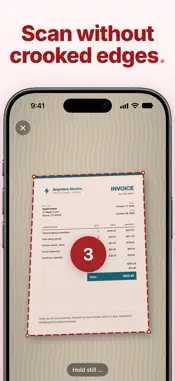
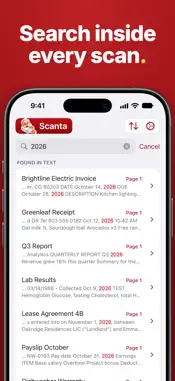
Scanta turns your iPhone into a modern document scanner. Manage your paperwork digitally, neatly organized and always at hand on your iPhone. AUTOMATIC SCANNING Point the camera at a document: Scanta detects it, captures it automatically after a short countdown and then optimizes the page. Simply scan additional pages one after another. Give it a name, add tags if you like, and your new digital document is ready. EDITING Every scanned page can be rotated, cropped and straightened afterwards. Adjust brightness, contrast, saturation and sharpness, choose one of 13 filters or add text, images and stickers. With Undo you can go back up to 50 steps. SIGNING Save one or more signatures and place them on any page with a single tap. You decide the position and size. TEXT RECOGNITION AND SEARCH Scanta automatically recognizes the text on every scanned page, right on your iPhone. Search for an invoice number, a name or an amount and find the right document. The text view of a document holds the recognized text of all pages, ready to read and to copy into any other app. ORGANIZATION Favorites and tags keep your documents neatly organized. Mark important documents with a star, filter everything else by tags or sort by date and title. SHARING AND MORE Share PDFs via AirDrop, Mail or any other app. Protect important documents with a password, compress large files, reorder pages, merge several documents into one PDF or print straight from the app. YOUR DOCUMENTS STAY WITH YOU No account, no cloud. Your scans are stored as PDFs in the Scanta folder of the Files app and never reach our servers. Scanning, text recognition and PDF creation all happen right on your iPhone. SUBSCRIPTION A weekly or yearly subscription is required to use Scanta. The yearly plan starts with a free 3-day trial. SUPPORT Do you have questions, feedback or ideas for improvement? Send an email to [email protected]. You can find our privacy policy at https://scanta.rondre.com/privacy. You can find our terms of use at https://scanta.rondre.com/termsofuse.
Technical Analysis
Package Overview Basic metadata
Bundle ID
com.rondre.scanta Current Version 1.0.0
Minimum iOS 18.0
Package Size App Store Size
Package Metadata 0 / 0 version records
Detailed binary, privacy manifest, framework, and Info.plist results have not been indexed for this package yet. The verified App Store and archive metadata above remains available.
Developer Information
Known Version Records
0 version records with stored package metadata
Stored metadata does not guarantee a package is currently available to download.
| Details | Version / IDs | Version date | Action |
|---|