
Preview



Description
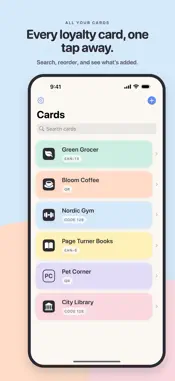
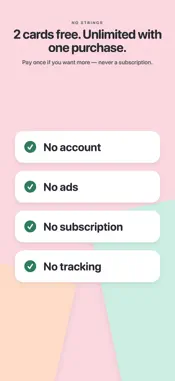
PassMint turns the loyalty cards in your pocket into passes in Apple Wallet — scanned, styled and signed on your iPhone. Free for 2 cards; unlock unlimited cards with a single purchase. No account, no ads, no subscription. SCAN ANY CARD Point the camera at the barcode or pick a photo from your library. PassMint reads the code on your device and builds the pass in seconds. MAKE IT YOURS Name the card, add a logo from a photo, the camera, a website or an image link — or keep it simple with initials — and choose from seven pastel colours. Add an expiry date and up to three extra fields, like a balance or membership tier. A live preview shows exactly what Wallet will show. INTO WALLET IN ONE TAP PassMint builds and signs the pass on your iPhone and hands it to Apple Wallet. Edit the card later and update the pass in place, or remove it when you no longer need it. ON YOUR HOME SCREEN Add the PassMint widget to see a card's barcode without opening the app — tap it for the full-size code. THERE WHEN YOU NEED IT Add the places where you use a card and Wallet suggests it on your Lock Screen when you're nearby. ON ALL YOUR DEVICES Your cards sync through your own iCloud account, so a new iPhone has them too. SUPPORTED BARCODES Shown by Wallet itself: QR, Aztec, PDF417 and Code 128. Drawn by PassMint as a full-width strip so shop scanners can read them from the screen: EAN-13, EAN-8, UPC-A, UPC-E, Code 39, Code 93, ITF-14 and Codabar. PRIVATE BY DESIGN PassMint has no account, no analytics and no servers. Your cards stay on your devices and in your own iCloud. The only network requests are fetching a logo from a website you paste, searching Apple Maps when you add a place, and iCloud sync. FREQUENT QUESTIONS Do I need an account? No. Open the app and scan. What does the unlock cost? The first 2 cards are free. PassMint Unlimited is a one-time purchase, shared with your family — never a subscription. What if a scanner can't read my screen? PassMint turns the brightness up for you; otherwise show the number printed under the barcode. You can also add a Code 128 as a second barcode. Requires iOS 17 or later.
What's New
Version 1.1.0 2026-10-05
First release. Scan loyalty cards, style them and add them to Apple Wallet. Free for 2 cards; unlimited with a single purchase. Technical Analysis
Package Overview Basic metadata
Bundle ID
com.farmakan.passcard Current Version 1.1.0
Minimum iOS 17.0
Package Size App Store Size
Package Metadata 0 / 0 version records
Detailed binary, privacy manifest, framework, and Info.plist results have not been indexed for this package yet. The verified App Store and archive metadata above remains available.
Developer Information
Known Version Records
0 version records with stored package metadata
Stored metadata does not guarantee a package is currently available to download.
| Details | Version / IDs | Version date | Action |
|---|