Preview








Description
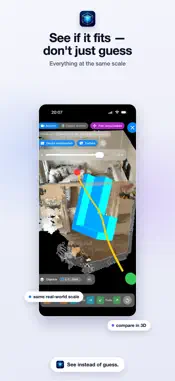
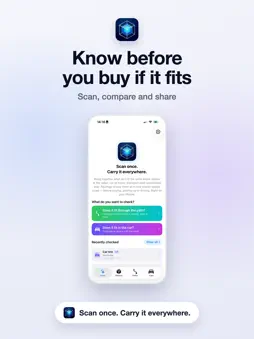
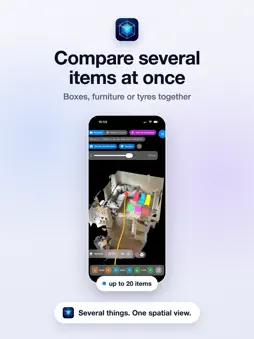
Will it fit in your car? See it before you set off. Picking up a piece of furniture, transporting a secondhand find or planning a move? Raumigo shows you in 3D — before you go — whether your purchase fits in your trunk, and whether it makes it through doors, hallways, stairwells and elevators. How it works • Scan your car, your trunk or your transport route — or simply enter the measurements by hand. • Create your object, import it, or load a multi-part object by its article number — a single piece of furniture, several boxes, or several parts at once. • Compare everything at the same scale in 3D — even when your car and the object aren't in the same place. Scan once. Always with you. Save trunks, hallways, doors and routes digitally and access them anytime — even when you're long gone from the spot. The Raumigo effect Raumigo digitally brings together things that aren't physically in the same place: the object at the seller's, your car at home, the route or apartment somewhere else. Objects, vehicles, trunks, rooms and transport routes can be shared and imported as Raumigo packages. This lets you compare spatial situations visually, even when they're in different locations. Examples: • Receive an object as a Raumigo package before you drive off to pick it up. • Compare a piece of furniture with your saved trunk before buying. • Estimate before an online order how an item would fit your car or home. • See how several objects work together — for example a table with several chairs, furniture pieces or moving boxes. • Compare several items with your trunk at once — like four tires, shopping crates or pieces of luggage. • Judge how a furniture combination looks — for example a sofa, ottoman, coffee table or several dining chairs. • Share your apartment, trunk or transport route with others so they can plan along, wherever they are. 3D size comparison View objects, vehicles, trunks, rooms and transport routes at the same scale. Rotate, move and compare objects for a better spatial understanding. Multi-object Add several objects — or a single multi-part object — at once and view them together at the same scale. Assess whole scenarios spatially instead of single items. Free 3D space check Move objects freely within the scanned space and view different placements directly in the 3D model. CarFit for your trunk Scan your trunk or create it manually and compare items visually with your vehicle. In move mode you can now place objects especially easily by tapping and dragging with your finger — or still precisely via the arrow buttons. Estimate transport routes visually Scan routes through your apartment, hallway, stairs, basement or entrance and view objects along the recorded route. Color orientation in the transport route Color information can help you orient yourself in the 3D transport route and recognize rooms, doors, walls or tight spots more easily. Depending on light, motion and scan quality, some areas may remain gray or uncolored. LiDAR-based scanning features require a LiDAR-capable iPhone or iPad. Depending on your device, manual entries and imported Raumigo packages can also be used. Important note Raumigo is a visual plausibility check. The display is based on captured scan and input data. Deviations due to scan quality, lighting, surfaces, device accuracy, incomplete 3D data or manual input are possible. You are responsible for judging spatial position, possible collisions and collision-freeness. Raumigo does not replace your own measurement on site, expert assessment or safe transport planning.
What's New
Version 1.7.2 2026-10-30
What's new in 1.7.2 • Object bundles: Multi-part objects can now be loaded by article number under "Create manual object" and compared directly with a trunk or...What's new in 1.7.2 • Object bundles: Multi-part objects can now be loaded by article number under "Create manual object" and compared directly with a trunk or a path. • Mix freely: Check several objects and bundles together — up to 20 parts at once. • Easier loading: In "Move object" mode you can now tap objects and drag them with your finger. The arrow buttons and the object manager are still there. • Article numbers at a glance: Sub-article numbers appear as floating labels in the 3D viewer. • Polish & stability: clearer controls, recently checked comparisons reopen reliably, and various bug fixes. Technical Analysis
Package Overview Basic metadata
Bundle ID
de.raumigo.app Current Version 1.7.2
Minimum iOS 17.6
Package Size App Store Size
Package Metadata 0 / 7 version records
Detailed binary, privacy manifest, framework, and Info.plist results have not been indexed for this package yet. The verified App Store and archive metadata above remains available.
Developer Information
Known Version Records
0 version records with stored package metadata • 7 known version records
Stored metadata does not guarantee a package is currently available to download.
| Details | Version / IDs | Version date | Action |
|---|---|---|---|
| Not archived | App Store ID: 886931396 | Unknown | Request Version |
| Not archived | App Store ID: 886873267 | Unknown | Request Version |
| Not archived | App Store ID: 886747852 | Unknown | Request Version |
| Not archived | App Store ID: 886728651 | Unknown | Request Version |
| Not archived | App Store ID: 886548454 | Unknown | Request Version |
| Not archived | App Store ID: 886390096 | Unknown | Request Version |
| Not archived | App Store ID: 885541388 | Unknown | Request Version |