
SSH Client - Secure ShellFish App Icon

SSH Client - Secure ShellFish

Developer Tools • Anders Borum
4+ v2026.34 Recorded price: Free App Store →
★★★★★
★★★★★
(1,563 App Store ratings)
🏆 Best: #1 Top Grossing (DNK)
IPA Analysis
Technical Specs
Bundle ID com.appliedphasor.secure-shellfish
Version 2026.34
App Store Size 132.0 MB
Minimum iOS 17.4
Devices iPhone, iPad, iPod touch
Catalog release date 2019-06-28
Latest recorded version date 2026-10-31
Features & Support
Apple Watch
Advisory 4+
Languages (2)
DA, EN
Top In App Purchases
ShellFish Monthly subscription $2.99
ShellFish Annual subscription $14.99
ShellFish Lifetime Pro Unlock $29.99
Compare country prices →

Preview

SSH Client - Secure ShellFish screenshot 1 SSH Client - Secure ShellFish screenshot 2 SSH Client - Secure ShellFish screenshot 3 SSH Client - Secure ShellFish screenshot 4 SSH Client - Secure ShellFish screenshot 5 SSH Client - Secure ShellFish screenshot 6 SSH Client - Secure ShellFish screenshot 7 SSH Client - Secure ShellFish screenshot 8 SSH Client - Secure ShellFish screenshot 9 SSH Client - Secure ShellFish screenshot 10 SSH Client - Secure ShellFish screenshot 11 SSH Client - Secure ShellFish screenshot 12 SSH Client - Secure ShellFish screenshot 13 SSH Client - Secure ShellFish screenshot 14 SSH Client - Secure ShellFish screenshot 15 SSH Client - Secure ShellFish screenshot 16

Description

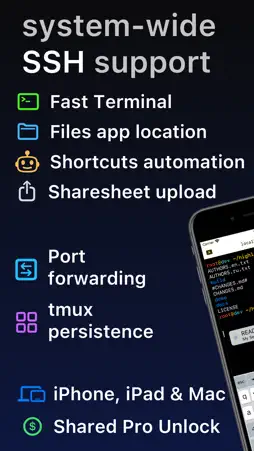
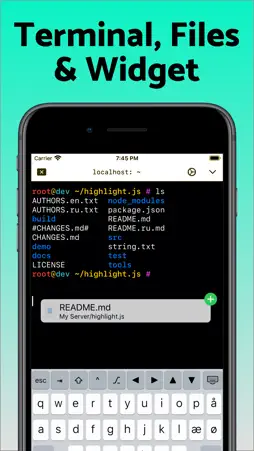
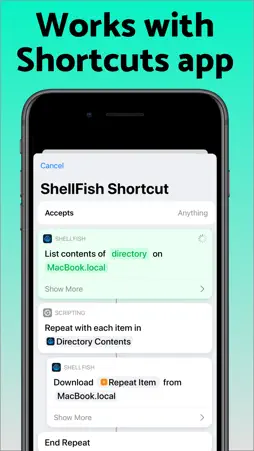
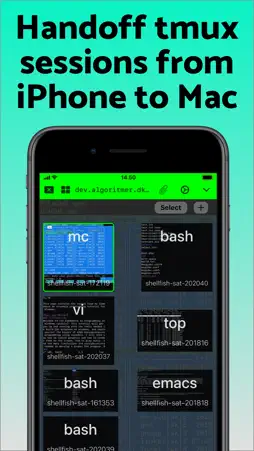
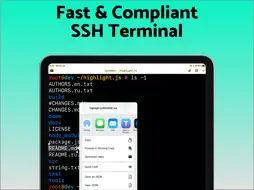
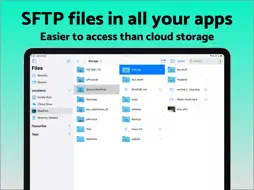
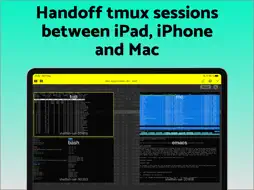
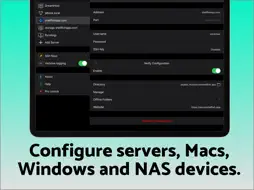
Lightning fast SSH terminal with remote file access. No other app fuses your SSH servers and iOS devices as well as Secure ShellFish. Tap Get and see for yourself. Terminal supports standard text editing gestures for selection, scrolling and copy/paste as well as custom gestures to send arrow keys and tabulator making shell entry and full screen editing with vim or emacs delightful. Bar above the keyboard makes it easy to type special keys and insert snippets. Select and drag filenames out of the terminal as actual files and drag files from other apps into the terminal to upload. Use built-in tmux support to persist terminal sessions if you lose Internet access, pick existing sessions with thumbnails and Handoff sessions between devices. Server file system is available in the Files app and recently accessed files and directories are cached to make them available when offline. Use apps like Textastic and iA Writer for a native editing experience working on your remote server files. Upload files or entire directories from the share sheet with minimal friction as the last destination directory for each kind of file is remembered or automate file transfers in the Shortcuts app. Connect to your Mac, Synology NAS and any other SSH server or create new Digital Ocean droplets right from the app. Secure ShellFish is useful as a free app and paying pro users can disable ads in the terminal, upload through the Files app and configure unlimited number of servers.

What's New

Version 2026.34 2026-10-31
This version introduces Mosh as an experimental feature. Choose Mosh under Persistence when editing a server to try it. Mosh is designed to keep the terminal co...This version introduces Mosh as an experimental feature. Choose Mosh under Persistence when editing a server to try it. Mosh is designed to keep the terminal connected as you move between Wi-Fi and cellular, through network dropouts and while your iPhone or iPad sleeps, and to show what you type right away on a slow connection. The server needs mosh-server and must accept UDP on ports 60000 to 61000, and ShellFish shows how to install mosh-server if it is missing. If Mosh gives you trouble, switch Persistence back to None or tmux, and feedback on what went wrong is very welcome. Images sent with the kitty graphics protocol now show in the terminal, from tools like kitten icat and yazi and from Claude Code mods that draw images. Run Install from Shell Integration on the server so Claude Code knows it can draw them. Images do not come through tmux or Mosh. Creating a security key such as a YubiKey, or signing in with one, now works on iOS 27. Fixes a new terminal sometimes being only a few rows tall when the keyboard bar is set to Always. Includes improvements from last version: ShellFish now supports iPhone Duo. On the wide inner display the terminal toolbar moves to a vertical strip beside the terminal with your tabs, the session picker and the server icon, and the keyboard bar spreads its keys across the wider keyboard. Partly folded like a laptop, the terminal takes the top half and is ready for typing. Suggest Command turns a plain-language description such as "make a compressed archive of src without the log files" into a shell command, using Apple's Private Cloud Compute model. Long-press the paste button on the keyboard bar or press Cmd-I. The model reads the manual pages on the server you are connected to, so it suggests options that exist there, and the command is only inserted at the prompt when you choose Insert. Requires the latest version of iOS with Apple Intelligence enabled. Shortcuts actions no longer have to finish within a few seconds. On the latest version of iOS an upload, a download or the listing of a large folder keeps running in the background for as long as it needs, showing how far it has come and offering a stop button if you want to end it early. A new Control Cloud Server action creates, starts, stops, checks and destroys cloud servers. You pick the region, the plan and the system image the same way you do in the app, and a server that takes minutes to come up reports what it is doing while you wait. The server it gives you back drops straight into the next action, even before you have saved it as a server of your own. A new Run Command action then runs a command on that server, or on any saved server, without opening the app. Output appears line by line while the command works and the full output is handed back to the rest of your shortcut, so a single shortcut can bring up a server, run a build or a backup on it that takes minutes, and shut it down again.

Technical Analysis

Package Overview Basic metadata
Bundle ID com.appliedphasor.secure-shellfish
Current Version 2026.34
Minimum iOS 17.4
Package Size App Store Size
Package Metadata 6 / 345 version records
Detailed binary, privacy manifest, framework, and Info.plist results have not been indexed for this package yet. The verified App Store and archive metadata above remains available.

Developer Information

Known Version Records

6 version records with stored package metadata • 345 known version records

Stored metadata does not guarantee a package is currently available to download.

Details Version / IDs Version date Action
SSH Client - Secure ShellFish icon
Not archived
App Store ID: 879565242 Unknown Request Version
SSH Client - Secure ShellFish icon
Not archived
App Store ID: 879498015 Unknown Request Version
SSH Client - Secure ShellFish icon
Not archived
App Store ID: 879376087 Unknown Request Version
SSH Client - Secure ShellFish icon
Not archived
App Store ID: 879246391 Unknown Request Version
SSH Client - Secure ShellFish icon
Not archived
App Store ID: 879047555 Unknown Request Version
SSH Client - Secure ShellFish icon
Not archived
App Store ID: 878669959 Unknown Request Version
SSH Client - Secure ShellFish icon
Not archived
App Store ID: 878507669 Unknown Request Version
SSH Client - Secure ShellFish icon
Not archived
App Store ID: 878311488 Unknown Request Version
SSH Client - Secure ShellFish icon
Not archived
App Store ID: 878265785 Unknown Request Version
SSH Client - Secure ShellFish icon
Not archived
App Store ID: 878108738 Unknown Request Version
SSH Client - Secure ShellFish icon
Not archived
App Store ID: 878091523 Unknown Request Version
SSH Client - Secure ShellFish icon
Not archived
App Store ID: 877937974 Unknown Request Version
SSH Client - Secure ShellFish icon
Not archived
App Store ID: 877349508 Unknown Request Version
SSH Client - Secure ShellFish icon
Not archived
App Store ID: 876972771 Unknown Request Version
SSH Client - Secure ShellFish icon
Not archived
App Store ID: 876781313 Unknown Request Version
SSH Client - Secure ShellFish icon
Not archived
App Store ID: 876057964 Unknown Request Version
SSH Client - Secure ShellFish icon
Not archived
App Store ID: 875432850 Unknown Request Version
SSH Client - Secure ShellFish icon
Not archived
App Store ID: 875306053 Unknown Request Version
SSH Client - Secure ShellFish icon
Not archived
App Store ID: 875228998 Unknown Request Version
SSH Client - Secure ShellFish icon
Not archived
App Store ID: 874929768 Unknown Request Version
SSH Client - Secure ShellFish icon
Not archived
App Store ID: 874423825 Unknown Request Version
SSH Client - Secure ShellFish icon
Not archived
App Store ID: 873998035 Unknown Request Version
SSH Client - Secure ShellFish icon
Not archived
App Store ID: 873958391 Unknown Request Version
SSH Client - Secure ShellFish icon
Not archived
App Store ID: 873791958 Unknown Request Version
SSH Client - Secure ShellFish icon
Not archived
App Store ID: 873727808 Unknown Request Version
SSH Client - Secure ShellFish icon
Not archived
App Store ID: 873551293 Unknown Request Version
SSH Client - Secure ShellFish icon
Not archived
App Store ID: 873509983 Unknown Request Version
SSH Client - Secure ShellFish icon
Not archived
App Store ID: 873365428 Unknown Request Version
SSH Client - Secure ShellFish icon
Not archived
App Store ID: 873205756 Unknown Request Version
SSH Client - Secure ShellFish icon
Not archived
App Store ID: 872937999 Unknown Request Version
SSH Client - Secure ShellFish icon
Not archived
App Store ID: 872623350 Unknown Request Version
SSH Client - Secure ShellFish icon
Not archived
App Store ID: 871768234 Unknown Request Version
SSH Client - Secure ShellFish icon
Not archived
App Store ID: 871541368 Unknown Request Version
SSH Client - Secure ShellFish icon
Not archived
App Store ID: 871412510 Unknown Request Version
SSH Client - Secure ShellFish icon
Not archived
App Store ID: 871248861 Unknown Request Version
SSH Client - Secure ShellFish icon
Not archived
App Store ID: 871074948 Unknown Request Version
SSH Client - Secure ShellFish icon
Not archived
App Store ID: 870971446 Unknown Request Version
SSH Client - Secure ShellFish icon
Not archived
App Store ID: 870531380 Unknown Request Version
SSH Client - Secure ShellFish icon
Not archived
App Store ID: 870296060 Unknown Request Version
SSH Client - Secure ShellFish icon
Not archived
App Store ID: 869916914 Unknown Request Version