
Preview



Description
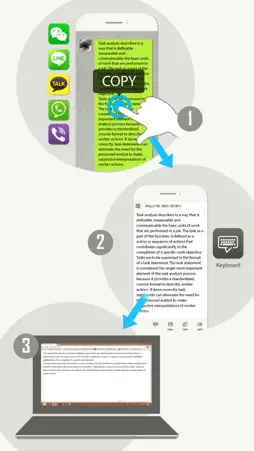
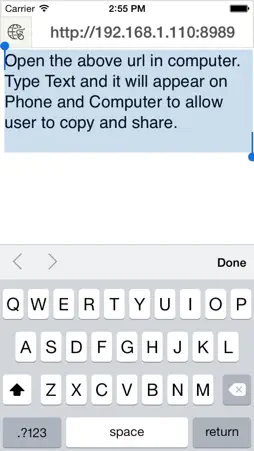
Keyboard App free version is made to share text from favorite messengers on phone to computer. This free version contains advertisements. Ever have to write a lengthy message on phone and reply on Whatsapp, WeChat, or Line? With Keyboard app, you can type message on desktop via wifi, your phone will automatically get the message allowing to copy and share to other apps. Ever receive an important message in your favorite messengers that you need to copy to desktop? Simply copy the text and paste to Keyboard App, your text will appear on your desktop. Ever receive a website URL on phone and you have to see it in computer, but the URL link is too long and hard to read? Keyboard App comes to rescue, Simply copy the URL and paste to Keyboard App, your text will appear on your desktop. With keyboard app, no more using email to transfer lengthy messages or URL to desktop computer. Here's the steps: 1. download this app 2. turn on wifi (same local network for your phone and computer) 3. open Keyboard App 4. open browser on your computer and enter the url appear on top of Keyboard App 5. Start typing and share your text 6. On iPhone or iPad make sure to press done on keyboard *Your computer and phone will need to be in same local network for this app to work. Enjoy!
What's New
Version 1.20 2014-10-08
ios8 support improve performance Technical Analysis
Package Overview Basic metadata
Bundle ID
com.ancientec.keyboardfree Current Version 1.20
Minimum iOS 6.1
Package Size App Store Size
Package Metadata 0 / 4 version records
Detailed binary, privacy manifest, framework, and Info.plist results have not been indexed for this package yet. The verified App Store and archive metadata above remains available.
Known Version Records
0 version records with stored package metadata • 4 known version records
Stored metadata does not guarantee a package is currently available to download.
| Details | Version / IDs | Version date | Action |
|---|---|---|---|
| Not archived | App Store ID: 837078951 | Unknown | Request Version |
| Not archived | App Store ID: 563784563 | Unknown | Request Version |
| Not archived | App Store ID: 545562650 | Unknown | Request Version |
| Not archived | App Store ID: 498452646 | Unknown | Request Version |