
Preview




Description
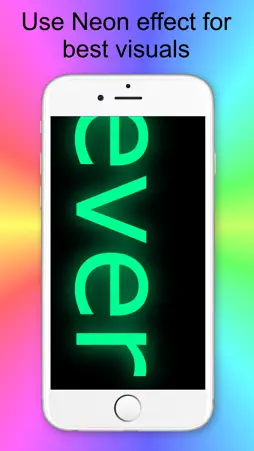
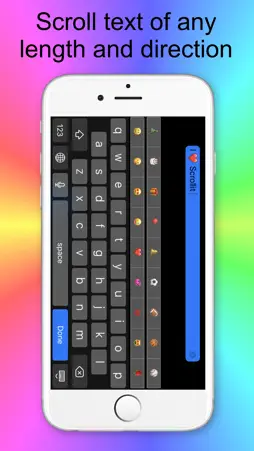
We support Ukraine ScrollIt turns your iPhone or iPod Touch into an L.E.D. message display board. ScrollIt will help you tell your friends, colleagues, or anyone something - when they can’t hear you: at a club, concert, class, meeting, lecture, or even a restaurant. Just type your message and hit Display, and ScrollIt will scroll the message large enough for everyone around to see. What adds to the fun is that ScrollIt offers easy-to-type emoticons right from the same keyboard. Make your text even more fun to watch! The phone vibrates quietly to let you know when the message has finished. (Replaced with a short beep on iPod Touch and iPad.) The endless-loop option lets ScrollIt repeat your message indefinitely. Some of the reviews by ScrollIt customers: Great app 5-STARS by Benji897765 - Version 1.2 - Jun 6, 2014 Works well, easy to use interface. If you want an app for scroll texts, this is the one you want. Happy 5-STARS by SpaceSkunk - Version 1.2 - Jun 5, 2014 This app does everything I expected and my kids love it when I'm cheering for them. ScrollIt features: • Simple yet powerful design with no confusing buttons or switches • Emoticons from the same keyboard • Unlimited message length • Mini live preview for easy color and speed selection • Short vibration at the end of scrolling • Endless-loop option • Right-to-left display for Arabic or Hebrew • Three L.E.D. shapes: neon, round, and square • Recently-used message list with one-tap access Want to use hundreds more emoticons in ScrollIt? From your iPhone Settings App, choose General -> Keyboard -> Keyboards -> Add New Keyboard, and select Emoji from the list. In ScrollIt, tap the globe button at the bottom left of the keyboard to switch to Emoji and back. Use ScrollIt for: • Flirting: display messages to people at the disco, bar, or other crowded places. • Talk to your friends at school or college: send your visual message up to 50 feet across a classroom. • Cheer at a concert or sports event: that rock star or your favorite player deserves to know how you feel! • In the office: get rid of unwanted visitors without even talking to them. • If you can't or don't want to talk: you’re sick or in a bad mood. • Just to be cool: we guarantee you’ll be popular anywhere with ScrollIt! If this is not enough for you, you can try our ScrollIt 2X. ScrollIt 2X has more features and capabilities. We’re constantly improving ScrollIt, and we value our users’ opinions. If you have a problem with the app, please contact us via Support in the Info screen. Thank you.
What's New
Version 2.2 2024-05-12
Bug fixes Version 2.1 2022-12-07
Improved visuals Large screens support Version 1.2.4 2017-09-23
This app has been updated by Apple to display the Apple Watch app icon. Bug fixes App Store User Reviews
MaitreMind 2020-09-24
Needs a few additional features to get 5 ⭐️
The app needs the following additional features for a 5 ⭐️ rating: 1. The ability to adjust the scrolling font size 2. Use the full width of the screen, not a n...
Joshua D. 2018-08-04
Could Have Updated Instead Of a New App
I really think it's kind of messed up that the developer didn't just update this app with two lines of text space available. But, they instead released this new...
Jadedrose35 2014-06-19
Cool
I just got the app it's cool but I'm confused on what all you can do I can't find the key board and I'm kind of disappointed first apt I pd for and it's not at ...
SBW PDXlive 2014-07-19
Fun app, wish it had a few more options...
Does just what it says - I wish, however, it had a few more text options like selectable fonts and the slider controls for color and speed were a bit longer for...
Ricorso 2014-06-24
Excellent!!
This is such a great app! Simple to use...very customizable (font color, speed, font type)... and displays a very large message on your device screen. I left m...
MaxFla72 2015-07-25
Cute & Easy
Update - added to my phone and once more a forced review. I guess if the keep wasting my time I have two more stars to pull. Does what is says it can do. Limite...
Seriously nickname 2015-08-15
More functions than other scrolling apps
I've tried a few other scrolling apps and deleted them after finding this one. I like the variety of fonts, colors, and speeds. Wish there were more "shapes" of...
Shaunajoelle 2015-07-18
Haven't actually used it yet..
I'm only writing this because I have to to be able to use the app. I gave it a 3 because I figured that was pretty "neutral" I have no idea how good or bad this...
Serx93 2015-08-15
This app does exactly what it's supposed to
This app works great! Very basic controls, simple interface and to date have had no problems with crashing or anything bad. If you need a scrolling app to send ...
Foo102 2014-09-24
Ok I guess
Pretty much just opened the app looked at it and it wanted a review or I can't use some features. Looks cool from what I saw. Can't tell if you can enter your o...
Technical Analysis
Package Overview Basic metadata
Bundle ID
com.amaxim.scrolled Current Version 2.2
Minimum iOS 12.0
Package Size App Store Size
Package Metadata 0 / 5 version records
Detailed binary, privacy manifest, framework, and Info.plist results have not been indexed for this package yet. The verified App Store and archive metadata above remains available.
Related Apps


More by AMAXIM APPS, INC


Developer Information
Known Version Records
0 version records with stored package metadata • 5 known version records
Stored metadata does not guarantee a package is currently available to download.
| Details | Version / IDs | Version date | Action |
|---|---|---|---|
| Not archived | v2.2 App Store ID: 865654847Build: 2.2 | 2024-05-12 22:16:52 | Paid / Arcade |
| Not archived | v2.1 App Store ID: 853774193Build: 2.1 | 2022-12-08 00:06:01 | Paid / Arcade |
| Not archived | App Store ID: 841444579 | Unknown | Paid / Arcade |
| Not archived | v1.1 App Store ID: 589432774Build: 1.1 | 2014-05-27 04:34:32 | Paid / Arcade |
| Not archived | v1.0 App Store ID: 143832658Build: 1.0 | 2013-11-28 19:19:10 | Paid / Arcade |