Preview




Description
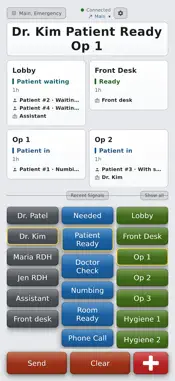
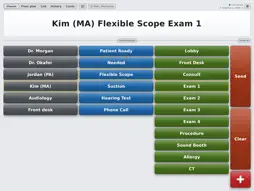
AltoSignal is silent staff paging, room to room. No overhead speakers. Tap who you need, what you need and where, and the signal appears at once on every screen set to hear that channel. One tap acknowledges it, and a live floor plan shows who is in which room. It runs on the iPads and iPhones you already own: a tablet on the wall in each room, one at the front desk, and phones for anyone moving between them. Made for any office that moves people between rooms: dental offices, eye care and optometry practices, ENT and other medical practices, veterinary clinics, day spas, med spas and salons. YOUR OFFICE AS A FLOOR PLAN Draw your rooms and hallways once, or let Auto layout draw them from your room buttons. Then everyone sees who is where. - Take a number: each patient or guest gets the next number and waits in your waiting area. No names needed; add a short label of up to eight characters if you want one. - Drag a person into a room. Patient states update on their own as people move. - Timers on states such as Numbing, Dilating or Allergy test. The clock counts down and turns red when it runs out. - A history for every patient and every room, so you can see where someone has been today. - Locate finds any person in one tap. - New day clears the patients and their history on every screen, for a fresh start. THE PLAN FOLLOWS THE PAGES Answer a page with On My Way and the floor plan moves you into that room on every screen, even when the page or the answer is typed. Button Setup marks the replies that move people, and replies in your own words are understood. Someone nothing has placed for an hour shows as last seen, so the plan never guesses. WHO'S IN TODAY Mark staff in, at lunch or away, with your own reasons for being away, and announce arrivals on every screen if you like. It is a board, not a time clock. FIVE WAYS TO SEE THE DAY Classic buttons, the Floor plan, a List of every room and who is in it, the History of recent signals, and Cards with each room's status. Each screen picks its own, and on a wide screen the history can sit beside the plan. PAGING - One-tap paging with who, what and where buttons you customize, shared across the account - One tap acknowledges, and every screen sees who answered - Quick replies in your own words, such as On My Way or Running 5 over - Room states every screen can see, such as Ready, Patient in or Needs cleaning. Setting a state pages nobody. - Channels, so each room or team hears only what matters to them, with an alert tone per channel - Emergency signals that take over every screen with a looping alarm and an Acknowledge button - Free-text messages when the buttons do not cover it READY-MADE SETUPS Start from buttons written for your kind of business: dental office, eye care practice, ENT practice, veterinary clinic, day spa, med spa, salon and studio, resort or hotel spa, massage practice, or float and sauna studio. Or load a complete sample office in one press, with buttons, rooms, timers and a floor plan, to try it before you build your own. THEMES AND SOUND Four themes and two sound packs, chosen per screen, so a dim treatment room and a bright front desk can each suit where they sit. A signal plays a tone on the screen it lands on, never overhead. A screen that should stay quiet can turn its alert sound off; the emergency alarm is the one sound it cannot. HOW THE CONNECTION WORKS AltoSignal is designed for devices that stay on and awake, such as a front-desk tablet or a wall-mounted screen. The app holds a live connection while it is open. It does not use background push notifications, so it has to be running to alert you. ACCOUNTS AltoSignal is a subscription service. Your business sets up an account at altosignal.com and adds devices to it. There is no registration and no purchase inside the app.
What's New
Version 4.9.0 2026-11-18
Activity now measures rooming: patients per day, how long they wait for a room and in the room, visit length, and the busiest hours and rooms. Export from Activ...Activity now measures rooming: patients per day, how long they wait for a room and in the room, visit length, and the busiest hours and rooms. Export from Activity: visits as CSV or a report as PDF. An unanswered emergency that arrived while the app was closed or reconnecting is now shown when the app starts or reconnects. New for practices with more than one office: Locations, each with its own rooms, patients and staff. Add them under Account. Your buttons and settings are kept. Technical Analysis
Package Overview Basic metadata
Bundle ID
com.altosignal Current Version 4.9.0
Minimum iOS 15.0
Package Size App Store Size
Package Metadata 0 / 0 version records
Detailed binary, privacy manifest, framework, and Info.plist results have not been indexed for this package yet. The verified App Store and archive metadata above remains available.
Developer Information
Known Version Records
0 version records with stored package metadata
Stored metadata does not guarantee a package is currently available to download.
| Details | Version / IDs | Version date | Action |
|---|