Preview



Description
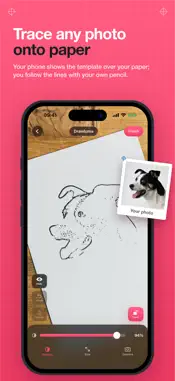
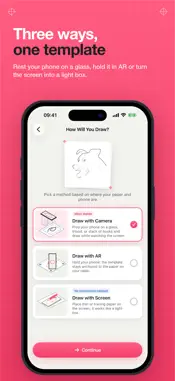
Trace any photo onto real paper. Drawluma turns your picture into clean line art and shows it over your paper through your phone; you follow the lines with your own pencil. Great for learning to draw, portraits of family and pets, favourite characters, flowers, lettering and stencils. THREE WAYS TO DRAW • Camera: Rest your phone on a glass above your paper and draw while watching the screen. The template sits on top of the live camera view. The most stable setup. • AR: Hold your phone. The template is anchored to the paper on your table and stays in place as you move. • Light box: No camera at all. Lay your phone flat, put thin or tracing paper on the screen and trace the glowing lines. Needs no permissions. PHOTO TO LINE ART Pick any photo from your library. On-device edge detection turns it into a clean, traceable sketch. Set the line amount with a single slider, or open Fine-tune for detail, darkness, line weight and smoothing. See the result instantly. Presets for portraits, general subjects and graphics. WHILE YOU DRAW • Drag the template with one finger, pinch and rotate with two • Lock it once aligned: your hand can rest on the screen without moving it • Set the opacity so you see both your paper and your pencil • Camera mode: torch, 0.5× ultra-wide lens, focus and exposure lock • True size: draw at an exact width in centimetres • Change the line colour: red reads far better over an existing pencil sketch • Left-handed layout keeps the controls away from your drawing hand YOUR WORK IS SAVED Every drawing is kept in your gallery. A portrait can take days; pick up exactly where you left off. FREE AND UNLIMITED Drawluma is free and the number of drawings is unlimited. Your first drawing is ad-free; after that, a full-screen ad appears before every second drawing, just before the canvas opens. Never while you are drawing. Drawluma PRO removes the ads. It locks nothing else: all three drawing methods, unlimited drawings and every setting are free. • Drawluma PRO: $0.99 per month (charged in your local currency) • Auto-renews unless cancelled at least 24 hours before the end of the period • Manage or cancel in Settings → Apple Account → Subscriptions • Payment is charged to your Apple Account at confirmation Terms of Use (Apple standard EULA): https://www.apple.com/legal/internet-services/itunes/dev/stdeula/ Privacy Policy: https://alperensaglam.github.io/drawluma-site/privacy.html PRIVACY Your photos and the line art you create stay on your device; they are never uploaded. No account needed. The app itself collects nothing. Google AdMob, which serves the ads, processes a device identifier, advertising data and coarse location derived from your IP in order to show them. Before the advertising identifier (IDFA) is accessed, the app asks for your permission through App Tracking Transparency: if you allow it, ads are personalised; if you don't, you see non-personalised ads and nothing else changes. You can change your choice anytime in Settings → Privacy & Security → Tracking. Going PRO disables the ad layer entirely. NOTES • AR mode requires an ARKit-capable device. On other devices, camera mode gives the same result. • In light box mode, don't press hard on the display; use thin or tracing paper.
What's New
Version 1.5.0 2026-10-31
PRO is one tap away, the controls are simpler and everything feels smoother. • New PRO button at the top left: remove ads with one tap. • Ads now appear just b... Technical Analysis
Package Overview Basic metadata
Bundle ID
com.alperensaglam.drawlumaapp Current Version 1.5.0
Minimum iOS 17.0
Package Size App Store Size
Package Metadata 0 / 0 version records
Detailed binary, privacy manifest, framework, and Info.plist results have not been indexed for this package yet. The verified App Store and archive metadata above remains available.
Developer Information
Known Version Records
0 version records with stored package metadata
Stored metadata does not guarantee a package is currently available to download.
| Details | Version / IDs | Version date | Action |
|---|