
Preview




Description
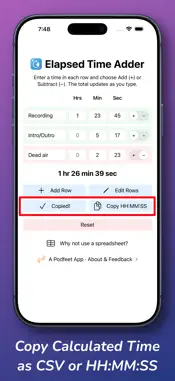
Elapsed Time Adder runs on iOS, iPadOS, and macOS to help you add and subtract elapsed time. You might ask why not just use a spreadsheet for this? Sadly, while spreadsheets are great at doing calculations, they don't know how to work with elapsed time; they think in time-of-day. Try adding 23 hours plus 7 hours in a spreadsheet — you won't get 30, you'll get 6 (AM)! If you need to add split times for running or walking, or keep track of time segments in audio or video recording, or time spent on projects, all of these efforts work great with ElapsedTimeAdder. Enter the times in each row, along with an optional title for each row, and watch the total update automatically in a plain-language way (e.g., "1 hr 23 min 45 sec"). You can type 384.6 seconds, or 74 minutes, and Elapsed Time Adder will easily work with it. If you want to subtract a row, simply hit the +/- toggle, and you'll see the row turn from green to pink. Use the "Add Another Row" button to have more rows in your calculations. If you're on a Mac or an iPad with a keyboard, hitting Tab at the end of the last second cell will add a new row too. Want to start over? Use the Reset button, and you'll be back to the default number of rows, and they'll all be empty. When you're finished, you can copy your data to a CSV suitable for opening in a spreadsheet application, or you can copy in HH:MM:SS format along with the titles for each row. Note that nothing is stored in a back-end system or in the cloud; all of your data is kept on-device only.
Technical Analysis
Package Overview Basic metadata
Bundle ID
com.podfeet.ElapsedTimeAdder Current Version 1.0
Minimum iOS 18.6
Package Size App Store Size
Package Metadata 0 / 0 version records
Detailed binary, privacy manifest, framework, and Info.plist results have not been indexed for this package yet. The verified App Store and archive metadata above remains available.
Developer Information
Known Version Records
0 version records with stored package metadata
Stored metadata does not guarantee a package is currently available to download.
| Details | Version / IDs | Version date | Action |
|---|