
Preview






Description
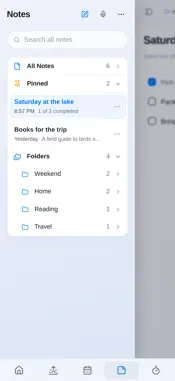
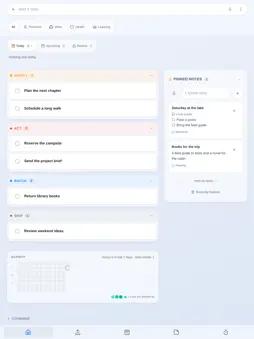
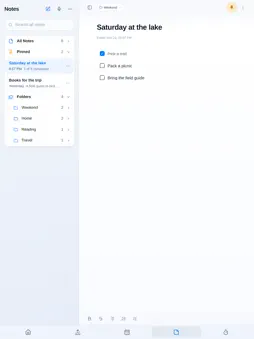
Daybeacon turns a flat to-do list into four clear choices: Act, Invest, Batch and Skip. Add a task by typing or speaking, attach dates and reminders, and see what deserves your attention without digging through menus. Five tabs keep everything in reach: - Matrix: your tasks sorted into Act, Invest, Batch and Skip. - Now: what's due today, what's coming up, and anything overdue, with a short Morning Brief. - Calendar: plan by date. - Notes: organize notes in folders, pin your favorites, and keep a capture note for quick ideas. On iPad, browse and edit side by side. - Timer: a focus timer for protected work sessions. Use recurring tasks for routines and bills, break big tasks into steps, and pin what matters most. Siri and the Shortcuts app can add tasks and notes, tell you what's due, and complete or reschedule a task hands-free. Edits work offline and sync securely when you reconnect. Optional AI, only with your permission: - Turn a typed or spoken thought into a task with a title, date, quadrant and category (OpenAI). - Break a task into steps, tidy a dictated note, or get a Morning Brief (OpenAI). - Talk through your day on the Now tab, or work through one task out loud with Focus With Me (Google Gemini; Daybeacon Pro). Ordinary task and note use sends nothing to AI providers. You can turn AI off at any time in Settings. The core app is free and includes a monthly AI allowance. Daybeacon Pro adds unlimited AI, a generated day plan on Now, Gemini voice planning, Focus With Me and the focus timer. Daybeacon is a general productivity tool. It is not a medical record system. Terms of Use (EULA): https://www.apple.com/legal/internet-services/itunes/dev/stdeula/
What's New
Version 2.1.0 2026-11-25
Notes now has folders you can rename or link to your Matrix categories. Open the sidebar to find pinned notes or browse by last edit. On iPad, keep the folder l...Notes now has folders you can rename or link to your Matrix categories. Open the sidebar to find pinned notes or browse by last edit. On iPad, keep the folder list beside the note you’re editing. The Matrix has more compact task rows, and collapsed quadrants show how many tasks are coming later. In Notes, tap below the last line to continue writing. Deleting formatted text now clears leftover formatting, and the placeholder disappears as you type. Technical Analysis
Package Overview Basic metadata
Bundle ID
com.milestonepediatrics.taskmatrix Current Version 2.1.0
Minimum iOS 15.0
Package Size App Store Size
Package Metadata 0 / 0 version records
Detailed binary, privacy manifest, framework, and Info.plist results have not been indexed for this package yet. The verified App Store and archive metadata above remains available.
Known Version Records
0 version records with stored package metadata
Stored metadata does not guarantee a package is currently available to download.
| Details | Version / IDs | Version date | Action |
|---|