
Preview








Description
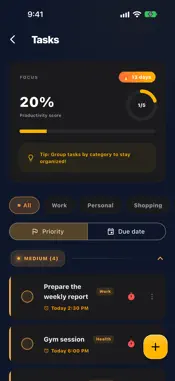
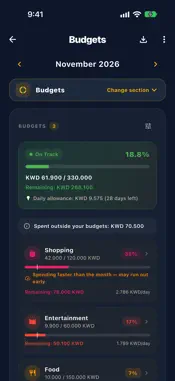
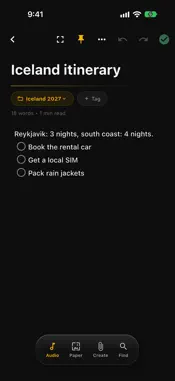
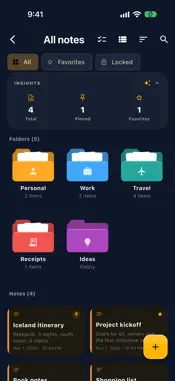
Organize your notes, tasks, expenses, and investments in one private, offline-first workspace. Mangoz Flow brings productivity and personal finance together, helping you capture ideas, plan your day, understand your spending, and follow your financial progress without switching between multiple apps. SMART NOTES Create rich-text notes with images, attachments, and voice memos. Organize your content into folders, pin important items, search your notes, review previous versions, and restore deleted content from Trash. HANDWRITING & DRAWING Write naturally on a flexible digital canvas, sketch ideas, annotate content, add shapes, and move or resize selected elements. On-device handwriting recognition can extract handwritten content without sending it to external servers. TASKS & REMINDERS Create tasks and subtasks, organize them by category, set priorities, due dates, reminders, and recurring schedules, and monitor your daily productivity. EXPENSES & BUDGETS Record income and expenses, create category budgets, separate fixed and variable spending, and explore monthly summaries and clear financial charts. INSTALLMENTS & SUBSCRIPTIONS Track existing or new installments, opening balances, partial payments, remaining amounts, payment history, recurring subscriptions, and upcoming payment reminders. MULTI-CURRENCY FINANCE Manage records in different currencies and view converted financial summaries using your selected primary currency. INVESTMENT TRACKING Track gold, silver, currencies, and cryptocurrencies. Follow invested cost, current value, portfolio allocation, performance, and custom price alerts. PDF & EXCEL REPORTS Export detailed financial reports containing transactions, categories, installments, subscriptions, and payment history to PDF or Excel. GOOGLE SHEETS EXPORT Optionally export your financial records to your own Google Sheets in a clear, one-way workflow controlled by you. SMART DOCUMENT SCANNER Scan documents and extract text using on-device OCR. Organize scanned content while keeping the processing on your device. BUSINESS CARD SCANNER Scan physical business cards, review detected contact information, prevent duplicate entries, and share contacts using vCard or QR codes. ENCRYPTED BACKUP Create password-protected backups that can be transferred between devices. Optional Google Drive backup stores an encrypted copy inside your personal Google account. MAKE IT YOURS Customize Mangoz Flow with Light, Pink, Midnight Navy, Forest, and OLED themes, accent colors, fonts, wallpapers, and multiple Home Screen app icons. QUICKER EVERYDAY WORKFLOW Use the redesigned Home Screen and Quick Actions menu to create notes, handwriting pages, scans, tasks, expenses, investments, and business cards faster. PRIVACY FIRST Your notes, tasks, financial records, scans, and investments are stored locally on your device by default. OCR runs on-device, and Mangoz Flow does not use advertising or behavioral tracking SDKs. Protect access using Face ID, device biometrics, or a PIN. Some advanced features require a one-time Lifetime Premium in-app purchase. No recurring subscription is required. Download Mangoz Flow and bring your ideas, plans, expenses, and investments together in one organized workspace. Privacy Policy: https://mangoz-flow-site.web.app/privacy_page.html Terms of Use: https://mangoz-flow-site.web.app/terms_page.html
What's New
Version 2.9.1 2026-11-05
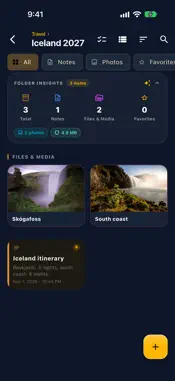
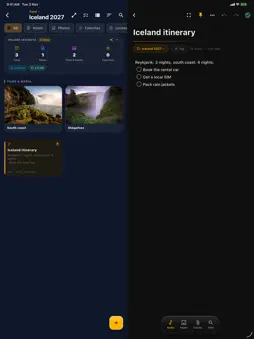
• Support for iPhone Duo: each screen's buttons sit in the side strip. • Folders look like folders: large icons in your colour, with papers inside when they hol...• Support for iPhone Duo: each screen's buttons sit in the side strip. • Folders look like folders: large icons in your colour, with papers inside when they hold something. Hide a folder or file, and lock any of them with a pattern of its own. • Files in folders: Word, PDF and other documents open inside the app; paste a copied photo, video or text straight in; photos and videos keep their original quality, with readable names and video thumbnails. • Price alerts are checked even while the app is closed. • Reminders: tapping a reminder opens its item. • Your net worth on Home, and the focus timer rings even when the app is in the background. • Leaving a note or drawing you changed asks whether to save, and Discard really discards. Long lists fold behind "Show all". • Fixes and improvements. Technical Analysis
Package Overview Basic metadata
Bundle ID
com.mangoz.flow Current Version 2.9.1
Minimum iOS 15.5
Package Size App Store Size
Package Metadata 0 / 11 version records
Detailed binary, privacy manifest, framework, and Info.plist results have not been indexed for this package yet. The verified App Store and archive metadata above remains available.
Known Version Records
0 version records with stored package metadata • 11 known version records
Stored metadata does not guarantee a package is currently available to download.
| Details | Version / IDs | Version date | Action |
|---|---|---|---|
| Not archived | App Store ID: 887707490 | Unknown | Request Version |
| Not archived | App Store ID: 887595341 | Unknown | Request Version |
| Not archived | App Store ID: 886588593 | Unknown | Request Version |
| Not archived | App Store ID: 886492954 | Unknown | Request Version |
| Not archived | App Store ID: 884323440 | Unknown | Request Version |
| Not archived | App Store ID: 884254356 | Unknown | Request Version |
| Not archived | App Store ID: 884117043 | Unknown | Request Version |
| Not archived | App Store ID: 883920271 | Unknown | Request Version |
| Not archived | App Store ID: 883296290 | Unknown | Request Version |
| Not archived | App Store ID: 883253631 | Unknown | Request Version |
| Not archived | App Store ID: 882995954 | Unknown | Request Version |