
Preview





Description
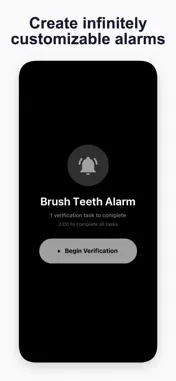
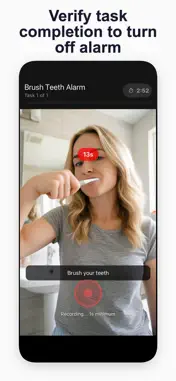
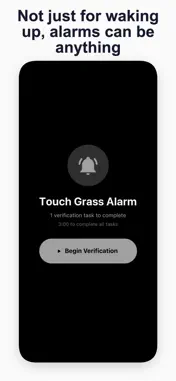
Create infinitely customizable task alarms with Last Alarm, a first of it's kind task alarm and verification app. Last Alarm is the alarm clock that doesn't let you cheat. Instead of a dismiss button, you complete a task, one you chose yourself. Complete it on camera, and AI verifies you actually did it. No task completion, no silence. It's that simple. How It Works You pick your own wake-up task ahead of time like standing up, touching your toes, or walking to the kitchen. When your alarm goes off, that's what you have to do. Record yourself completing it, and our AI confirms you did it for real. Only then does the alarm stop. No cheating, no snoozing. You prove you're awake, or the alarm keeps going. AI-Verified Wake-Up Tasks - Record a short video completing your assigned task - AI analyzes the footage and confirms completion - Adjust strictness from lenient to strict - you set the difficulty Build Your Own Routine - Create custom tasks in the Task Lab: "Do 10 pushups," "Make your bed," "Make coffee" - Stack multiple tasks per alarm for a full wake-up sequence - Use preset templates or design your own - Test tasks before adding them to an alarm Deadline System - A countdown starts when verification begins - If time runs out, the alarm resumes - No loopholes. No workarounds. Lock Screen & Live Activities - Verification prompt appears directly on your Lock Screen - Even if you close the app, it stays with you Typing Fallback - If AI is unavailable, a typing challenge kicks in automatically - Type out a sentence to prove you're alert enough to function - Customize sentences to reinforce what's important to you Smart Alarm Management - Set one-time or recurring alarms on specific days - Add labels and custom sounds - Time-based locking prevents you from editing alarms too close to trigger time Why Last Alarm Works Some alarm apps add friction - math problems, puzzles, shaking your phone. But these often are unpleasant, ineffective, or simply to easy to cheat. Last Alarm is different because it requires real physical action. Wake up your way, by peacefully going about your morning routine and verifying actions to turn off one or more alarms. This is the last alarm app you'll need. Hence the name. --- Purchase of a Last Alarm Pro subscription required to access the full set of features. Plans include weekly, monthly, and yearly options, with up to a 7-day free trial available on the yearly plan. Payment is charged to your Apple ID account. Subscriptions auto-renew unless canceled at least 24 hours before the end of the current period. The free plan includes access to unlimited typing alarms, 1 video task alarm per day, as well as the ability to join task lists and clubs. Unlimited video alarms, fully customizable alarm audio, referral rewards, and the ability to create new task lists and clubs require Last Alarm Pro to unlock. Privacy Policy: https://lastalarmclock.com/privacy Terms of Use: https://lastalarmclock.com/terms
What's New
Version 2.0.5 2026-10-05
Clubs: Wake up with friends. Start a club with a daily goal, invite people by link or QR code, and climb the leaderboard. Your own alarms and tasks count toward...Clubs: Wake up with friends. Start a club with a daily goal, invite people by link or QR code, and climb the leaderboard. Your own alarms and tasks count toward it, and streaks show who actually showed up. Shared task lists: Share a list and everyone sees the same tasks, each one verified on video. Daily and weekly lists reset on their own, with a heatmap and a full activity history. Refer a friend: Share your code and your friend gets $5 off their first year. You earn $5 for every friend who joins and stays. No limit. Your own sounds: A downloadable sound library, your own recordings, and songs from your Music Library playing on the lock screen. A better camera: Rear lens picker with 0.5x, 1x and telephoto, pinch to zoom, and recordings up to 90 seconds. Last Alarm Free Plan: Free version includes unlimited typing alarms, 1 video verification task per day, and the ability to join task lists and clubs. Also a faster sign-up, invites that open straight from a QR code, and a long list of alarm, camera and sign-in fixes. Technical Analysis
Package Overview Basic metadata
Bundle ID
com.lastalarm.app Current Version 2.0.5
Minimum iOS 15.1
Package Size App Store Size
Package Metadata 0 / 10 version records
Detailed binary, privacy manifest, framework, and Info.plist results have not been indexed for this package yet. The verified App Store and archive metadata above remains available.
Developer Information
Known Version Records
0 version records with stored package metadata • 10 known version records
Stored metadata does not guarantee a package is currently available to download.
| Details | Version / IDs | Version date | Action |
|---|---|---|---|
| Not archived | App Store ID: 886840672 | Unknown | Request Version |
| Not archived | App Store ID: 886438665 | Unknown | Request Version |
| Not archived | App Store ID: 886132730 | Unknown | Request Version |
| Not archived | App Store ID: 885843135 | Unknown | Request Version |
| Not archived | App Store ID: 885362993 | Unknown | Request Version |
| Not archived | App Store ID: 884912545 | Unknown | Request Version |
| Not archived | App Store ID: 884483585 | Unknown | Request Version |
| Not archived | App Store ID: 884077567 | Unknown | Request Version |
| Not archived | App Store ID: 883860634 | Unknown | Request Version |
| Not archived | App Store ID: 881391339 | Unknown | Request Version |