Preview


Description
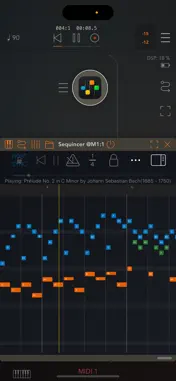
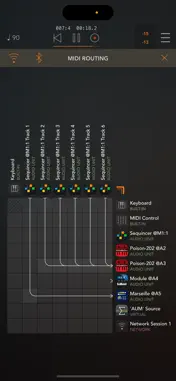
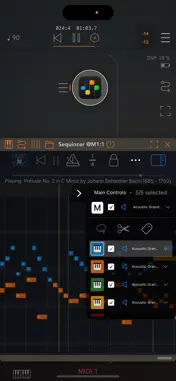
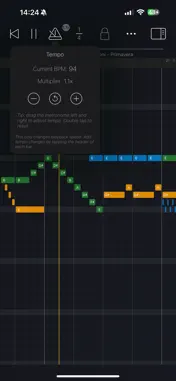
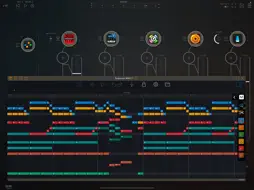
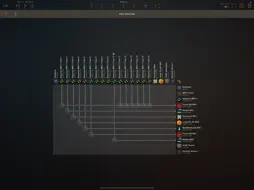
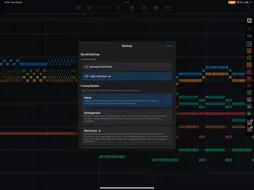
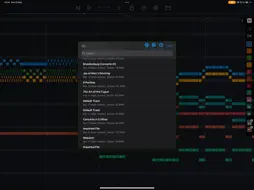
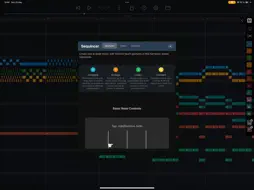
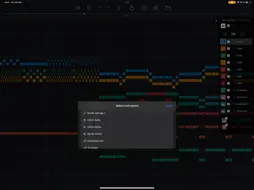
Sequincer is a multi-track, grid-based MIDI sequencer for iPhone and iPad which makes it easy to compose music on the go. Just tap the grid to add notes and hit the play button to hear your creation. Notes added by a tap will have the duration of whichever beat division is selected. You can select a wide range of beat divisions by tapping the "1/4" button, or by pinching horizontally to double and halve the current value. You can change a note's duration by tapping on it to shorten it, or by holding and panning to the right to increase it. There are four tiers: a free preview tier, then Loops, Producer, and Composer. The free tier lets you preview the app. The second tier, Loops, gives you 4 tracks and 64 beats to compose (16 standard bars). The third tier, Producer, brings this to 16 tracks and 1000 beats, enough for a full-length song. The fourth tier, Composer, allows you to use up to 64 tracks and an even greater number of beats, enough for a complete symphony. The 7-note input system, inspired by sheet music, uses the diatonic scale, and you can add accidentals for any new note by dragging up or down as soon as you create it. The 12-tone chromatic mode lets you input notes like on most piano rolls. Velocity, tempo changes and other properties can be edited for each bar in "Structure" mode, by tapping the bar's header or using the edit button. You can write up to 64 simultaneous tracks each with its own instrument, all overlaid on the same piano roll so you can see your full composition at a glance. Each track can be selected, muted, or soloed. • Works as standalone or as a plugin Sequincer is also an AUv3 MIDI processor, so you can use it inside host apps like AUM. Each track can send MIDI to a different synth, making it ideal for layering sounds or building complex arrangements. • Flexible timing and rhythm Create as many bars as you need, and set a custom beat count for each one. Pinch horizontally to zoom in or out on the beat divisions: add quarters, eighths, sixteenths, or even dotted rhythms for compound time. Pinch vertically to zoom in and out of the piano roll. Add tempo change events to speed up or slow down specific parts. • MIDI and MusicXML compatibility Import MIDI files or MusicXML (sheet music). Sequincer currently supports many standard features like tempo changes, dynamics, and jumps. Route tracks to external MIDI devices • Write with real notes Each bar can be set to a musical key, so you’re always writing in scale. A C sharp and a D flat might sound the same in equal temperament, but they’re not the same note. If you’re writing a B flat minor chord for example, you need a D flat for the minor third–a C sharp would be an augmented second. This harmonic awareness makes it possible to experiment with other tuning systems such as Pythagorean, Meantone, and Microtonality. To add accidentals, drag the note up or down as you place it. • Compatible with Apple Pencil on iPad Hover to hear notes before placing them. Double-tap to quickly switch instruments. Use a squeeze gesture (on Pencil Pro) to open the track palette. It’s a fast and intuitive way to compose, if you’ve got a compatible device. • Available on all your devices Your creations are automatically synced with iCloud so you can start on your iPhone and finish it on your iPad. Happy composing! This app is subject to Apple’s standard EULA: https://www.apple.com/legal/internet-services/itunes/dev/stdeula/
What's New
Version 2.1.0 2026-10-27
New in 2.1: • Track settings: hold a track to set its volume, mute or solo it, rename, duplicate or reorder it, or move its notes to another track. • Instrument... Technical Analysis
Package Overview Basic metadata
Bundle ID
com.alexisdoualle.Sequincer Current Version 2.1.0
Minimum iOS 18.0
Package Size App Store Size
Package Metadata 3 / 30 version records
4.6 / 5.0 (11 ratings)
Detailed binary, privacy manifest, framework, and Info.plist results have not been indexed for this package yet. The verified App Store and archive metadata above remains available.
Known Version Records
3 version records with stored package metadata • 30 known version records
Stored metadata does not guarantee a package is currently available to download.
| Details | Version / IDs | Version date | Action |
|---|---|---|---|
 31.46 MB | v1.9.0 App Store ID: 885929523Build: 1.9.0 | 2026-05-24 00:53:26 | Get Version |
| 27.44 MB | v1.8.1 App Store ID: 885373657Build: 2026051002 | 2026-05-10 11:11:00 | Get Version |
| Not archived | v1.8.0 App Store ID: 885345384Build: 1.8.0 | 2026-05-07 06:40:05 | Request Version |
| Not archived | v1.7.0 App Store ID: 883174850Build: 1.7.0 | 2026-03-10 19:31:58 | Request Version |
| Not archived | v1.6.2 App Store ID: 879906122Build: 1.6.2 | 2026-02-20 01:07:50 | Request Version |
 26.63 MB | v1.6.1 App Store ID: 879841033Build: 2025111802 | 2025-11-18 23:12:30 | Get Version |
| Not archived | v1.6.0 App Store ID: 879364586Build: 1.6.0 | 2025-11-04 19:30:57 | Request Version |
| Not archived | v1.5.2 App Store ID: 879156522Build: 1.5.2 | 2025-10-23 22:43:39 | Request Version |
| Not archived | v1.5.1 App Store ID: 879108202Build: 1.5.1 | 2025-10-21 11:08:42 | Request Version |
| Not archived | v1.5.0 App Store ID: 878669256Build: 1.5.0 | 2025-10-20 17:32:46 | Request Version |
| Not archived | v1.4.2 App Store ID: 877803808Build: 1.4.2 | 2025-10-02 08:31:46 | Request Version |
| Not archived | v1.4.1 App Store ID: 877719678Build: 1.4.1 | 2025-09-02 15:59:24 | Request Version |
| Not archived | v1.4.0 App Store ID: 877165960Build: 1.4.0 | 2025-08-26 00:13:44 | Request Version |
| Not archived | v1.3.2 App Store ID: 876846592Build: 1.3.2 | 2025-08-09 01:17:54 | Request Version |
| Not archived | v1.3.1 App Store ID: 876082451Build: 1.3.1 | 2025-07-21 16:06:33 | Request Version |
| Not archived | v1.3.0 App Store ID: 875965407Build: 1.3.0 | 2025-07-01 11:08:07 | Request Version |
| Not archived | v1.2.3 App Store ID: 875407775Build: 1.2.3 | 2025-06-08 14:19:42 | Request Version |
| Not archived | v1.2.2 App Store ID: 875330494Build: 1.2.2 | 2025-06-05 09:21:39 | Request Version |
| Not archived | v1.2.1 App Store ID: 875173578Build: 1.2.1 | 2025-06-03 15:36:51 | Request Version |
| Not archived | v1.2.0 App Store ID: 874246127Build: 1.2.0 | 2025-05-26 09:40:19 | Request Version |
| Not archived | v1.1.3 App Store ID: 873974244Build: 1.1.3 | 2025-04-14 09:59:29 | Request Version |
| Not archived | v1.1.2 App Store ID: 873912799Build: 1.1.2 | 2025-04-11 14:08:59 | Request Version |
| Not archived | v1.1.1 App Store ID: 873671925Build: 1.1.1 | 2025-04-02 11:21:19 | Request Version |
| Not archived | v1.1.0 App Store ID: 873390632Build: 1.1.0 | 2025-03-28 17:15:06 | Request Version |
| Not archived | v1.0.5 App Store ID: 873300636Build: 1.0.5 | 2025-03-18 03:23:43 | Request Version |
| Not archived | App Store ID: 873283444 | Unknown | Request Version |
| Not archived | App Store ID: 873274011 | Unknown | Request Version |
| Not archived | App Store ID: 873214613 | Unknown | Request Version |
| Not archived | App Store ID: 873194796 | Unknown | Request Version |
| Not archived | App Store ID: 870394550 | Unknown | Request Version |