
Preview


Description
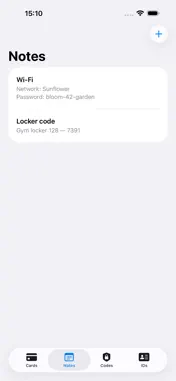
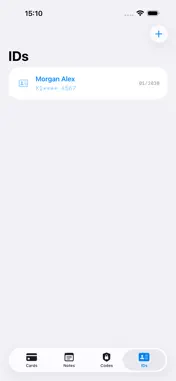
StashKey keeps the things you type most — gift cards, secure notes, two-factor (2FA) codes and ID details — right inside your keyboard, so you can drop them into any app with a single tap. Add your items once in the StashKey app, then switch to the StashKey keyboard in any text field to paste them instantly. No more digging through other apps or screenshots. WHAT YOU CAN STASH • Gift cards — balances, codes and the details you reuse • Secure notes — anything you type often • 2FA codes — a built-in authenticator for time-based one-time passwords (TOTP) • Passports & IDs — the key details, ready when you need them PRIVATE BY DESIGN • Everything stays on your device • No internet connection is used, and none of your data ever leaves your phone • The StashKey keyboard asks for Full Access only to share your saved items with the app — nothing more GET STARTED IN UNDER A MINUTE 1. Add the StashKey keyboard in Settings 2. Turn on Allow Full Access 3. Tap the StashKey key in any app to insert your saved items StashKey — your essentials, a tap away.
What's New
Version 1.1 2026-06-22
We've added the EN keyboard as the first tab so you can use it instead of the default one Technical Analysis
Package Overview Basic metadata
Bundle ID
team.kook.swissknife.SwissKnife Current Version 1.1
Minimum iOS 15.0
Package Size App Store Size
Package Metadata 0 / 0 version records
Detailed binary, privacy manifest, framework, and Info.plist results have not been indexed for this package yet. The verified App Store and archive metadata above remains available.
Known Version Records
0 version records with stored package metadata
Stored metadata does not guarantee a package is currently available to download.
| Details | Version / IDs | Version date | Action |
|---|