
Preview


Description
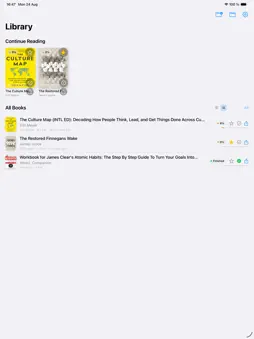
PageBuddy — Read. Understand. Annotate. A PDF reader for iPad where reading and writing finally feel like one experience. Open a PDF and start reading. Pick up your Apple Pencil and write directly on the page — without entering an annotation mode, opening a toolbar, or leaving full screen. The page stays the page. The book stays the book. Your Pencil just works. What makes PageBuddy different Read and write without leaving the page PageBuddy is designed around one simple idea: you shouldn't have to switch modes to interact with a book. Read in full screen. Pick up your Apple Pencil. Underline, highlight, circle, draw, or write in the margins. Your annotations happen directly on the page, while the reading experience stays completely intact. No edit mode. No annotation mode. No extra UI. Your PDFs stay where they are PageBuddy doesn't import your books into another library or copy your PDFs somewhere else. It works directly with the files and folders you already use. Move a PDF, rename it, organize your folders, or add new books — your files remain yours, exactly where you put them. Your annotations don't modify the original PDF This is important. Your notes, highlights, drawings, and reading progress belong to PageBuddy, not to the original file. The original PDF stays untouched. PageBuddy remembers the documents you've read and recognizes them when they appear again in folders you follow. If the file hasn't changed externally, your annotations and reading progress come back with it. Your library follows you Your reading progress, favorites, document status, and annotations sync through iCloud, so your PageBuddy experience can follow you across your iPads. And because PageBuddy doesn't need to copy your PDFs into its own library, your files don't have to move just because your device does. Need the annotations inside the PDF? You can export them whenever you want. Export annotations into an existing PDF, or create a new annotated copy while keeping the original completely untouched. So PageBuddy doesn't lock your notes inside the app. They're yours to take with you. The PageBuddy feeling The first time you pick up the Apple Pencil and underline a sentence, there is nothing to figure out. You just write. No mode. No toolbar. No confirmation. No interruption. Just a book and a pencil. That's how reading and writing should feel on iPad.
Technical Analysis
Package Overview Basic metadata
Bundle ID
com.pagebuddy.app Current Version 1.0
Minimum iOS 26.5
Package Size App Store Size
Package Metadata 0 / 0 version records
Detailed binary, privacy manifest, framework, and Info.plist results have not been indexed for this package yet. The verified App Store and archive metadata above remains available.
Developer Information
Known Version Records
0 version records with stored package metadata
Stored metadata does not guarantee a package is currently available to download.
| Details | Version / IDs | Version date | Action |
|---|