Preview




Description
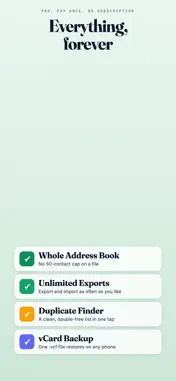
Contacts to Excel & CSV Export saves your iPhone address book as a real Excel (.xlsx) or CSV file, and imports contacts back from a spreadsheet or vCard. Everything runs on the device: no account, no upload, and it works offline. To export contacts from your iPhone: open the app, allow contacts access, choose which columns you want, and tap Export. You get a genuine .xlsx workbook with a bold, frozen header row that opens correctly in Excel, Numbers and Google Sheets. Accented and non-Latin names arrive intact, and phone numbers keep their leading + and zeros. To import contacts into your iPhone: open any .xlsx, .csv or .vcf file. The app matches each column to a contact field, shows you every contact before a single one is added, skips people already in your address book, and can undo the whole run. WHY PEOPLE CHOOSE THIS APP • Exact columns, in your order: choose from 15 columns (names, every phone & email, company, addresses, birthdays, websites) and drag to reorder • Multi-value done right: second and third phone numbers and emails get their own columns instead of disappearing • Real .xlsx output: a true Excel file with a bold, frozen header row, not a renamed CSV • Encoding that just works: å, ü, é and every other character arrive intact in Excel, and phone numbers keep their + and leading zeros • CSV that Excel actually splits: switch between comma and semicolon separators for US and European Excel • Works with iOS limited access: share only the contacts you choose with the app IMPORT INTO YOUR IPHONE • Open .xlsx, .csv or .vcf and the app matches the columns to contact fields for you • Change any column yourself, with a live sample from your own file • See every contact in a preview before a single one is added • Contacts you already have are spotted and left out, so nothing doubles up • Undo removes exactly what an import added, and nothing else • Reads files saved in other alphabets, including Cyrillic and CJK text • Handles the separators and encodings Excel writes on Windows, so nothing arrives as gibberish PRO: PAY ONCE, YOURS FOREVER • Export and import your entire address book (the free plan covers 50 contacts per file, 3 exports or imports a day) • Unlimited exports and imports • Duplicate finder: spot doubled contacts and export a clean, duplicate-free list • vCard (.vcf) backup that restores on any phone No subscription. One small one-time purchase unlocks everything, forever. PRIVATE BY DESIGN Everything happens on your iPhone. Your contacts are never uploaded, there is no account, and the app works completely offline. The exported file goes only where you send it. PERFECT FOR • Backing up your contacts before switching phones • Mail merges, newsletters, and holiday card lists • Importing customers into a CRM or email tool • Moving a contact list from a spreadsheet onto a new iPhone • Restoring a vCard backup after switching phones • Cleaning up years of duplicate contacts • Keeping an offline copy of the people who matter Questions or ideas? We answer fast: [email protected] Privacy Policy: https://app.innovaapps.ai/privacy Terms of Use: https://www.apple.com/legal/internet-services/itunes/dev/stdeula
What's New
Version 1.3.1 2026-10-30
Find and restore just the contacts you need. • Contact previews now start in alphabetical order. Choose A to Z, Z to A, or the original file order. • Search by... Technical Analysis
Package Overview Basic metadata
Bundle ID
innovaapps.Contacts-to-Excel-and-CSV Current Version 1.3.1
Minimum iOS 17.0
Package Size App Store Size
Package Metadata 2 / 4 version records
Detailed binary, privacy manifest, framework, and Info.plist results have not been indexed for this package yet. The verified App Store and archive metadata above remains available.
Developer Information
Known Version Records
2 version records with stored package metadata • 4 known version records
Stored metadata does not guarantee a package is currently available to download.
| Details | Version / IDs | Version date | Action |
|---|---|---|---|
| Not archived | App Store ID: 891489067 | Unknown | Request Version |
| Not archived | App Store ID: 890924091 | Unknown | Request Version |
| 6.33 MB | v1.1 App Store ID: 890608349Build: 1.1 | 2026-09-01 17:01:33 | Get Version |
| 5.79 MB | v1.1 App Store ID: 886878321Build: 1.1 | 2026-09-01 17:01:33 | Get Version |