
Preview





Description
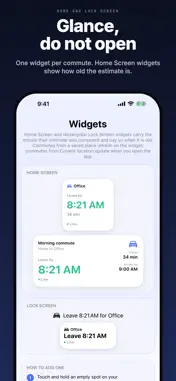
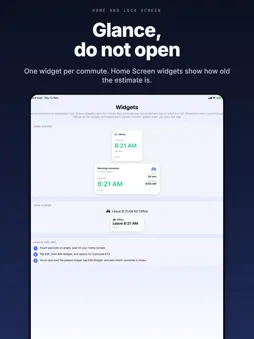
Commute ETA Widget tells you the exact minute to leave for a trip you make often, and keeps that minute on your Home Screen, Lock Screen and Apple Watch. Save a commute once: where you start, where you are going, how you travel and the time you have to be there. The app asks Apple Maps for a live, traffic aware travel time, takes off a buffer you choose, and shows the time to walk out of the door. It answers the questions you ask every morning. When do I need to leave to be at work by 9? Is traffic going to make me late? How old is the travel time I am looking at? KNOW WHEN TO LEAVE, NOT JUST HOW LONG IT TAKES Set an arrival time once. The app solves for the departure minute and solves it again with live traffic every time you open the app or pull to refresh. The large number on screen is the time to go, not a duration you have to count backwards from. ALWAYS SHOWS HOW OLD THE ESTIMATE IS iOS decides when a widget may refresh. A commute that starts from a saved place refreshes on the widget and on Apple Watch by itself; one that starts from your current location updates when you open the app, because location is only read while the app is open. Every travel time in the app, and on the Home Screen and rectangular Lock Screen widgets, carries the minute it was computed and a live, aging or stale badge. A stale widget says so and asks for a tap, instead of showing an old number as though it were current. ON APPLE WATCH Your commutes appear in the watch app, on a Smart Stack card and as complications, with the minute to leave and, where there is room, how old the travel time is. You create and edit commutes on iPhone. FOUR WAYS TO TRAVEL, HONESTLY REPORTED Drive, transit, walk and bike, straight from Apple Maps. Transit and cycling coverage varies by city, so when Apple Maps has no answer for a route the mode is greyed out with the reason. You never get a number from the wrong kind of journey. A BUFFER YOU CONTROL Choose how many minutes you want in hand. It is applied openly and shown on screen next to a second time: the last possible minute you could leave with no buffer at all. A DEPARTURE COUNTDOWN THAT SURVIVES A BACKGROUND Tap Start departure for a full screen countdown with a live ring. A new commute opens straight into its countdown when you are leaving within the next few hours. Close the app, find your keys, come back, and the same countdown is still running. YOUR OWN TYPICAL RANGE Each time you tap I am leaving now, the app keeps that moment's Apple Maps estimate. Together they build a range for your route: thirty four minutes becomes thirty four minutes, usually twenty nine to forty one. It reflects the times you actually leave, not traffic in general. PRIVATE BY CONSTRUCTION No account. No sign in. No server of ours anywhere in the app. Travel times come from Apple Maps on your device, and nothing about you, your places or your trips is ever sent to us. Location is optional and only used while the app is open; you can use the whole app by typing two addresses instead. WHAT IS FREE One saved commute, two saved places, all four travel modes, unlimited refreshes, the full staleness display, a Home Screen widget and the Apple Watch app. Free forever, with no daily limit and no timer. COMMUTE ETA WIDGET PRO Pro adds unlimited commutes and places, leave by alerts, the Lock Screen countdown, your typical range and a widget for every commute. Pro is a single purchase, not a subscription. Nothing renews and nothing is charged again. It includes Family Sharing, and Restore Purchases lives in Settings. This app is a departure planning aid. It shows Apple Maps estimates and hands off to your chosen maps app for navigation; it does not promise an arrival time. Privacy policy: https://app.innovaapps.ai/privacy Terms of use: https://www.apple.com/legal/internet-services/itunes/dev/stdeula
What's New
Version 1.2.0 2026-11-17
New: Commute ETA on Apple Watch. A watch app, a Smart Stack card and watch face complications show the minute to leave for the commutes you save on your iPhone,...New: Commute ETA on Apple Watch. A watch app, a Smart Stack card and watch face complications show the minute to leave for the commutes you save on your iPhone, with the age of the travel time where there is room. A commute from a saved place refreshes on the watch by itself; one from your current location shows the latest time from your iPhone. Your Home Screen and Lock Screen widgets now follow the commute you pick in the app. Switch commutes and the widget switches with you. If a widget you added earlier stays on one commute, touch and hold it, tap Edit Widget and choose Current commute. Technical Analysis
Package Overview Basic metadata
Bundle ID
innovaapps.Commute-ETA-Widget Current Version 1.2.0
Minimum iOS 17.0
Package Size App Store Size
Package Metadata 0 / 0 version records
Detailed binary, privacy manifest, framework, and Info.plist results have not been indexed for this package yet. The verified App Store and archive metadata above remains available.
Developer Information
Known Version Records
0 version records with stored package metadata
Stored metadata does not guarantee a package is currently available to download.
| Details | Version / IDs | Version date | Action |
|---|