Preview




Description
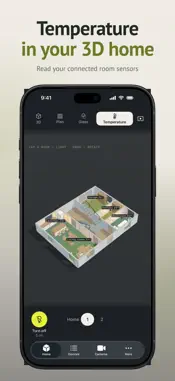
See which lights are on, at a glance. Smart Home 3D puts your smart home on a 3D floor plan. Rooms, floors, furniture and lights appear where they belong. Glass walls reveal the interior, so you can see lighting states and control supported lights in their place. YOUR HOME IN 3D Scan rooms with RoomPlan on a compatible iPhone or iPad with LiDAR. Add floors and stairs, and edit walls, doors and windows. Switch between glass, architectural and top-down views. Metric rulers, guides and snapping help refine your plan. Set precise wall dimensions and angles, and add balcony doors and rolling garage doors. LIGHTS IN THEIR PLACE Place chandeliers, individual spots or groups, switches and LED strips. Mark lights through the camera and set a strip's start and end points. Link them to available devices and circuits. Tap a light or room to control supported lighting. Brightness, colour and colour temperature depend on your device and provider. FURNITURE AND YOUR MODELS Furniture recognised during a room scan appears in your home. Import USDZ models, preview them and replace suitable items with your own models. On a supported iPhone, capture an individual object from several angles to create its 3D model. A regular room scan identifies furniture; it does not create an exact photographic replica. Open the home on Mac to arrange catalog furniture and edit position, dimensions, rotation and finish. The catalog includes living room, bedroom, kitchen and bathroom furniture, decor, TVs and smart speakers. TVs and speakers are objects placed in the home model. CONNECT AND SAVE On iPhone and iPad, choose Apple Home, SprutHub or Home Assistant. Devices must be set up in your chosen system, with the required permissions. Available features depend on the provider and device. Save your home to a file and keep a backup in your own iCloud. LiDAR is required for room scanning, but not for controlling connected devices. Smart Home 3D is an independent app. Its lighting illustrates device states and is not an engineering lighting calculation. ACCESS AND PAYMENT The app is free to download. New subscribers receive 7 days of full access after confirming a subscription in the App Store. Your chosen monthly or yearly plan then applies; the price for your country is shown before confirmation. Cancel in your Apple settings. Customers who bought paid version 1.0 retain lifetime full access. Without a subscription, rotate the demo home and switch its lights, view your saved home and export it. Scanning, editing and commands to your devices require full access. Terms of Use: https://www.apple.com/legal/internet-services/itunes/dev/stdeula/
What's New
Version 1.3 2026-10-11
Explore the new demo home as soon as the app opens. Furniture, custom USDZ models, precise plan rulers and wall angles, new doors and single spotlights. Easier ...Explore the new demo home as soon as the app opens. Furniture, custom USDZ models, precise plan rulers and wall angles, new doors and single spotlights. Easier views, floors and scenes, plus temperature in 3D. Improved rescanning, home recovery, backups and access restoration. Technical Analysis
Package Overview Basic metadata
Bundle ID
ru.fedotoff.smarthome3d Current Version 1.3
Minimum iOS 18.0
Package Size App Store Size
Package Metadata 0 / 0 version records
Detailed binary, privacy manifest, framework, and Info.plist results have not been indexed for this package yet. The verified App Store and archive metadata above remains available.
Developer Information
Known Version Records
0 version records with stored package metadata
Stored metadata does not guarantee a package is currently available to download.
| Details | Version / IDs | Version date | Action |
|---|