
Preview


Description
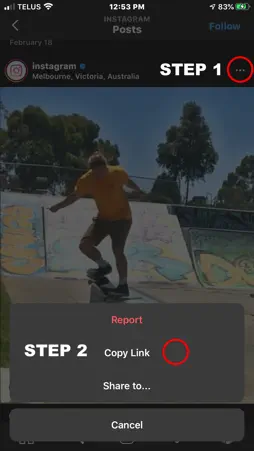
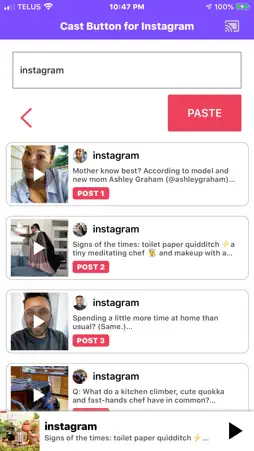
Stream your Instagram and IGTV videos to Televisions that are connected to a Chromecast device, or to a cast-enabled smart speaker. 1. Make sure you are on the same WiFi network as your cast-enabled device. 2. In Instagram, go to any public video, and select ... and Copy Link 3. Return to the app and press PASTE, or you can type the profile handle of any public Instagram profile. 4. Press the Chrome cast icon in the top right, and select your TV or Bluetooth speaker to Cast to. 5. You are now casting! You can also type the name of the instagram account and see the top videos on that account. Only videos can be casted. Things you should know: 1. Make sure your phone is on the same WiFi network as your cast devices. (Casting will not work over Cell / LTE / 3G) 2. Make sure your cast devices are connected to power to be discoverable by the app. 3. You can cast to a Chromecast equipped TV or also to a Cast enabled smart speaker, if you only want to play Audio from Instagram/IGTV posts. We are always trying to improve our apps. Please send all feedback to: [email protected]
What's New
Version 1.1 2020-11-09
- bugfixes and stability improvements. Technical Analysis
Package Overview Basic metadata
Bundle ID
com.isemobile.castforinsta Current Version 1.1
Minimum iOS 12.0
Package Size App Store Size
Package Metadata 0 / 2 version records
3.5 / 5.0 (13 ratings)
Detailed binary, privacy manifest, framework, and Info.plist results have not been indexed for this package yet. The verified App Store and archive metadata above remains available.
Developer Information
Known Version Records
0 version records with stored package metadata • 2 known version records
Stored metadata does not guarantee a package is currently available to download.
| Details | Version / IDs | Version date | Action |
|---|---|---|---|
| Not archived | App Store ID: 838742967 | Unknown | Request Version |
| Not archived | App Store ID: 835124663 | Unknown | Request Version |