
Preview





Description
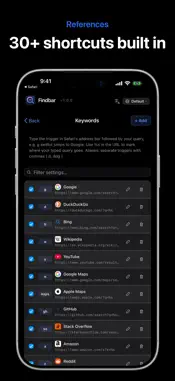
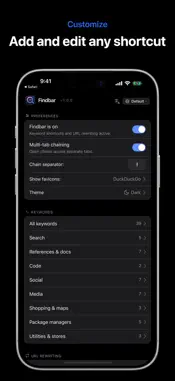
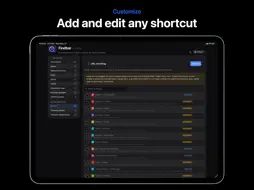
Findbar turns Safari's address bar into a shortcut to any site. Type a short keyword followed by what you want, and jump straight there. No more typing the full URL. 30+ BUILT-IN SHORTCUTS, EDIT EVERY ONE • g apple → Google search for "apple" • w eiffel tower → Wikipedia article • y cooking tutorial → YouTube search • maps central park → Apple Maps location • a airpods → Amazon product search • and 25 more: YouTube, Wikipedia, Amazon, Apple Maps, IMDb, Spotify, Reddit, X, TikTok, Translate, plus picks for developers like GitHub, Stack Overflow, MDN, and Apple Developer. Add your own keywords, edit any default, or remove what you don't use. Your list, your rules. OPEN MULTIPLE SITES AT ONCE Type one phrase and Findbar can open more than one tab in a single keystroke. Useful when you want to compare results without retyping the search. PATH-STYLE SHORTCUTS FOR POWER USERS Set up shortcuts that take part of what you type and drop it into the right URL. Jump to any GitHub repo by name, any video by its ID, any subreddit by name. Unlimited custom patterns for the workflows you use most. FASTER, CLEANER SITE VERSIONS Turn on shortcuts that automatically open lighter or cleaner versions of popular sites. Open Reddit in its classic layout. Skip extra clutter on certain pages. All off by default, turn on what you want. Some redirects depend on community-run services that may not always be available. WHY FINDBAR • 100% on your device. No accounts, no tracking, no cloud sync. • Instant redirects with zero flicker for the 30+ built-in shortcuts. • Universal: works on Mac, iPad, and iPhone. One purchase, all three. • Built for privacy. Your shortcut list, your searches, and your browsing never leave your device. REQUIREMENTS • macOS 14 or later • iOS / iPadOS 17 or later
What's New
Version 1.1.2 2026-08-10
Privacy redirects now point at servers that are actually online, and send you to the original site when none are available. The popup no longer shows the wrong ... Technical Analysis
Package Overview Basic metadata
Bundle ID
com.corvusdevs.findbar Current Version 1.1.2
Minimum iOS 17.0
Package Size App Store Size
Package Metadata 1 / 2 version records
Detailed binary, privacy manifest, framework, and Info.plist results have not been indexed for this package yet. The verified App Store and archive metadata above remains available.
Developer Information
Known Version Records
1 version record with stored package metadata • 2 known version records
Stored metadata does not guarantee a package is currently available to download.
| Details | Version / IDs | Version date | Action |
|---|---|---|---|
| 7.6 MB | v1.1.2 App Store ID: 887981612Build: 1.1.2 | 2026-08-10 02:06:34 | Paid / Arcade |
| Not archived | App Store ID: 886167374 | Unknown | Paid / Arcade |