Preview




Description
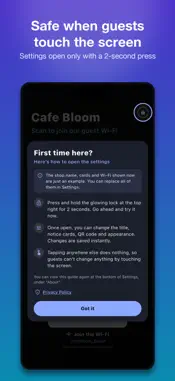
Standboard (스탠드보드 in Korean) is a free digital sign that turns a tablet or phone into a Wi-Fi QR code and link QR code display. Use it as a QR code sign on a shop counter, a café table, an outdoor market stall or wherever you meet people. It shows a title, a key notice, notice cards, and a Wi-Fi or link QR code in large type. Guests just point their phone camera at the code, so you never have to read out a password or an address again. Use it to • Run a shop, café or restaurant: guest Wi-Fi QR code, a "Back in 5 minutes" notice, and cards for the menu, restroom code or last order • Sell at an outdoor market or stall (flea market, goods and handmade markets and more): prices, payment methods and hours on cards, plus a link QR code to your shop page or contact • Share your social media: creators and cosplayers can show a link QR code to their profile with their handle in large type Features • Wi-Fi QR code: network name, password, security type (WPA or open) and hidden networks; optionally show the password in text under the QR code • Link QR code: enter any address to create a QR code, with your own caption under it (for example "Follow us: @yourname") • Notice cards: add, delete and reorder as many as you need; the layout adapts to the number of cards • 4 themes (Modern dark, Classic chalkboard, Minimal white, Wood / beige) and 3 text sizes • 3 saved boards: switch between, say, a day board and a night board with one tap, with undo • Keeps the screen on, and can hide the status bar • Korean, English, Japanese, Traditional Chinese and Russian (follows your device language) Safe even when guests touch the screen • Settings open only when you press and hold the lock at the top right for 2 seconds. Tapping anywhere else does nothing. • Optionally protect settings with a 4-digit PIN (entered twice to confirm, with an eye button to show or hide the digits). • To keep guests from leaving the app, use Guided Access (Settings › Accessibility). Instructions are built into Settings. Getting started 1. Open the app. You will see an example board and a short first-time guide (every example can be replaced in Settings). 2. Press and hold the lock at the top right for 2 seconds to open Settings. 3. Enter your shop name, notice, cards and QR code. Changes are saved and shown right away. Your privacy • Free, with no ads and no sign-in. • Everything you enter stays on your device and is never sent anywhere. There are no analytics or tracking tools. • Works fully offline. • It is not synced between devices, so please enter your board again on a new device. For questions or suggestions, email the address under "About" at the bottom of Settings. Every message is read.
What's New
Version 1.1.0 2026-11-17
Added Traditional Chinese and Russian: the app, the privacy policy, the terms of use and the support page are now available in these languages. The language lis...Added Traditional Chinese and Russian: the app, the privacy policy, the terms of use and the support page are now available in these languages. The language list in Settings now shows all languages as chips. Technical Analysis
Package Overview Basic metadata
Bundle ID
com.alchanlabs.standboard Current Version 1.1.0
Minimum iOS 16.0
Package Size App Store Size
Package Metadata 0 / 0 version records
Detailed binary, privacy manifest, framework, and Info.plist results have not been indexed for this package yet. The verified App Store and archive metadata above remains available.
Known Version Records
0 version records with stored package metadata
Stored metadata does not guarantee a package is currently available to download.
| Details | Version / IDs | Version date | Action |
|---|