Preview




Description
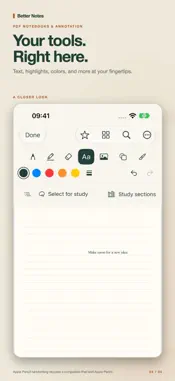
Make room for your ideas with Better Notes. Create PDF notebooks, annotate documents, and organize your work on iPhone and iPad. • Create notebooks with customizable covers and blank, ruled, grid, or dot-grid pages. • Write and draw with Apple Pencil on compatible iPads, or add typed text with your finger. • Choose pen styles, highlight, erase, and insert basic shapes. • Import PDFs and ZIP archives of PDFs while preserving folder structure. • Organize documents into folders and favorites, and copy links to individual pages. • Add Continue Reading and Favorites Home Screen widgets in small, medium, and large sizes; tap to return to a saved page. • Search library folders, PDF text, annotations, study captures, voice notes, and bookmarks, with on-device recognition of page images and handwriting. Recognition may miss words, and initial indexing can take time. • Use Apple Pencil on compatible iPads to lasso and move app-created ink within a page, with undo and redo. • Find page voice notes from waveform badges and recording counts. • Keep documents in your iCloud Drive when available, with local storage when it is not. • Record or import voice notes on document pages, edit transcripts, and search titles and transcripts. • Transcribe on-device when supported by your device and language; play recordings and edit transcripts manually otherwise. • Sync voice audio and note metadata through your iCloud account when available. • Save page bookmarks, resume reading, and reorder or delete notebook pages with undo. • Share your work as PDFs; voice notes and study captures remain separate from PDF exports. Apple Pencil handwriting requires compatible iPad hardware. iCloud synchronization requires an Apple Account and available iCloud storage; upload and download timing is controlled by iOS. Password-protected PDFs and encrypted, multipart, or ZIP64 archives are not supported. Free to use, with optional tips that do not unlock features. No subscriptions.
What's New
Version 1.3.1 2026-11-15
On iOS and iPadOS 27.1 or later, page thumbnails use a compact companion pane. Show or hide thumbnails with the sidebar button or close them from the pane. Your...On iOS and iPadOS 27.1 or later, page thumbnails use a compact companion pane. Show or hide thumbnails with the sidebar button or close them from the pane. Your visibility preference is remembered, focus mode hides thumbnails, and toggling them keeps your current page. Earlier OS versions keep their existing reader layout. Technical Analysis
Package Overview Basic metadata
Bundle ID
com.gragera.betternotes Current Version 1.3.1
Minimum iOS 17.0
Package Size App Store Size
Package Metadata 0 / 0 version records
Detailed binary, privacy manifest, framework, and Info.plist results have not been indexed for this package yet. The verified App Store and archive metadata above remains available.
Known Version Records
0 version records with stored package metadata
Stored metadata does not guarantee a package is currently available to download.
| Details | Version / IDs | Version date | Action |
|---|