
Preview





Description
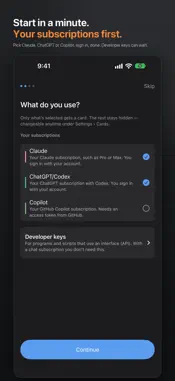
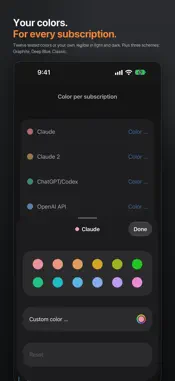
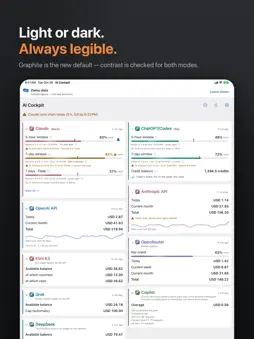
Claude, ChatGPT & Codex, Copilot and six more AI services — how much is left, and when it resets. On your iPhone, your iPad and your Apple Watch: the phone fetches everything itself, no Mac required. No browser cookies. No data collection. Your keys stay in this device's keychain and never travel to the watch. Free. No account with the publisher, no server in between. WHAT THE APP SHOWS • Claude subscription: the 5-hour, 7-day and model-scoped weekly windows, each with a percentage and a reset time • ChatGPT/Codex: the quotas of the signed-in account • OpenAI API and Anthropic API: cost today, this month and in total • Kimi: balance • OpenRouter: spend, credit and the key's cap • Grok (xAI): balance and spending cap • DeepSeek: balance per currency • GitHub Copilot: usage and quota — personal paid plans only If one service fails, the rest carry on. (i) buttons explain every term. NO SURPRISES • One sentence at the top says where you stand: "All in the green" or "Claude is getting tight today" • A forecast under every window: "full at 16:40 at this pace" — or that it lasts until the reset • A tip when a window is nearly full and another plan or account still has room • A plan check from your weekly peaks (Claude only, an estimate) • Alerts at your threshold, before a five-hour window fills, when it starts over and when it resets off schedule • A cost alert when API spend jumps or credit drains fast; a monthly budget • A Live Activity with up to four windows on the Lock Screen and in the Dynamic Island • A control for Control Center, the Lock Screen and the Action button YOUR MONEY AND YOUR TIME • Renewal dates: a note days before each plan renews, with the amount • Reset alarm: one bell, one notification when a window is free again • Today's share: "9% left for today so the week lasts" • Quiet hours and "Pause until tomorrow" — cost alerts may come through • Your AI month: on the 1st, a review of what you spent and used, to share as an image • Six shortcuts for Siri and the Shortcuts app Alerts are made on the device when the app fetches — no server. In the background, iOS decides how often. WIDGETS • One service or all, used or remaining • Three sizes for the Home Screen; the large one adds the one-sentence status and today's share • Tap a widget and the app opens that card • Three shapes for the Lock Screen with a live countdown, also in StandBy; in a Smart Stack, AI Cockpit moves up when a window gets tight APPLE WATCH • A verdict first: "Still fine", "Getting tight" or "Window full", and the window behind it • A crown turn away: every source, one line each • Complications in all four shapes The watch shows, it does not fetch: the figures come from the phone. YOUR LOOK Three color schemes — Graphite, Deep Blue, Classic — and a color per card, carried into widgets, watch and Live Activity. Share your status as an image, account names hidden. WHAT YOU NEED For each card the matching plan, API key or account. All optional: without one, only that card stays empty. Demo mode shows the whole app with sample figures. The app speaks English, German, French, Spanish, Simplified Chinese and Hindi. Runs on iOS 17, iPadOS 17 and watchOS 10; the control from iOS 18, on the watch from watchOS 26. WHAT THE APP DOES NOT DO No registration, no analytics, no tracking, no ads. The in-app purchase is a voluntary tip that unlocks nothing. It never reads your chats; it fetches quotas and amounts, nothing else. Settings and figures stay on the device; every connection uses HTTPS and goes straight to the service you added. DISCLAIMER AI Cockpit is an independent tool, not affiliated with or endorsed by Anthropic, OpenAI, Moonshot AI, OpenRouter, xAI, DeepSeek or GitHub. Their names appear because their figures do.
What's New
Version 2.22 2026-11-20
Feedback, for widget users too • The one-time feedback line now also appears if you mostly use the widget: it needs 30 successful refreshes in the app instead o...Feedback, for widget users too • The one-time feedback line now also appears if you mostly use the widget: it needs 30 successful refreshes in the app instead of 100. • A single card with an error no longer holds back the request for a rating. • Nothing else changes. Technical Analysis
Package Overview Basic metadata
Bundle ID
com.ip-style.aicockpitmobile Current Version 2.22
Minimum iOS 17.0
Package Size App Store Size
Package Metadata 0 / 19 version records
Detailed binary, privacy manifest, framework, and Info.plist results have not been indexed for this package yet. The verified App Store and archive metadata above remains available.
Developer Information
Known Version Records
0 version records with stored package metadata • 19 known version records
Stored metadata does not guarantee a package is currently available to download.
| Details | Version / IDs | Version date | Action |
|---|---|---|---|
| Not archived | App Store ID: 895739483 | Unknown | Request Version |
| Not archived | App Store ID: 895136492 | Unknown | Request Version |
| Not archived | App Store ID: 894985545 | Unknown | Request Version |
| Not archived | App Store ID: 893529566 | Unknown | Request Version |
| Not archived | App Store ID: 893284536 | Unknown | Request Version |
| Not archived | App Store ID: 893051044 | Unknown | Request Version |
| Not archived | App Store ID: 892934455 | Unknown | Request Version |
| Not archived | App Store ID: 892853974 | Unknown | Request Version |
| Not archived | App Store ID: 892787171 | Unknown | Request Version |
| Not archived | App Store ID: 892463673 | Unknown | Request Version |
| Not archived | App Store ID: 892390480 | Unknown | Request Version |
| Not archived | App Store ID: 892292167 | Unknown | Request Version |
| Not archived | App Store ID: 892222085 | Unknown | Request Version |
| Not archived | App Store ID: 892058578 | Unknown | Request Version |
| Not archived | App Store ID: 891733460 | Unknown | Request Version |
| Not archived | App Store ID: 891357094 | Unknown | Request Version |
| Not archived | App Store ID: 890612328 | Unknown | Request Version |
| Not archived | App Store ID: 890503476 | Unknown | Request Version |
| Not archived | App Store ID: 890049719 | Unknown | Request Version |