
Preview



Description
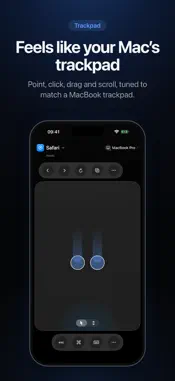
Turn your iPhone or iPad into a trackpad, keyboard and control surface for your Mac, one that automatically adapts to the app you're using. Control your Mac from the couch, across the room or right beside your desk. ControlPad connects directly to your Mac over your local network, with a trackpad tuned to feel like a MacBook's and controls that change as you switch apps. A TRACKPAD THAT FEELS LIKE YOUR MAC'S • Tap to click, two fingers to scroll, press and drag to move windows • Two-finger tap to right-click • Four-finger swipes for Mission Control, App Exposé and switching Spaces • Pointer speed tuned to match a MacBook trackpad, and adjustable to suit you TYPE WITH YOUR OWN KEYBOARD • Type on your Mac with the iPhone or iPad keyboard you already know, including autocorrect, dictation and emoji • Command, Option, Control and Shift, the arrow keys and Escape, always one tap away CONTROLS THAT FOLLOW WHAT YOU'RE DOING Switch apps on your Mac and ControlPad adapts automatically: tabs and navigation in Safari, replies in Mail, formatting in Notes, builds in Xcode, playback for music and video. More than 50 Mac apps have their own controls, and every other app still gets the essentials, like Undo, Copy, Paste and Find. THREE LAYOUTS • Input: the whole screen is your trackpad • Balanced: a trackpad and your app's controls, side by side • Controls: every command at a glance, beside your own keyboard and mouse Switch any time, on iPhone and iPad. MORE • Switch between the apps running on your Mac • Pair as many iPhones and iPads as you like; one controls your Mac at a time • Haptic feedback for clicks, drags, gestures and controls PRIVATE BY DESIGN • Your devices talk directly to each other over your local network, with no cloud service in between • Pair once with a code shown on your Mac; the code is never sent over the network, and every connection is secure. • No account, no sign-up and no in-app analytics GETTING STARTED ControlPad works with ControlPad for Mac, a companion app you download from controlpad.tech. Open it on your Mac, allow Accessibility access when macOS asks (it's what lets ControlPad move the pointer and type for you), then open ControlPad on your iPhone or iPad on the same local network. Your Mac appears by itself; enter the code it shows and you're connected. Requires iOS or iPadOS 26 or later, and a Mac with macOS 26.6 or later on the same local network.
What's New
Version 1.1 2026-10-24
Made for iPhone Duo ControlPad now fits however you hold iPhone Duo: • Closed: your Mac keys and the app's commands move into the column under the battery, so ... Technical Analysis
Package Overview Basic metadata
Bundle ID
com.alanbryden.ControlPad Current Version 1.1
Minimum iOS 26.0
Package Size App Store Size
Package Metadata 0 / 0 version records
Detailed binary, privacy manifest, framework, and Info.plist results have not been indexed for this package yet. The verified App Store and archive metadata above remains available.
Developer Information
Known Version Records
0 version records with stored package metadata
Stored metadata does not guarantee a package is currently available to download.
| Details | Version / IDs | Version date | Action |
|---|