Preview



Description
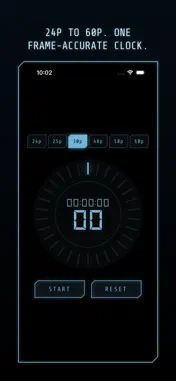
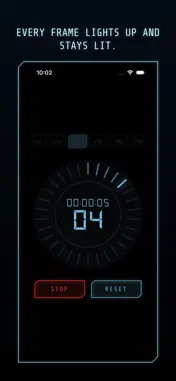
Frame Timer is a frame-accurate stopwatch built for testing NDI and other wireless or networked camera links. THE PROBLEM Wireless and IP-based video transmission (NDI, RF links, streaming encoders) can silently drop frames. A dropped frame is nearly impossible to spot by eye in normal footage — you need a reference clock that counts in frames, not milliseconds. HOW IT WORKS 1. Pick your production's frame rate: 24p, 25p, 30p, 48p, 50p or 60p. 2. Point your camera at this screen and start recording through your NDI / wireless link as usual. 3. Start the timer and let it run. 4. Play back the recording frame-by-frame. If the frame count ever jumps or the ring skips a tick, you've found a dropped frame — and exactly when it happened. WHAT'S ON SCREEN • A large HH:MM:SS + frame-number readout, so you can read the exact frame off a paused recording. • A ring of tick marks — one per frame of your chosen rate. Each elapsed frame lights up and stays lit, filling the ring clockwise, then resets the instant a new second begins. • The count is driven by a monotonic system clock, not by how often the screen redraws, so a slow or dropped UI frame never throws off the number itself. • Start / Stop / Reset controls, and a layout that adapts cleanly between portrait and landscape so you can mount the device however fits your rig. WHO IT'S FOR Broadcast and live-production engineers, NDI camera operators, and anyone verifying a wireless or IP video link before it goes to air. PRIVACY Frame Timer does not collect, store, or transmit any personal data. It has no network access, no analytics, and no third-party services — it's a simple on-device clock.
Technical Analysis
Package Overview Basic metadata
Bundle ID
com.dreaming.Frame-Check-Clock Current Version 1.0
Minimum iOS 18.0
Package Size App Store Size
Package Metadata 0 / 0 version records
Detailed binary, privacy manifest, framework, and Info.plist results have not been indexed for this package yet. The verified App Store and archive metadata above remains available.
Known Version Records
0 version records with stored package metadata
Stored metadata does not guarantee a package is currently available to download.
| Details | Version / IDs | Version date | Action |
|---|