
Preview


Description
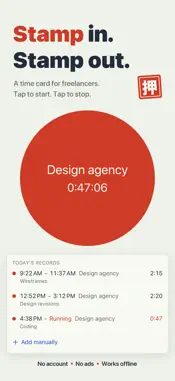
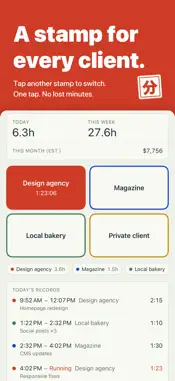
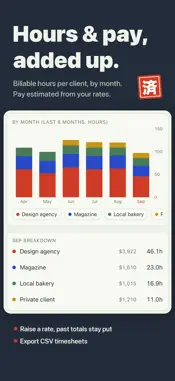
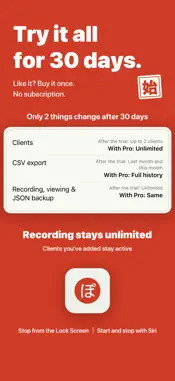
Tap once to start. Tap again to stop. That is the entire app. No account. No subscription. No servers. Your hours never leave your iPhone. A work log for people who bill by the hour, work for more than one client, and have never once managed to keep a timer running. WHAT YOU ACTUALLY DO Every client gets its own stamp button in its own color. Press it when you start, press the same button when you finish. Press a different client and it switches over in that one tap — no confirmation, no menus, no project pickers. While the clock runs you never have to open the app: a Live Activity on the Lock Screen and in the Dynamic Island, and a small Home Screen widget with today's total. "Start recording" and "Stop recording" also work as Shortcuts and with Siri, so you can put them on the Action button. WHAT YOUR TAPS TURN INTO • Home — today's total, this week's total, and this month's estimated earnings • Calendar — a month at a glance, each day shaded by how long you worked and dotted with the colors of the clients you worked for, with the monthly total on top • Charts — the last 7 days and the last 6 months, stacked by client, plus this month broken down client by client • Earnings estimate — give each client an hourly rate and your minutes become an approximate amount • CSV export — date, start, end, end date, minutes, client, memo and rate; eight columns any spreadsheet will open • JSON backup — export and import your whole history, free and unlimited. The app also keeps copies on the device (at most one an hour as you record and edit, and right before an import or a full delete), restores them automatically if a file is ever damaged, and lets you pick one by date in Settings > Backups on This iPhone BILLABLE HOURS, KEPT PER CLIENT Every client keeps its own color and its own hourly rate. A record you finish after setting a rate keeps that rate, so raising it next month will not move the numbers you already quoted. (A record finished before you set any rate picks up the rate you set later.) IF YOU FORGET TO STOP Turn on the optional reminder and it tells you once a record has been running for more than 12 hours. It stays off until you switch it on. Work that runs past midnight is split across both days in the calendar and the charts. WHAT IT DELIBERATELY DOES NOT DO • It does not write or send invoices. It hands you a clean CSV and gets out of the way • It does not calculate tax, withholding or overtime. The earnings figure is an estimate and nothing more • No team, no sharing, no cloud sync, no sign-in, no server, no ads • No GPS and no automatic tracking. Nothing is recorded unless you press the button • Built for iPhone — there is no iPad layout, and no Mac or Apple Watch app (on iPad it runs in iPhone compatibility mode) WHAT IT COSTS Free to download, with every limit off for 30 days from first launch. After that, recording, editing, the calendar, the charts, the earnings estimate and JSON backup all stay free and unlimited, permanently. Only two things narrow. You can add up to 2 clients — anything you created during the trial stays, and archiving one hides its button without freeing a slot. CSV export covers records started since the 1st of last month. Lifting both is a single one-time purchase. Nothing renews and there is no second tier. iOS 18 or later. English and Japanese. Everything works in airplane mode — the one-time purchase is the only thing that needs a connection. Made by one person, in Canada, for the kind of week where you look up and cannot say where the hours went.
What's New
Version 1.1.5 2026-09-26
Fixed the running timer's seconds sometimes looking doubled as they ticked over. • The backup notes in Settings and on the Backups on This iPhone screen now ma...Fixed the running timer's seconds sometimes looking doubled as they ticked over. • The backup notes in Settings and on the Backups on This iPhone screen now match what the app actually does (at most one copy an hour, up to 10) • During the trial, the comparison on the upgrade screen now labels the free limits “After the trial” • Section labels are easier to read • At a few milestones, the app may ask you to rate it on the App Store Send requests or bug reports from the support page. Technical Analysis
Package Overview Basic metadata
Bundle ID
com.akirako.pochilog Current Version 1.1.5
Minimum iOS 18.0
Package Size App Store Size
Package Metadata 0 / 0 version records
Detailed binary, privacy manifest, framework, and Info.plist results have not been indexed for this package yet. The verified App Store and archive metadata above remains available.
Known Version Records
0 version records with stored package metadata
Stored metadata does not guarantee a package is currently available to download.
| Details | Version / IDs | Version date | Action |
|---|