Preview


Description
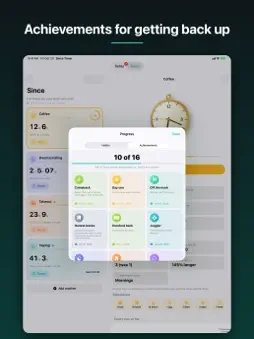
Since is two things in one calm app: a clock for every habit you are breaking, and a daily list for the habits you are building. Start a clock for smoking, vaping, drinking, doomscrolling, takeout, caffeine or anything else, and it counts up from the last time. The number only goes up. That's the whole trick. When you slip, reset the clock: the run that just ended is kept in your history, and your best run is never lost, however many times you start again. A REAL CLOCK FOR EVERY HABIT YOU QUIT Each tracker gets a ticking clock whose hands show the time since your last reset. Pick a style: pocket watch, wall clock, grandfather clock with a swinging pendulum, digital, alarm clock or microwave. Tap the clock to try the next one. TODAY: HABITS AND TO-DOS Habits sit on Today as a wall of rings. Hold a ring to tick it off, start a timer for reading or meditation, or log a slip on something you are giving up. Schedules can be every day, certain days, a few times a week or month, or every few days. Today's to-dos sit underneath, and anything unfinished carries over to tomorrow. Missed a day? Go back on the strip at the top and fill it in. RESET SAFELY An accidental reset is the worst thing a tracker can do to you, so every reset can be undone for a window you choose. Slipped earlier than now? Turn the clock's bezel to wind it back to when it really happened. YOUR PROGRESS, HONESTLY KEPT • Best run, average run, restarts and total time for every clock • A chart of every run against your previous best, and how the slips are trending • Streaks, completion rates and a month calendar for every habit • Milestones from one hour to five years, with confetti when you cross one • Sixteen achievements, and half of them reward getting back on the clock: Comeback, Phoenix, Stubborn, Honest Books • Money not spent, when you give a habit a daily cost WIDGETS AND CONTROLS • Time Since: up to three clocks as dials, each with its own reset button and undo • Today: your habit rings and to-dos, ticked off right from the Home Screen • One Clock, Best Runs and Not Spent • Lock Screen widgets and Control Center controls SIRI AND SHORTCUTS Reset a tracker, check a run, mark a habit done, hear what's left today or add a to-do, by voice or in the Shortcuts app. MADE FOR IPHONE DUO AND IPAD Closed, every clock and ring is a thumb away. Open it and your list sits beside the clock or habit you picked, lined up with the fold. Stand it half open and it becomes a desk clock: the time since in big numbers on the upright half, the reset button on the half nearest your hands. PRIVATE BY DESIGN No account and no sign in. Your data stays on your device. Switch on iCloud backup to keep a copy in your own iCloud account, and export everything as a file at any time. Since is a self tracking tool, not medical advice. If you are trying to stop something that harms your health, your doctor or a local support service can help alongside it.
What's New
Version 1.1 2026-10-25
Since now speaks 45 languages, with right to left layouts for Arabic, Hebrew and Urdu. • iPhone Duo: the list and the open clock now line up with the fold when... Technical Analysis
Package Overview Basic metadata
Bundle ID
com.aja.stopwatch Current Version 1.1
Minimum iOS 17.0
Package Size App Store Size
Package Metadata 0 / 0 version records
Detailed binary, privacy manifest, framework, and Info.plist results have not been indexed for this package yet. The verified App Store and archive metadata above remains available.
Developer Information
Known Version Records
0 version records with stored package metadata
Stored metadata does not guarantee a package is currently available to download.
| Details | Version / IDs | Version date | Action |
|---|