
Preview




Description
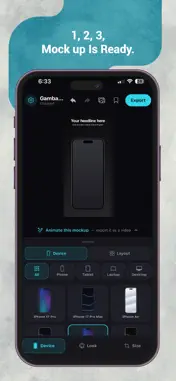
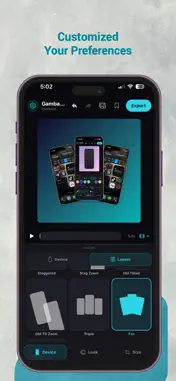
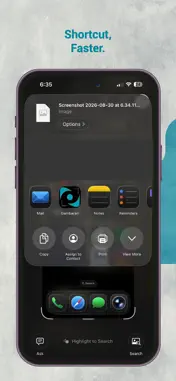
Gambaran turns your screenshots and screen recordings into professional device mockups — right on your phone. Pick a device, drop in your screenshot, choose a background, and export. That's it. No design skills, no desktop software. DEVICE MOCKUPS THAT LOOK REAL • 21 pixel-perfect device frames — iPhone 17 Pro, iPhone Air, Pixel 9 Pro, iPad Pro, MacBook Air, MacBook Pro, iMac and more • Phones, tablets, laptops and desktops — all in one app • Pick a device tint to match your brand LAYOUTS & COMPOSITIONS • 13 layout presets — single, double and triple device arrangements • Straight, tilted, staggered, fan and cascade compositions • Drag and pinch to fine-tune every device's position and size BEAUTIFUL BACKGROUNDS • 27 curated backdrop presets — solids and gradients • Custom solid colour picker • Import your own background image • Texture overlays: grain, grid, dots • Backdrop blur effects MOTION & ANIMATION • 8 motion templates: Slide Up, Slide In, Pop In, Tilt In, Zoom In, Zoom Out, Float, Pulse • Entrance, emphasis and ambient effects • Full keyframe timeline editor with easing curves • Export animated mockups as MP4 video APP STORE SCREENSHOTS MADE EASY • 5 App Store screenshot templates: Headline, Tilted, Caption Below, Peek, Corner • Captions with title and subtitle — customisable text, colour and alignment • Exact pixel-size export for App Store (iPhone 6.7", iPad 13", Mac) • Ready-to-upload at the dimensions App Store Connect accepts SHARE EXTENSION • Share a screenshot from any app directly into Gambaran • Supported on both platform PROJECT MANAGEMENT • Save and reopen mockups locally on your device • Thumbnail previews for saved projects • Guard against losing unsaved work BUILT FOR CREATORS • Works fully offline — your media never leaves the device • No account required to create and edit • Sign in with Apple or email for your plan • What's New feed for product updates • In-app problem reports with reply notifications • Dark, modern interface designed for focus GAMBARAN PRO (OPTIONAL) • Unlimited exports — no cap • Every device, layout and ratio • Motion effects and MP4 export • Your plan follows you to a new phone Gambaran Pro is available as: • Monthly — RM 9.90 per month, with a 3-day free trial • Yearly — RM 49.90 per year • Lifetime — RM 59.90, a one-time purchase (not a subscription) Payment is charged to your Apple Account at confirmation of purchase. Subscriptions renew automatically unless auto-renew is turned off at least 24 hours before the end of the current period. Your account is charged for renewal within 24 hours prior to the end of the current period. You can manage or cancel your subscription in your Apple Account settings after purchase. Any unused portion of a free trial is forfeited when a subscription is purchased. Terms of Use (EULA): https://www.apple.com/legal/internet-services/itunes/dev/stdeula/ Privacy Policy: https://aizztech.com/gambaran/privacy-policy
What's New
Version 1.1 2026-09-23
New • App Store screenshot templates, with your caption laid out above the device. • Export at exactly the size you type. Custom pixel dimensions are honoured ... Technical Analysis
Package Overview Basic metadata
Bundle ID
com.aizztech.gambaran Current Version 1.1
Minimum iOS 16.4
Package Size App Store Size
Package Metadata 0 / 0 version records
Detailed binary, privacy manifest, framework, and Info.plist results have not been indexed for this package yet. The verified App Store and archive metadata above remains available.
Developer Information
Known Version Records
0 version records with stored package metadata
Stored metadata does not guarantee a package is currently available to download.
| Details | Version / IDs | Version date | Action |
|---|